
Shopping feed optimization is the ongoing process of restructuring your product data (titles, identifiers, images, and pricing attributes) so Google can match your products to the right searches and rank them competitively in the auction. It is not a setup task you finish once and forget. The three levers that move ROAS fastest are title rewriting built from actual search terms, identifier cleanup (GTIN, MPN, brand), and price/availability sync that matches your landing pages daily.
If you have an hour right now, spend it here:
- Pull your Merchant Center diagnostics and fix any active disapprovals on your top 20 revenue-generating products first.
- Cross-check price and availability in the feed against live landing pages. Mismatches are the single most common cause of disapproval.
- Open the Search Terms Report in Google Ads and note which converting queries are missing from your current titles.
Pro Tip: Don’t start with the products you like best. Start with the products that generated the most revenue in the last 90 days. Feed work has a compounding effect, and fixing your best sellers first returns the fastest ROAS lift.
The ROI on this work is real, but only if you treat it as a discipline, not a project. Feed optimization should be ongoing rather than a one-time setup task, especially for catalogs with more than a few hundred SKUs, because prices shift, inventory turns over, and Google’s own signal requirements evolve every year.
Key Takeaways
Feed optimization succeeds when disapprovals and price mismatches are fixed first, titles are rebuilt from real search data, and margin-aware custom labels guide which products earn bid support.
| Point | Details |
|---|---|
| Fix blockers first | Clear disapprovals and price/availability mismatches before any title or image enrichment work. |
| Rebuild titles from data | Use the Search Terms Report to structure titles around brand, product type, and converting attributes. |
| Segment with custom labels | Build margin-aware labels so bidding decisions reflect profitability, not just ROAS. |
| Test before scaling | Deploy feed changes to a labeled test segment and wait through a full learning window before judging results. |
| Consider senior-led management | North Country Consulting offers a free strategy audit and hands-on feed fixes for accounts spending $25,000 or more monthly. |
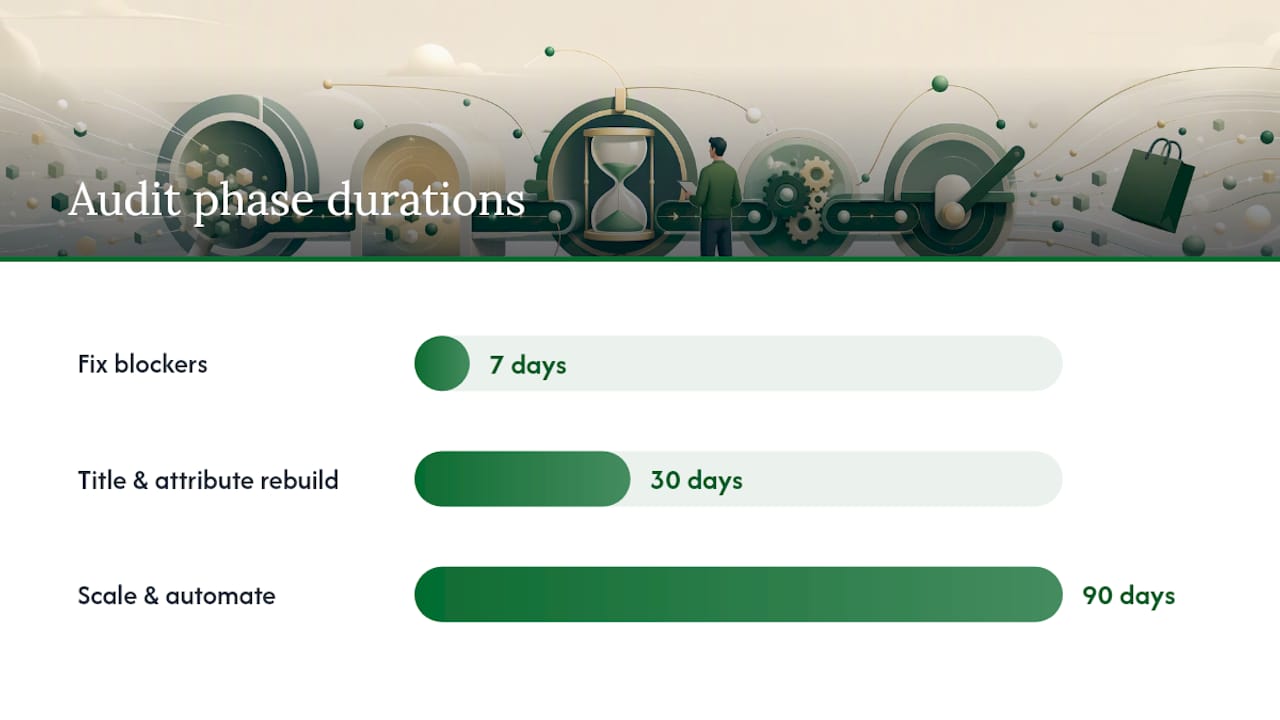
7 days: triage blockers. 30 days: rebuild and test titles and attributes. 90 days: scale validated changes and lock in a recurring diagnostics cadence, always measured against your pre-fix baseline with margin protected through custom labels.
Table of Contents
- Why Your Product Feed Is the Foundation of Shopping Performance
- Which Product Attributes Should You Fix First?
- Merchant Center Setup and the Errors That Block Everything Else
- Scaling Fixes Safely With Feed Rules and Automation
- How Feed Quality Changes Performance Max and Smart Bidding Results
- What Metrics Actually Tell You to Exclude a Product
- A Senior-Led Audit Process You Can Run or Hand to an Agency
- Best Practices for Geo-Targeting and Language Localization
- Using Seasonal and Promotional Attributes to Capitalize on Sales Events
- Integrating Third-Party Feed Management Tools
- Common Feed Errors Beyond Basic Diagnostics
- Sources
Why Your Product Feed Is the Foundation of Shopping Performance
Your feed functions as both your keyword list and your ad creative in Shopping campaigns. There is no separate “targeting” layer the way there is in Search. Every attribute you submit, from the title down to custom_label_4, feeds directly into how Google decides whether your product shows up at all and how it ranks once it does.
Think of it as a three-stage chain. First, your feed attributes get parsed against a shopper’s query to determine matching and basic eligibility. Second, Google evaluates the product’s competitiveness (price, reviews, shipping speed, image quality) to decide ranking and placement among eligible offers. Third, your bidding strategy, whether manual, Target ROAS, or Performance Max, consumes those same signals to decide how aggressively to compete for that placement.
Google evaluates product data on two separate axes: eligibility and competitiveness. Required attributes like GTIN, availability, and price get you into the auction. Richer, optional attributes, accurate product_type hierarchies, additional images, size and color variants, determine how well you compete once you’re there. Confusing the two is the most common mistake we see: teams pour hours into custom labels and enrichment while a handful of disapproved SKUs are sitting outside the auction entirely, earning zero impressions.
Fixing a disapproval on a product that already converts well is almost always higher ROI than any bid adjustment you could make that day. The auction can’t optimize a product it can’t see.
Pro Tip: *Rank your catalog by trailing 90-day revenue before you touch a single attribute.
Which Product Attributes Should You Fix First?
Titles, identifiers, and price/availability sync deliver the fastest measurable improvement, in that order. Everything else, images, descriptions, custom labels, matters, but it compounds on top of a clean foundation rather than replacing it.
Title formulas that actually work
Titles are the single most impactful attribute in a Shopping feed, and the winning structure is consistent: brand, then product type, then the attributes shoppers actually search for, then variant details. Google gives you up to 150 characters for algorithmic matching, but only the first roughly 70 characters show in most user-visible placements, so front-load accordingly.
- Apparel:
[Brand] Men's [Product Type] [Color] [Size]— “Patagonia Men’s Down Jacket Black Medium” - Consumer electronics:
[Brand] [Model] [Product Type] [Key Spec]— “Sony WH-1000XM5 Wireless Headphones Noise Canceling” - Home goods:
[Brand] [Product Type] [Material] [Dimension/Size]— “Threshold Area Rug Wool 5×8”
Don’t guess at what belongs in that first 70 characters. Titles should read like keywords built from your actual converting queries pulled from the Search Terms Report, not copywriting instinct.
The required and high-value optional attributes
google_product_categoryandproduct_type: build a real hierarchy, at least three breadcrumb levels, not a single flat category.gtin,mpn,brand: submit all three where they exist; missing identifiers quietly suppress competitiveness even when the product is technically approved.color,size,material: use Google’s standardized values where they exist rather than inventing your own strings.additional_image_link: submit at least 2 to 3 extra angles for anything above a basic commodity price point.sale_priceandsale_price_effective_date: keep these synced with your actual checkout price, not a stale promotional window.custom_label_0throughcustom_label_4: reserve these for margin tier, seasonality, or bestseller status, not for information already captured elsewhere.
For normalization at scale, simple regex does most of the heavy lifting. Extracting a model number from a messy product name might be as light as capturing everything after the last hyphen. Standardizing size formatting (converting “Large,” “L,” and “lrg” into one consistent value) is a basic find-and-replace mapping table, not a complex pattern. The goal is consistency across every SKU, not clever syntax.
Images need a plain white or neutral background for the primary image, a minimum resolution around 800×800 pixels (1200×1200 or larger for apparel, where zoom matters), and no overlaid text or watermarks. At catalog scale, spot-check a random 5% sample weekly rather than assuming every image passed policy the day it was uploaded.

Variants deserve their own rule set. Use item_group_id to tie color and size variations of the same product together so Google understands they’re related, not competing, offers. Bundles are different: if you’re selling a bundled kit as a single purchasable unit, it needs its own unique identifier and should not share a GTIN with any single component inside it. Mixing these up is a quiet source of disapprovals that rarely gets flagged until revenue has already been lost.
| Attribute Priority | Why It Matters | Fix Difficulty |
|---|---|---|
| Title structure | Drives query matching and CTR directly | Low, template driven |
| GTIN/MPN/brand | Controls eligibility and competitiveness | Medium, requires data sourcing |
| Price/availability sync | Most common disapproval trigger | Medium, needs automation |
| Image quality | Affects click-through and policy compliance | Low, one-time audit |
| Variant grouping | Prevents duplicate-offer conflicts | Medium, structural fix |
Merchant Center Setup and the Errors That Block Everything Else
Fix active disapprovals, price and availability mismatches, and missing identifiers before you touch anything else. None of your title work or bidding strategy matters if a meaningful chunk of your catalog is sitting outside the auction.
Merchant Center supports primary, supplemental, and regional feeds, and knowing when to use each saves a lot of wasted rebuilding. A primary feed is your core data source, pulled from your platform or ERP. A supplemental feed overlays or patches specific fields (adding a missing GTIN, applying a temporary price adjustment) without touching your source system. Regional feeds matter once you’re selling into multiple countries or currencies and need different pricing, shipping, or tax rules per market.
| Issue Type | Typical Impact | Remediation Priority |
|---|---|---|
| Active disapproval | Product excluded from auction entirely | Immediate |
| Price or availability mismatch | Warning now, disapproval risk later | Immediate |
| Missing GTIN/MPN | Reduced competitiveness, lower impression share | High |
| Image policy warning | Reduced CTR, risk of future disapproval | High |
| Feed fetch error | Entire feed or segment stale | Immediate |
| Missing shipping/tax setup | Account-level suspension risk | Immediate |
The most common individual errors and how to clear them:
- Price mismatch: Compare your feed price against the live landing page price for a sample of SKUs weekly; automate this check if your catalog exceeds a few hundred items.
- GTIN conflicts: Verify the GTIN against the manufacturer’s actual barcode data. A reused or incorrect GTIN gets flagged as a data quality issue and can suppress the listing.
- Image policy violations: Remove promotional text overlays and watermarks; Google’s policy engine flags these more aggressively than most merchants expect.
- Feed fetch errors: Check your feed’s hosting URL for uptime and confirm your fetch schedule matches your update frequency; a feed that fails to refresh silently goes stale.
Shipping and tax attributes deserve a standing checklist item because errors here trigger account-level issues, not just individual product warnings. Confirm your shipping settings match your actual carrier rates and that tax settings reflect your nexus obligations in every state you ship to.
Scaling Fixes Safely With Feed Rules and Automation
Feed rules let you apply structured, reversible transformations at ingestion without ever touching your source catalog. That distinction matters once you’re managing thousands of SKUs, because manually editing product names in your e-commerce platform for feed purposes alone creates a maintenance nightmare and risks breaking your actual site content.
Use feed rules to concatenate fields into a proper title structure (brand + type + attribute) and use supplemental feeds to patch missing GTINs, apply custom labels, or run temporary promotional pricing. A few patterns come up constantly:
- Concatenating
brandandproduct_typeinto a clean title prefix when your source system stores them separately. - Extracting a numeric size value from a messy product name string using a basic pattern match.
- Normalizing inconsistent color naming (“Navy,” “navy blue,” “Dark Navy”) into one standardized value across the whole catalog.
Before you evaluate any third-party feed management platform, know what capabilities actually matter: a real rule engine (not just simple find-and-replace), scheduled fetches on a cadence that matches your update frequency, API support for near-real-time price sync, and clear version history so you can see what changed and when.
Automation without governance creates its own risk, though. Build in a staging or test feed you can validate changes against before pushing to production. Keep a rollback plan documented, not mental, for every rule you deploy. And standardize naming conventions for supplemental feeds and custom labels now, before you have 40 of them named inconsistently by three different team members.
Pro Tip: Never push a bulk feed rule change directly to your live feed on a Friday. Stage it, validate a 48-hour sample, and roll it into production early in the week so you have time to catch and reverse a mistake before a weekend sales spike.
How Feed Quality Changes Performance Max and Smart Bidding Results
Better feed signals produce more reliable Performance Max decisions, which shows up as both higher impression volume and better ROAS. Performance Max leans entirely on your feed and creative assets to assemble ads and find demand across Search, Shopping, Display, YouTube, and Discover. A vague product_type or a thin title gives the algorithm less to work with, and it compensates by casting a wider, less efficient net.
The mechanism is straightforward: your feed attributes inform matching and creative assembly, and PMax’s Smart Bidding layer uses those same signals as inputs for real-time bid decisions. As AI Mode interprets longer, conversational queries, attributes like use-case descriptions and compatibility details are starting to matter more than they did even two years ago, particularly for products where shoppers ask comparative or need-based questions rather than searching by exact model name.
Don’t judge a feed change too quickly. Smart Bidding needs a learning window, typically two to four weeks of stable data, before its decisions stabilize around a new signal set. In the first few days after a title overhaul, watch impression share and CTR as early indicators; conversion rate and ROAS take longer to normalize because the algorithm is still recalibrating.
- Isolate feed changes using a custom label so you can filter reporting to just the affected SKUs.
- Avoid changing titles, bids, and budgets simultaneously; you won’t know which lever caused the movement.
- Expect a temporary dip in impression volume during the first week as the algorithm re-learns matching, then watch for recovery and improvement by week three or four.
Pro Tip: Create a “feed_test” custom label and apply it only to the SKUs in your current test batch. This lets you build a segmented report inside Google Ads that isolates performance without touching your main campaign structure.
What Metrics Actually Tell You to Exclude a Product
Match quality signals like impressions and CTR tell you whether a product is being found. Margin-informed ROAS and unit economics tell you whether it should stay in the auction at all. Both matter, but only one should decide whether you pull the plug on a SKU.
Track these at the product level, not just the campaign level:
- Impression share (are you even competing for available volume)
- CTR (does the title and image earn the click)
- Conversion rate (does the landing page and price close the sale)
- Cost per conversion and ROAS, segmented by custom label
- Revenue per click, which catches low-margin products that look fine on ROAS alone but aren’t actually profitable
Set exclusion rules in advance so you’re not making emotional decisions about a product mid-quarter:
- Pause any product where margin falls below your minimum threshold and ROAS misses target after a defined evaluation window, typically 14 to 30 days depending on your sales cycle.
- Remove products with repeated disapprovals rather than continuing to re-approve them manually every week.
- Disable SKUs with recurring price mismatches until the root sync issue is actually fixed, not just patched.
A margin-aware custom label scheme might look like this: custom_label_0 for margin tier (high, medium, low), custom_label_1 for seasonality (evergreen, seasonal, clearance), and custom_label_2 for a specific ROAS target band. This lets you build bidding rules and reporting segments around actual profitability instead of treating every SKU the same. It’s also worth remembering that consent and tracking gaps can distort conversion data, so before you exclude a product based on a sudden ROAS drop, confirm the drop is real and not a measurement artifact.
| Metric | What It Signals | Action Trigger |
|---|---|---|
| Impression share | Auction competitiveness | Low share, high margin: raise bids |
| CTR | Title/image relevance | Below category average: rewrite title |
| Conversion rate | Landing page and price fit | Low CVR, high CTR: check price competitiveness |
| ROAS by custom label | Segment-level profitability | Below margin-adjusted target: reduce bid or pause |
| Revenue per click | True profitability per click | Consistently low: exclude from campaign |
A Senior-Led Audit Process You Can Run or Hand to an Agency
Start with a revenue-prioritized audit, fix the blockers it surfaces, then iterate on titles and labels using controlled tests rather than sweeping changes. Skipping straight to enrichment without first clearing disapprovals and mismatches is the most common reason feed projects underdeliver.
- Discovery (days 1 to 7): Pull Merchant Center diagnostics, rank products by trailing revenue, and identify every active disapproval and price mismatch on top sellers.
- Blocker resolution (days 1 to 14): Fix disapprovals, resync price and availability, and correct any missing required identifiers.
- Title and attribute rebuild (days 7 to 30): Rebuild titles using actual Search Terms data, standardize product_type hierarchy, and fill high-value optional attributes.
- Controlled testing (days 14 to 45): Deploy changes to a labeled test segment before rolling out catalog-wide, watching impression share and CTR as early signals.
- Scale and automate (days 30 to 90): Roll validated changes across the full catalog, build feed rules for ongoing maintenance, and establish a recurring diagnostics review.
| Timeline Window | Primary Focus | Key Measurement |
|---|---|---|
| 7 days | Fix blockers, baseline audit | Disapproval count, price accuracy |
| 30 days | Title/attribute rebuild, controlled tests | Impression share, CTR movement |
| 90 days | Scale, automate, establish cadence | ROAS by custom label, revenue lift |
Measure a pre-fix baseline before touching anything, then check short-term signals (impression share, CTR) within the first one to two weeks, and hold final judgment on ROAS until you’ve completed a full 30-day learning window.
Pro Tip: Document your pre-fix baseline numbers before you change a single attribute. Without it, you’ll have no credible way to prove the audit worked, to yourself, your boss, or an agency you’re evaluating.
Accounts that go through this kind of structured, priority-first audit typically see meaningful ROAS and revenue improvement within the first 60 to 90 days, largely because the biggest gains come from clearing blockers that were suppressing otherwise-solid products, not from clever bidding math. North Country Consulting runs a version of this exact process as a free strategy audit for accounts spending $25,000 or more monthly on Google Ads.
Best Practices for Geo-Targeting and Language Localization
If you sell into multiple countries or language markets, your feed needs to reflect that granularity, not just your ad copy. Use separate feeds or regional feed segments for each target country, with pricing, availability, and shipping attributes localized to that market’s currency and carrier reality.
Language localization goes beyond translation. A title translated word-for-word from English rarely matches how a native speaker actually searches for that product. Rebuild titles per language using local search behavior, ideally pulled from the Search Terms Report specific to that market’s campaigns, rather than running the same English title formula through a translation tool. google_product_category values and identifier formats should also match Google’s requirements for each destination country, since these vary in Merchant Center by region.
Using Seasonal and Promotional Attributes to Capitalize on Sales Events
Seasonal attributes like sale_price, sale_price_effective_date, and promotional custom labels let you time visibility spikes around events like Black Friday or back-to-school without manually editing your core catalog. Set the sale_price_effective_date window precisely rather than leaving a stale promotional price active after an event ends. This is one of the more common causes of a sudden compliance flag right after a sale wraps up.
Tag seasonal or event-specific products with a dedicated custom label ahead of time (custom_label_3: holiday_2026, for instance) so you can build targeted campaigns and pull segmented performance data without waiting for the event to build reporting from scratch. Ramp bids gradually in the days leading into a major sales event rather than making a single large jump, since Smart Bidding performs better with a signal it can adjust to incrementally.
Integrating Third-Party Feed Management Tools
A dedicated feed management platform, tools like DataFeedWatch, pays for itself once your catalog exceeds a few hundred SKUs or you’re managing feeds across multiple countries and marketplaces. The core benefit isn’t the interface. It’s the rule engine that lets you build title formulas, attribute mappings, and conditional logic once and apply them consistently across your entire catalog, instead of manually editing spreadsheets every time a price or category changes.
Look for scheduled fetch capability that matches your update cadence, API access for near-real-time price and availability sync, and a change history you can audit and roll back. Some platforms also support multi-channel feed generation, letting you manage Google Shopping, Meta catalog, and marketplace feeds from a single rule set rather than maintaining separate exports for each. If you’re also investing in organic product discovery, pairing feed work with programmatic landing page strategies can extend the same structured product data into SEO-driven traffic, not just paid placements.
Common Feed Errors Beyond Basic Diagnostics
Past the standard disapproval and mismatch warnings, a handful of subtler errors quietly erode performance without ever triggering a hard block. Duplicate GTINs across variant SKUs confuse Google’s matching and can cause one variant to cannibalize impressions from another. Inconsistent item_group_id values break variant grouping, causing Google to treat related products as unrelated competitors in the same auction.
Stale availability values are another quiet killer. A product marked “in stock” that’s actually backordered generates clicks Google will eventually penalize you for through reduced trust signals, even if no formal disapproval ever fires. Mismatched currency or unit-of-measure formatting between your feed and landing page, particularly common after a platform migration, can trigger price mismatch warnings that look like a pricing error but are actually a formatting error.
Troubleshoot these by running a monthly reconciliation between your feed export and a live crawl of your top-selling landing pages, checking specifically for currency format, availability status, and identifier consistency across variants. This catches drift that basic Merchant Center diagnostics often miss because the feed and the site can each look internally consistent while quietly disagreeing with each other.
Senior-Managed Perspective: What Experienced Teams Focus on That DIYs Often Miss
Senior-managed accounts prioritize bid-to-margin using custom labels, enforce measurement hygiene as a standing discipline, and run every feed change through a strict governance process before it touches production. That’s the difference that actually shows up in the numbers, not some proprietary bidding trick.
Most DIY feed work treats titles and images as the finish line. Experienced teams treat those as table stakes and spend their real effort on ownership structure: who owns the feed when pricing changes, who owns it when the catalog team adds a new product line, and who signs off before a bulk rule change goes live. Without that handoff clarity between catalog, pricing, and ad operations, you get exactly the kind of quiet drift described above, a price update that never made it into the feed, a new SKU launched without a GTIN, a promotional price that never got unwound.
The release cadence matters more than people expect, too. Senior teams treat feed changes with the same discipline as a software deployment: staged testing, a defined rollback window, and a change log that survives staff turnover. That’s the operational muscle a spreadsheet-and-hope approach almost never builds, and it’s usually the actual gap between an account that plateaus and one that keeps compounding.
If you’re evaluating an agency, ask these three questions before signing anything: What’s your process for catching a price mismatch within 24 hours, not after a week of wasted spend? How do you structure custom labels for margin-aware bidding, and can you show me an example? And what’s your rollback process if a bulk feed change tanks performance? An agency that can’t answer the third question concretely probably hasn’t been burned by it yet, which means you might be the one who gets burned first.
Governance is the boring part nobody wants to build, and it’s exactly why most feed optimization work plateaus after the obvious fixes are done.
How North Country Consulting Can Help
Running this level of feed discipline in-house takes a dedicated operator, not a marketer squeezing it in between campaign reviews. North Country Consulting handles the full cycle for high-spend e-commerce accounts: a revenue-prioritized audit, hands-on fixes to the exact attributes covered above, and senior-led ongoing management so the work doesn’t quietly lapse three months after launch.
The engagement breaks into three parts. First, a free strategy audit that identifies your specific disapprovals, price mismatches, and enrichment gaps, ranked by revenue impact. Second, prioritized fixes applied directly by senior staff, not a junior account manager learning on your budget. Third, ongoing management that treats your feed as a living system, with the same testing and rollback discipline described above, backed by North Country Consulting’s track record of an average 8.7× ROAS across more than $40 million in managed ad spend.
If your account spends $25,000 or more per month on Google Ads and your feed hasn’t had a real audit in the last two quarters, start with the free strategy audit and get a specific, prioritized list of what’s costing you impressions right now.
Sources
These sources were chosen for their practical, implementation-level guidance rather than generic feed overviews, covering official mechanics, tool-specific setup, and current attribute trends.
- Google Shopping Feed Optimization (2026): Titles, Attributes & Feed Rules to Win Impressions and ROAS · EshopPick
- Google Shopping Product Feed Optimization: Complete Guide | SKU Analyzer