
Server-side tracking for Google Ads reliably improves conversion visibility when you run it as a hybrid setup: client-side code captures browser metadata, and the server handles delivery to Google. If you have a high monthly Google Ads spend, deal with Safari’s Intelligent Tracking Prevention (ITP), or lose conversions to ad blockers, this is worth prioritizing now.
Three concrete next steps:
- Confirm you have admin access to Google Ads, Google Tag Manager (both web and server containers), GA4, and your hosting infrastructure.
- Create a GTM server container and choose a hosting provider (Stape, Google Cloud, or a cloud VM).
- Schedule a two-week implementation sprint or book an agency audit to scope the migration.
You should prioritize this now if you want to learn conversion rate optimization tips that help you act on improved measurement.
- Monthly Google Ads spend exceeds $25K and marginal conversion data materially affects Smart Bidding.
- More than 15–20% of your traffic comes from Safari or browsers with aggressive cookie restrictions.
- You run cross-domain conversion flows or blend CRM data with ad platform attribution.
Key Takeaways
Server-side tracking for Google Ads works best as a hybrid setup where client-side code captures browser metadata and the server container handles resilient conversion delivery to Google.
| Point | Details |
|---|---|
| Hybrid design is non-negotiable | Keep client-side triggers for UTMs, user agent, and GCLID; use server-side for conversion delivery. |
| GCLID persistence is the foundation | The Conversion Linker must fire on all pages to write the FPGCLAW cookie before any conversion event. |
| Enhanced conversions require exact hashing | SHA-256 hex-encode email (lowercase, trimmed) and phone (E.164 format) before forwarding to the server tag. |
| Validate with a parallel window | Run client and server tags simultaneously for 7–14 days and confirm counts are within 5% before removing client Ads tags. |
| North Country Consulting | Offers senior-led audits covering GTM server container readiness, enhanced conversions, and GCLID handling for $25K+/mo advertisers. |
Table of Contents
- What you need before setting up server-side tracking for Google Ads
- How to set up your GTM server container for Google Ads conversions
- How to implement enhanced conversions server-side
- GCLID handling and the Google Ads API import flow
- How to QA and verify your server-side Google Ads conversions
- Benefits, tradeoffs, and realistic costs of server-side tracking
- How to design a hybrid tracking model that actually holds up
- Your implementation checklist and timeline
- When to hire an agency for server-side tracking
- Advanced troubleshooting for server-side implementation issues
- A practitioner’s perspective on what actually matters here
- North Country Consulting handles the implementation so you don’t have to
- Sources
What you need before setting up server-side tracking for Google Ads
Getting the accounts and permissions in order before writing a single tag saves days of back-and-forth. Here’s what must be in place.
Accounts and permissions
You need admin-level access across five systems: Google Ads (conversion manager), GTM web container (publish rights), GTM server container (publish rights), GA4 (editor), and your hosting or server infrastructure. If any of these require a separate team or approval chain, surface that now, not mid-sprint.
Hosting options
| Option | Best for | Pros | Cons |
|---|---|---|---|
| Managed vendor (Stape) | Teams without DevOps resources | Fast setup, auto-scaling, built-in monitoring | Monthly fee, vendor dependency |
| Google Cloud Run | Teams already on GCP | Native GCP billing, tight IAM controls | Requires GCP knowledge to configure |
| Cloud VM (AWS/Azure) | Enterprise with existing infra | Full control, cost-predictable at scale | Manual scaling, more ops overhead |
| Container orchestration (Kubernetes) | High-traffic enterprise | Maximum scalability and resilience | Significant engineering investment |
Stape is the fastest path for most teams. It deploys a GTM server container in minutes and handles auto-scaling without DevOps involvement. For enterprise accounts with existing GCP infrastructure, Cloud Run is a natural fit.
Privacy and consent checklist
US-based advertisers don’t face GDPR’s strict opt-in requirements, but California’s CPRA and state-level privacy laws are tightening. Before go-live:
- Implement Google Consent Mode v2 so tags fire conditionally based on user consent signals.
- Hash all personally identifiable information (PII) with SHA-256 before it leaves the browser or server.
- Define a data retention policy for any PII stored server-side.
- Confirm your privacy policy discloses server-side data processing.
- Review whether your use of first-party cookies for GCLID persistence requires a cookie notice update.
Matomo’s documentation on server-side tracking covers privacy-first architectures and how server-side methods integrate with self-hosted analytics, which is useful if your team is evaluating privacy-preserving alternatives alongside Google’s stack.
Pro Tip: Involve legal, engineering, analytics, and paid media in a single kickoff call before implementation starts. Misaligned assumptions about consent or data handling discovered mid-build cost more time than the call itself.
Stakeholders to involve
Paid media owns the conversion requirements. Engineering owns the GTM server container and hosting. Analytics owns the GA4 configuration and QA. Legal or privacy signs off on data handling. Assign a single project owner who can make decisions across all four groups.
How to set up your GTM server container for Google Ads conversions
The full data flow looks like this: a user action on your web page fires a dataLayer push, your web GTM container picks it up and sends a GA4 event (with user data and GCLID attached) to your server container endpoint, and the server container’s Ads Conversion Tracking tag forwards that event to Google Ads. The GTM server-side documentation prescribes this exact path: Conversion Linker, GA4 client configuration, and Ads Conversion Tracking tag as the canonical setup.
Ordered implementation steps
- Create the GTM server container. In GTM, create a new container of type “Server.” Copy the server container URL (your tagging server endpoint).
- Deploy the server container. Use Stape, Google Cloud Run, or a VM. Point the server container URL to your deployed instance.
- Configure the GA4 client in the server container. This client receives incoming GA4 events from your web container and makes them available to server-side tags.
- Add the Conversion Linker tag in the server container. This sets the first-party GCLID cookie (FPGCLAW) on your domain, which is critical for attribution. Set it to fire on all pages.
- Build the server Ads Conversion Tracking tag. Add a new tag of type “Google Ads Conversions.” Map your Conversion ID and Conversion Label from your Google Ads account. Enable enhanced conversions and map the user_data variable.
- Set the trigger. Fire the Ads Conversion Tracking tag on the specific GA4 purchase or conversion event forwarded by the GA4 client.
- Map conversion value variables. Pull value, currency, and order_id from the incoming event data using GTM server-side variables.
- Validate before removing client-side tags. Run the server container in preview mode and confirm conversions appear in Google Ads before touching any existing client-side Ads tags.
- Remove duplicate client-side Ads Conversion tags only after server-side conversions are confirmed and deduplication logic is in place.
Sample dataLayer push (illustrative payload fields)
Your web page should push an event that includes these fields before the web GTM tag fires:
event: "purchase"
value: 149.00
currency: "USD"
order_id: "ORD-20260312-4821"
user_data.email: "user@example.com" (pre-hashed SHA-256 before push, or hashed in GTM)
user_data.phone_number: "+15551234567"
utm_source: "google"
utm_medium: "cpc"
utm_campaign: "brand-search"
gclid: "Cj0KCQjw..."
The gclid value should be read from the FPGCLAW cookie or the URL parameter and included explicitly. Order_id is your deduplication key.
Pro Tip: Use GTM tag sequencing to fire a “Set User Data” tag before the Ads Conversion Tracking tag on every purchase event. This guarantees user_data variables are populated when the conversion tag fires, which is the most common reason enhanced conversions fail silently.
Variables, triggers, and sequencing checklist
- Create a GA4 event data variable for each field: value, currency, order_id, user_data.email_address, user_data.phone_number.
- Set tag sequencing: user_data setup tag fires before the Ads Conversion tag.
- Confirm the GA4 client in the server container is receiving events (check server container preview logs).
- Verify the Conversion Linker fires on all pages, not just the conversion page.
How to implement enhanced conversions server-side
Enhanced conversions improve match rates by sending hashed first-party user data alongside standard conversion signals. The Google Ads API documentation covers both the GTM path and the API route for ConversionAdjustment uploads.
Three collection methods
Automatic collection lets Google’s tag read user-provided data from your page (form fields, checkout inputs) automatically. It’s the fastest to enable but gives you less control over what’s collected and when.

Manual configuration in GTM means you define the user_data variable explicitly, mapping specific dataLayer keys to the required fields. This is the right choice for most server-side implementations because you control exactly what gets hashed and forwarded.
Code configuration (via the Google tag or gtag.js) lets you pass user_data directly in the event call. Useful when you’re not using GTM or when you need precise control over the data shape before it hits any tag manager.
Hashing requirements
All fields must be SHA-256 hex-encoded. Google will reject conversions where the hashing format is wrong, and it fails silently in most cases, so verification matters.
Common errors and fixes:
- Missing user_data in GA4 request: The web GTM tag isn’t pushing user_data to the dataLayer before the GA4 event fires. Fix: add an explicit dataLayer.push with user_data before the purchase event, or use tag sequencing.
- Wrong hashing format: Email wasn’t lowercased before hashing, or phone wasn’t in E.164 format. Fix: normalize in GTM using a custom JavaScript variable before the SHA-256 hash.
- order_id mismatches: The order ID sent with the conversion doesn’t match what’s in your CRM or backend. Fix: use a single canonical order ID source and pass it consistently through the dataLayer.
- Timing/latency issues: The server-side tag fires before user_data is available. Fix: tag sequencing or a short event delay on the client.
GCLID handling and the Google Ads API import flow
GCLID (Google Click ID) is the attribution backbone of Google Ads. Lose it, and your conversions become unattributed. Here’s how to keep it intact through a server-side setup.
How GCLID flows through your system
- User clicks a Google Ad; the landing page URL receives a gclid parameter.
- The Conversion Linker tag (firing on all pages) reads the gclid and writes it to the FPGCLAW first-party cookie on your domain.
- When a conversion event fires, your web GTM tag reads the FPGCLAW cookie value and includes it in the GA4 event payload sent to the server container.
- The server container’s Ads Conversion Tracking tag picks up the gclid from the event and sends it to Google Ads with the conversion.
Google’s official guidance is explicit: cross-domain flows and click-tracking redirects must preserve the gclid parameter. If your site uses server-side redirects or a click tracker between the ad click and the landing page, that redirect must pass gclid through. Parallel tracking is required for reliable click measurement and must be enabled in your Google Ads account settings.
API import vs. tag-based server calls
Tag-based (GTM server container): Near-real-time delivery. Best for standard purchase and lead conversions where the data is available at the moment of conversion. Lower engineering overhead.
Google Ads API (ConversionUpload / ConversionAdjustment): Best for delayed conversions, CRM-sourced matches, or when you want to blend offline data. You send hashed user data and order_id after the fact, and Google matches it to the original click. The enhanced conversions API route supports this flow explicitly.
Best practices for both paths:
- Always include order_id when available. It’s your deduplication key.
- Include gclid when you have it. Without it, Google falls back to probabilistic matching.
- Include a user_agent timestamp to help Google with deduplication when both client and server conversions are possible.
- For API imports, batch uploads within 24 hours of the conversion event for best match rates.
- Test with a small conversion volume before switching Smart Bidding to rely on server-side data.
For phone lead tracking alongside server-side conversions, the Google Ads call tracking guide covers how offline and call conversions integrate with the same attribution framework.
How to QA and verify your server-side Google Ads conversions
Testing must cover both request-level inspection and platform receipts. Checking one without the other leaves gaps.
Step-by-step QA checklist
- Enable GTM web container preview. Use Tag Assistant to confirm the GA4 event fires on conversion with the correct payload (value, currency, order_id, user_data, gclid).
- Open the server container preview. In GTM, preview the server container and confirm the GA4 client is receiving the event from the web container.
- Inspect server container logs. Confirm the Ads Conversion Tracking tag fires and the outgoing request to Google Ads includes gclid, order_id, and hashed user_data.
- Verify the FPGCLAW cookie. In browser dev tools, check that the FPGCLAW cookie is set on your domain after a page load. If it’s missing, the Conversion Linker isn’t firing correctly.
- Check Google Ads conversion receipts. In Google Ads, go to Tools > Conversions and look for “Received” status on your conversion action. Allow up to 24 hours for conversions to appear.
- Compare conversion counts. Run both client-side and server-side tags in parallel for a 7–14 day validation window. Compare counts and flag discrepancies above 5%.
Debug checks
- Confirm user_data is present and hashed in the server container request log, not just in the dataLayer.
- Verify order_id matches between the dataLayer push, the server container log, and your backend order system.
- Check for double-counting: if both client and server Ads tags are live, confirm your deduplication logic (order_id matching) is working.
- Compare attributed conversions per channel in GA4 and Google Ads over the validation window.
Common troubleshooting patterns
- UTM stripping: If your server-side redirects strip UTM parameters, attribution breaks upstream of GCLID. Fix: audit every redirect in your funnel for parameter preservation.
- Redirects removing gclid: Server-side redirects that don’t pass gclid through will break attribution. Fix: use parallel tracking and confirm your redirect chain preserves gclid.
- Missing tag sequencing: Ads Conversion tag fires before user_data is set. Fix: add a setup tag that runs first in the sequence.
- Smart Bidding performance drop: If you see a sudden drop in attributed conversions after switching to server-side, check whether the Conversion Linker is firing on all pages, not just the homepage.
Benefits, tradeoffs, and realistic costs of server-side tracking
The case for server-side tracking is strongest when measurement gaps are costing you Smart Bidding signal. Usercentrics reports that server-side tagging reduces data loss from ad blockers and ITP, improving first-party collection and conversion measurement resilience. Twilio’s guidance frames the decision around data-quality needs and resource availability, noting that high-spend accounts are the primary candidates.
Benefits:
- Conversions that ad blockers would have dropped now reach Google Ads.
- First-party GCLID cookies (FPGCLAW) persist longer than third-party cookies and survive ITP.
- Enhanced conversions match rates improve when hashed user data is forwarded reliably.
- Smart Bidding receives a more complete signal, which tends to improve Target CPA and Target ROAS performance over time.
- Server-side data handling reduces the surface area for client-side JavaScript errors to corrupt conversion data.
Tradeoffs:
- Engineering cost: a clean pilot takes 1–2 development sprints; a full rollout across multiple domains takes 3–6 sprints.
- Hosting cost: Stape costs a monthly fee for low-to-medium traffic; cloud VM or GCP costs scale with request volume.
- Privacy governance overhead: you now own PII on your server, which requires documented retention and deletion policies.
- If client-side triggers are removed or misconfigured, you lose browser metadata (UTMs, user agent, referrer) that server-side can’t reconstruct.
Effort bands:
- Small pilot (one conversion action, single domain): 1–2 dev sprints.
- Medium rollout (multiple conversion types, enhanced conversions, GCLID handling): 3–6 sprints.
- Enterprise (multi-domain, CRM integration, API imports, ongoing ops): ongoing engineering allocation.
Switching too early can destabilize a well-performing campaign.
How to design a hybrid tracking model that actually holds up
Google’s own guidance is clear: retain client-side capture for browser metadata and use server-side for resilient delivery. A server-only setup that skips client triggers will lose UTMs, user agent strings, and initial referrers, and those gaps reduce attribution quality in ways that are hard to diagnose after the fact.
What to always capture client-side:
- UTM parameters (source, medium, campaign, content, term).
- User agent string.
- Initial page referrer.
- GCLID (read from URL, written to FPGCLAW cookie by Conversion Linker).
- Consent signals (Consent Mode v2 status).
What to default to server-side:
- Order totals and revenue figures.
- Hashed PII (email, phone) for enhanced conversions.
- Conversion event delivery to Google Ads.
- Any data that benefits from reduced ad-blocker exposure.
Required payload fields for server container events
When your web GTM tag sends an event to the server container, include all of these:
- event (purchase, generate_lead, etc.)
- value and currency
- order_id
- user_data.email_address (SHA-256 hashed)
- user_data.phone_number (SHA-256 hashed, E.164 format)
- utm_source, utm_medium, utm_campaign
- gclid (from FPGCLAW cookie)
- user_agent (from client)
Sequencing and race condition prevention
Fire a dedicated “Set User Data” tag before the GA4 event tag on every purchase trigger. This prevents the race condition where the Ads Conversion tag fires before user_data variables are resolved. In GTM server container, use tag sequencing (Setup Tag) to enforce this order.
Security and privacy guardrails:
- All PII must be SHA-256 hashed before leaving the browser or before the server tag fires.
- Use HTTPS for all communication between client, server container, and Google endpoints.
- Store only what you need: don’t log full user_data payloads in server logs.
- Integrate Consent Mode v2 so server-side tags respect user consent signals passed from the client.
Pro Tip: Server-side tracking can integrate with self-hosted analytics platforms like Matomo through APIs or SDKs, which is worth considering if your team is building a privacy-first data architecture alongside Google Ads measurement.
Your implementation checklist and timeline
Planning phase (weeks 1–2)
- Confirm all account access and permissions.
- Choose hosting provider and deploy server container.
- Define conversion events and required payload fields.
- Align legal/privacy on consent mode and data handling.
- Assign project owner and stakeholder responsibilities.
Infrastructure and GTM phase (weeks 2–4)
- Create GTM server container and configure GA4 client.
- Deploy Conversion Linker tag (all pages, web and server containers).
- Build Ads Conversion Tracking tag with conversion ID, label, and user_data mapping.
- Configure tag sequencing for user_data setup.
- Set up GCLID capture and FPGCLAW cookie verification.
Enhanced conversions and GCLID phase (weeks 3–5)
- Implement SHA-256 hashing for email and phone.
- Map all required and optional user_data fields.
- Configure order_id deduplication logic.
- Enable parallel tracking in Google Ads account settings.
Testing and validation phase (weeks 4–6)
- Run 7–14 day parallel window with both client and server tags live.
- Compare conversion counts and flag discrepancies.
- Verify FPGCLAW cookie, server logs, and Google Ads conversion receipts.
- Confirm Smart Bidding signals are stable.
Go-live and stabilization (weeks 6–12)
- Remove duplicate client-side Ads Conversion tags after validation.
- Monitor conversion counts weekly for the first month.
- Document the setup for handoff to analytics and paid media teams.
Minimum deliverables before signing off as “done”:
- Server container logs showing Ads conversion requests with gclid and order_id.
- Google Ads conversion receipts showing “Received” status.
- Parallel conversion count within 5% of baseline.
- Consent mode integration confirmed.
- Handoff documentation for analytics and paid media.
Typical timeline: Pilot (2–4 weeks), full rollout (6–12 weeks), stabilization (1–3 months).
When to hire an agency for server-side tracking
DIY is viable if you have a developer comfortable with GTM server containers, a clear conversion architecture, and time to run a proper QA window. Hire outside help when any of these apply:
- Monthly Google Ads spend is $25K or more and measurement gaps are visibly affecting Smart Bidding performance.
- Internal engineering bandwidth is limited or the team has no GTM server container experience.
- You’re running multi-domain conversion flows, offline/CRM conversion joins, or complex attribution models.
- You need fast, reliable Smart Bidding signals and can’t afford a slow or failed implementation.
Questions to ask any agency or engineer before hiring
- Have you deployed GTM server containers in production, and can you show an example setup?
- How do you handle GCLID persistence across redirects and cross-domain flows?
- What’s your approach to enhanced conversions hashing and field validation?
- How do you verify deduplication when both client and server tags are live?
- What data privacy practices do you follow for PII handled server-side?
North Country Consulting offers senior-led Google Ads audits that include a technical tag review, GTM server container readiness assessment, enhanced conversions check, and a timeline estimate for migration. With an average return on ad spend of 8.7× across over $40 million in managed spend, the team brings direct platform experience to measurement architecture, not just campaign management. A free Google Ads audit is available for advertisers who want a scoped assessment before committing to a full implementation sprint.
For a baseline on what proper conversion tracking looks like before migrating to server-side, the Google Ads conversion tracking setup guide is a useful pre-read.
Advanced troubleshooting for server-side implementation issues
Most server-side tracking problems fall into a small number of patterns. Here’s how to diagnose and fix the ones that go beyond basic testing.
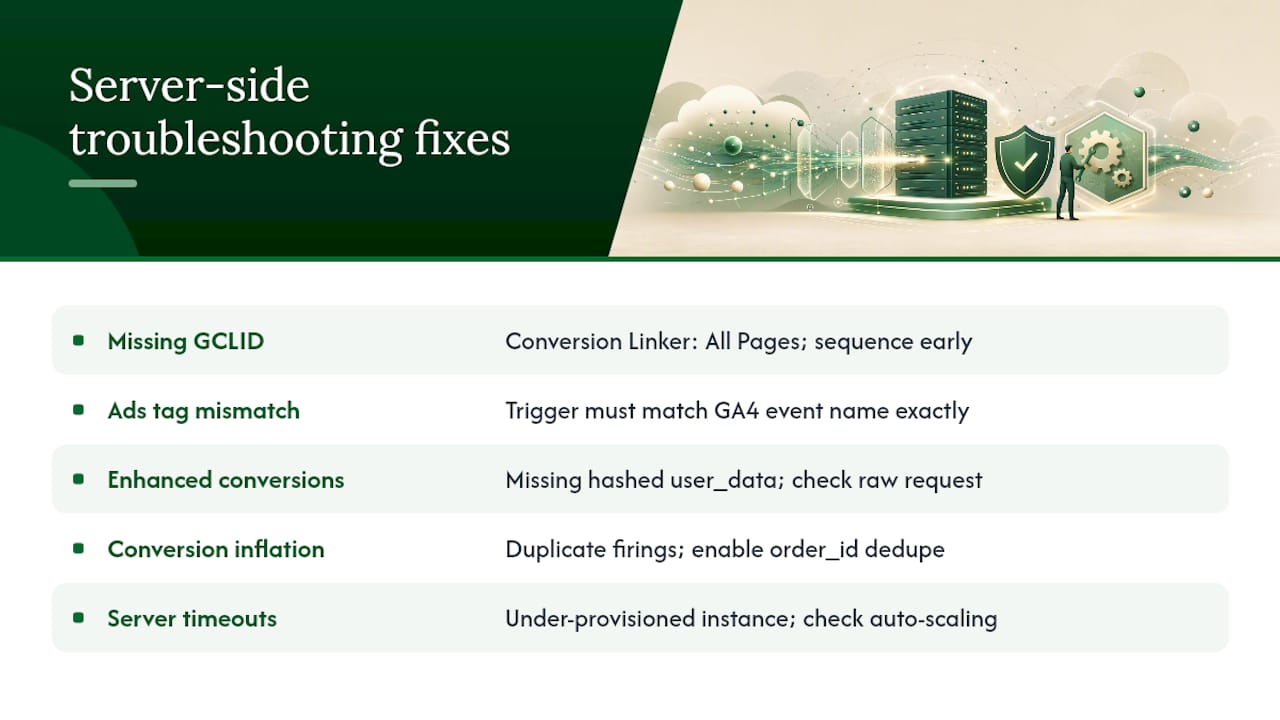
GCLID not appearing in server container events. The Conversion Linker tag isn’t firing on the page where the click lands, or it’s firing after the conversion event. Check that the Conversion Linker trigger is set to “All Pages” and that it fires before any conversion tags in the tag sequencing order.
Server container receiving events but Ads tag not firing. The trigger condition on the Ads Conversion Tracking tag doesn’t match the event name coming from the GA4 client. Open the server container preview and check the exact event name in the incoming request. It must match your trigger exactly, including case sensitivity.
Enhanced conversions showing “No recent conversions” in Google Ads. This usually means user_data is missing from the server-side request, or the hashing format is wrong. Pull the raw request from server container logs and verify the hashed fields are present and correctly formatted.
Conversion counts inflating after server-side launch. Both client and server Ads tags are firing without deduplication. Confirm your order_id deduplication is active in the Google Ads conversion action settings (set “Count” to “One” per order ID) and that the same order_id is being passed from both tags.
GA4 events arriving at server container with missing UTMs. The web GTM GA4 tag isn’t including UTM parameters in the event payload. Add explicit event parameters for utm_source, utm_medium, and utm_campaign in the web GA4 tag configuration, pulling from URL variables or the dataLayer.
Server container timing out under high traffic. Your hosting instance isn’t scaled to handle peak request volume. If you’re on Stape, check their auto-scaling settings. On GCP Cloud Run, review the concurrency and instance count settings. A timeout means conversions are dropped silently.
Cross-domain GCLID loss. If a user clicks an ad, lands on domain A, and converts on domain B, the GCLID must be passed in the URL between domains using the linker parameter. Configure cross-domain linking in your GA4 web tag and verify the gclid survives the domain transition in browser dev tools.
For e-commerce setups with complex order ID and revenue mapping, the Google Ads e-commerce conversion tracking guide covers the payload design in more detail.
A practitioner’s perspective on what actually matters here
The most common mistake teams make with server-side tracking isn’t a technical one. It’s treating the server container as a replacement for client-side tags rather than a complement to them. The moment you remove client-side triggers without verifying that UTMs, user agent, and GCLID are being forwarded explicitly in the event payload, you’ve traded one measurement problem for a different one.
The implementation wins I’ve seen come from accounts that ran a clean parallel window, confirmed the server-side conversion count matched their baseline, and only then removed the duplicate client tags. The accounts that struggled skipped the parallel window, saw Smart Bidding destabilize, and spent weeks diagnosing a problem that a 14-day validation would have caught.
Starter plan:
- Audit your current conversion setup and identify which events are most exposed to ad-blocker loss.
- Pilot server-side tracking on your highest-value conversion action first.
- Validate with a parallel window before touching any existing tags.
- Roll out to remaining conversion actions once the pilot is confirmed stable.
Keep your client-side triggers. They’re not legacy code. They’re the source of browser metadata that your server container cannot reconstruct on its own.
North Country Consulting handles the implementation so you don’t have to
For advertisers spending $25K or more per month on Google Ads, a failed or incomplete server-side migration isn’t just a technical inconvenience. It’s a Smart Bidding signal problem that compounds over weeks.
North Country Consulting’s senior-led measurement migrations cover the full scope: technical tag review, GTM server container readiness, enhanced conversions configuration, GCLID handling, and a realistic timeline estimate. The team has managed over $40 million in Google Ads spend with an average 8.7× ROAS, and measurement architecture is part of every engagement, not an add-on. A free audit gives you a clear picture of where your current tracking is leaking conversions and what a server-side migration would require. If you’re ready to see the full scope of what’s available, the services overview covers every engagement model. Request your audit and get a scoped implementation plan within a week.
Sources
- Google Ads Server Side Tracking – Set Up With Experts (Usercentrics)
- Server-side tracking vs client-side: when to track on the client vs server | Twilio
- What is server-side tracking? | Matomo blog