
Skip the prep work and you’ll just pay more for the same ROAS, or worse. Google’s own systems can spend up to double your daily budget on strong days, so the constraint that actually matters is your monthly cap, not the daily number sitting in your campaign settings.
TL;DR:
- Increasing budgets by no more than 15–20% ensures Smart Bidding maintains stable learning, with several days to a few weeks needed before evaluating results.
- Campaigns should have sufficient recent conversion volume and accurate tracking data to support Target ROAS, or start with Maximize conversion value to build data.
- Removing duplicate campaigns, matching landing pages to ad promises, and maintaining clear test separation are essential for account hygiene before scaling.
- Automated rules should supplement human oversight with proper caps and thresholds, accounting for delayed conversion data in performance reviews.
- Launch new audience segments in their own campaigns with modest budgets and incrementally raise successful tests while monitoring key metrics.
Table of Contents
- Before You Increase Budget: A 5-Point Readiness Check
- Getting Your Account Ready to Scale
- Choosing the Right Bid Strategy for Growth
- The Right Way to Raise Your Budget, Step by Step
- What to Watch After You Increase Spend
- Testing New Audiences and Keywords Before You Scale Them
- Why Senior Oversight Changes the Outcome
- How North Country Consulting Approaches Scaling
- Sources
- FAQ
Before You Increase Budget: A 5-Point Readiness Check
Run through this before you touch a single budget field. Most “scaling disasters” trace back to skipping one of these five checks.
- Conversion accuracy: confirm your conversion actions fire correctly and carry real values, not placeholder counts. Bad values poison Smart Bidding before it ever gets a chance to work.
- Conversion volume: check whether you have enough recent conversions to support Target ROAS, or whether you need a fallback strategy first.
- Baseline KPIs: write down your current ROAS, CPA, and conversion rate. You can’t spot a decline without a number to compare against.
- Budget guardrails: decide your daily and monthly ceilings and the exact metric drop that triggers a rollback.
- Test architecture: separate campaigns you’re actively testing from the ones carrying your core revenue, so a bad test never touches proven spend.
Ten minutes on this list saves weeks of cleanup later.
Getting Your Account Ready to Scale
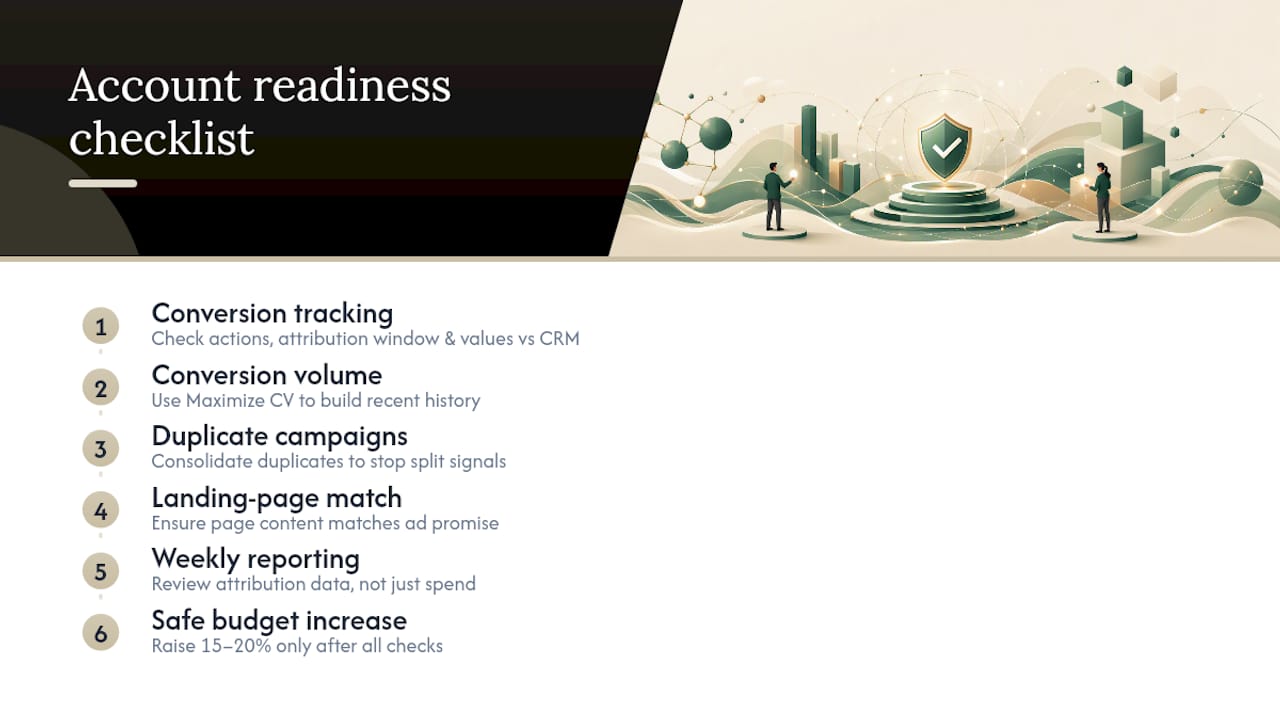
Conversion tracking is the input Smart Bidding trades on. If your “purchase” action double counts, misses mobile app conversions, or assigns flat values to orders that range from $40 to $4,000, every bidding decision downstream is built on bad data. Before raising any budget, pull your conversion actions list and check the attribution window and value settings against what your CRM or order system actually records.
Target ROAS generally needs a reasonable volume of recent conversions to generate stable auction-time predictions, and Google’s own guidance points to needing enough conversion history before Smart Bidding’s models have anything useful to learn from. If your account falls short, don’t force it. Run Maximize conversion value first to build volume, then graduate to Target ROAS once the data catches up.
Account hygiene matters more than people expect. Duplicate campaigns targeting the same keywords split your conversion signal in half, which can quietly disqualify you from Target ROAS even when your total conversion count looks fine on paper. Clean that up before scaling, not during. Label test campaigns clearly, make sure landing pages match ad promises (mismatches tank Quality Score and inflate CPCs right when you’re trying to spend more efficiently), and set a weekly reporting cadence that reviews attribution, not just spend and clicks.
Choosing the Right Bid Strategy for Growth
Your bidding strategy should match your conversion data, not your ambition. Google Ads Help recommends Smart Bidding models like Target ROAS and Maximize conversion value for accounts with strong measurement, because they use auction-time signals no manual bidder can react to in real time.
- Target ROAS works best once you have enough recent conversion history and accurate values; it’s the tightest control on efficiency but the least forgiving of thin data.
- Maximize conversion value with a Target ROAS fallback is the standard move when your value tracking is solid but conversion counts are still borderline, per Google’s guidance on automated bidding.
- Target CPA suits lead-gen accounts where deal value doesn’t vary much and volume matters more than value spread.
Budget headroom matters too. If you cap a campaign at exactly what it’s already spending, the algorithm has no room to find incremental volume. Google recommends calculating monthly totals as your daily budget times 30.4, and using its suggested budgets when a campaign keeps hitting its cap. For accounts running several related campaigns, a shared or portfolio bid strategy lets Google balance spend across them instead of forcing you to guess the split manually.
The Right Way to Raise Your Budget, Step by Step
- Increase the budget by 15–20%, not more. Practitioner data consistently shows this range gives the algorithm room to expand without triggering a full relearning phase.
- Wait several days before the next increase. Jumping again too soon stacks unstable signals on top of each other.
- Give major changes 1 to 2 weeks before judging results. Early ROAS dips are common and often self-correct as the system recalibrates.
- Never change bids and budgets in the same move. Isolate the variable so you know exactly what caused any shift in performance.
- Use seasonal budget adjustments for short-term spikes. These settings schedule a temporary daily budget increase for a sale or launch and revert automatically, without you having to remember to dial it back.
Pro Tip: Keep a simple change log, one line per budget move: date, percentage change, and the metric you’re watching. When ROAS wobbles two weeks later, you’ll know exactly which lever caused it instead of guessing across five simultaneous changes.
What to Watch After You Increase Spend
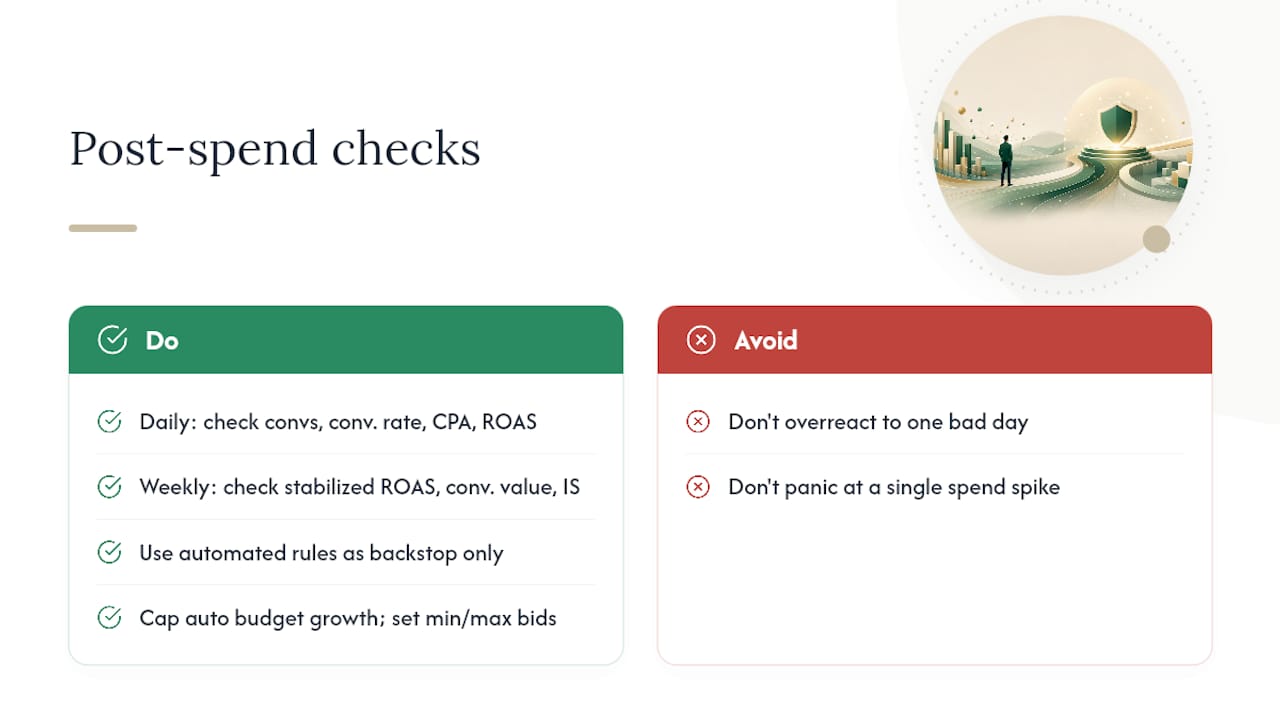
Set a daily and weekly rhythm and stick to it. Daily, glance at conversion volume, conversion rate, cost per conversion, and short-term ROAS movement. Weekly, look at stabilized ROAS, conversion value trends, and any shifts in impression share that suggest you’re finally clearing your old budget ceiling.
Automated rules are worth setting up as a backstop, not a replacement for human review. Cap how far a budget can climb automatically, pause campaigns that fall below a CPA or ROAS threshold, and set min/max bid limits so a bad Smart Bidding cycle can’t run unchecked overnight. One catch: conversion-based automated rules need a longer lookback window than click-based rules, since conversions arrive on a delay and a rule reacting to a single bad day will overcorrect.
Remember Google’s own overdelivery math: campaigns can spend up to 2x your daily budget on a strong day but never more than your daily budget times 30.4 across the month. A daily spike that looks alarming is often just normal pacing, not a broken account.
Testing New Audiences and Keywords Before You Scale Them
- Launch new segments in their own campaign with a modest cap. A new audience, location, or product line should never share a budget with proven performers until it’s earned its place.
- Use experiments or drafts to compare bid and creative changes cleanly. This gives you a real A/B read instead of a before/after guess muddied by seasonality.
- Raise winning tests in stepwise ROAS adjustments in moderate increments at a time, once conversion volume has stabilized enough to trust the number.
This is also where cross-channel thinking pays off. A coordinated approach to campaign planning across paid and organic channels helps you validate whether a landing page is genuinely ready for more traffic before you commit real budget to it.
Why Senior Oversight Changes the Outcome
Most scaling failures aren’t strategy failures. They’re discipline failures: someone changes three things at once, panics after two days, and rolls everything back before the data means anything. Senior-level account management enforces the boring stuff, one change at a time, a real rollback plan before the increase, not after the dip.
A proper audit usually surfaces two or three easy efficiency wins before you spend a dollar more. Fix those first. Scaling a leaky account just multiplies the leak.
— Eric
How North Country Consulting Approaches Scaling
North Country Consulting runs Google Ads scaling the way this article describes it: fix the account first, then grow it. That means account restructures that clean up duplicate campaigns and mismatched landing pages, rebuilt conversion tracking and attribution so Smart Bidding has real signals to work from, and Smart Bidding management that respects the one-change-at-a-time rule instead of stacking increases and hoping.
Every engagement starts the same way: a free Google Ads audit that identifies where your current budget is being wasted before anyone recommends spending more of it. Accounts managed this way have shown strong return on ad spend while being overseen by experienced operators rather than junior staff. If your monthly spend is high and you want a second set of eyes before your next budget increase, consider requesting a professional audit.
Sources
- How to steer AI-powered Search ads – Google Ads Help
- Best Way to Scale Profitable Google Ads | Coinis
FAQ
How much can I increase my Google Ads budget at once?
Most practitioner guidance recommends 15–20% increases with a few days between each change. Larger jumps tend to disrupt Smart Bidding’s learning signals and can cause temporary performance dips that make it hard to tell if the increase actually worked.
Why did my daily spend exceed my set budget?
Google allows campaigns to spend up to 2x your average daily budget on a single high-traffic day, but it caps your total monthly charge at your daily budget times 30.4. This is normal pacing behavior, not a billing error.
Do I need a minimum number of conversions before using Target ROAS?
Yes. Google recommends having a recent, reasonable volume of conversions before switching to Target ROAS, since the strategy relies on historical data to set auction-time bids. If you’re short on volume, Maximize conversion value is the standard fallback while you build up conversion history.
How long should I wait to judge results after a budget change?
Give a significant budget or bid change 1 to 2 weeks to stabilize before drawing conclusions. Evaluating performance in the first few days almost always catches the account mid-relearning, not its true steady state.
What does North Country Consulting charge for Google Ads management?
Pricing isn’t published and is quoted based on account size and scope; current details are available by requesting a free audit. The audit itself identifies specific budget and efficiency opportunities before any engagement begins.