
The fastest way to improve your Shopping performance this week is to fix your product titles. Use this template: [Brand] [Product Type] [Primary Keyword] [Key Attribute] [Variant Detail]. For running shoes, that looks like: Nike Men’s Trail Running Shoes Waterproof Wide Width Size 11. That single title covers the product type, the primary keyword, and two variant attributes, all within the first 70 characters where Google reliably shows them.
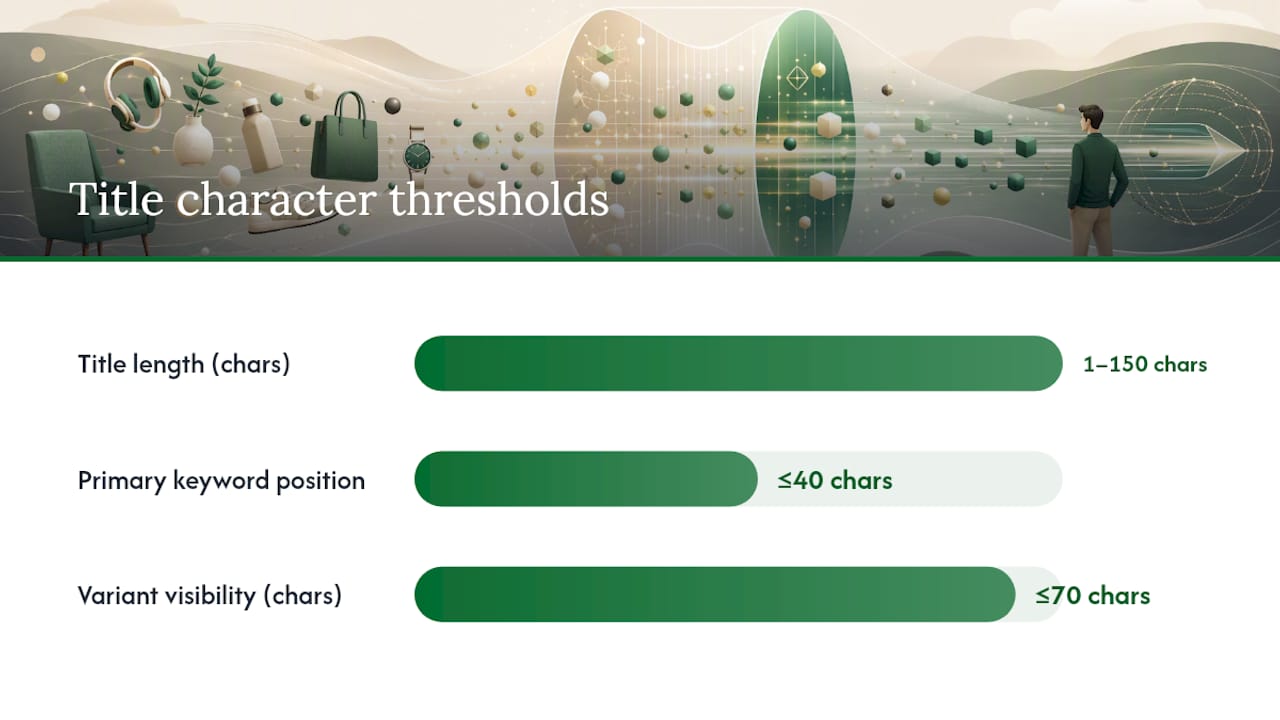
According to Google Merchant Center’s title requirements, merchant-provided titles must be specific and accurate, with a hard limit of 1–150 characters. AI-generated titles require the structured_title attribute with digital_source_type set to trained_algorithmic_media. The first ~70 characters are the most visible window, especially on mobile.
Three rules to apply right now: Put the product type and primary keyword before the brand unless brand is the primary search driver in your category. Keep variant details (size, color, material) inside the first 70 characters. Never include promotional text like “Free Shipping” or “Best Price” — Google will disapprove the listing.
Key Takeaways
Strong product title optimization is the highest-leverage feed change available to eCommerce advertisers: front-loading product type and primary keyword within the first 70 characters directly improves Shopping matching, expected CTR, and conversion alignment.
| Point | Details |
|---|---|
| Front-load the first 70 characters | Place product type and primary keyword before character 70; everything after is secondary matching space. |
| Use the five-field template | [Brand] [Product Type] [Primary Keyword] [Key Attribute] [Variant] covers matching, CTR, and conversion signals in one structure. |
| Follow platform rules strictly | Google Merchant Center limits titles to 150 characters; AI-generated titles require the structured_title attribute with trained_algorithmic_media. |
| Test for 2–4 weeks minimum | Track impressions, CTR, conversion rate, and query-level changes; higher CTR with lower conversion signals a keyword mismatch. |
| North Country Consulting | Offers a free senior-led audit covering title structure, feed compliance, and a prioritized quick-win list for Shopping accounts spending $25K+/month. |
Table of Contents
- Why product titles drive discovery, ad performance, and conversions
- What every high-performing product title needs
- Platform-specific rules you need to follow
- How to optimize titles at scale, step by step
- Before/after examples and templates by vertical
- How to test title changes and which metrics prove a win
- Tools and automation patterns for scaling title optimization
- Expert audit checklist: align titles with Shopping and Ads performance
- Common mistakes and red flags to avoid
- How the title optimization process connects to ad performance
- North Country Consulting’s free Shopping title audit
- Official docs and recommended reading
- Sources
Why product titles drive discovery, ad performance, and conversions
Google Shopping treats your product title as the primary matching signal. When a shopper types “waterproof trail running shoes wide,” Google scans your feed for titles that match those terms. A title that buries “waterproof” in character position 90 simply does not compete with one that leads with it.
The title’s job extends beyond matching. In a Shopping auction, Google uses expected CTR as a component of ad rank, and a well-structured title that mirrors the shopper’s query language raises that expected CTR. More relevant titles generate more impressions, and titles that accurately describe the product convert those impressions at a higher rate.
There’s also a meaningful distinction between your feed title and your on-site product name. Your on-site title is optimized for page layout, brand voice, and SEO. Your feed title is optimized for query matching and Shopping auction performance. They can and often should differ. A product page might read “The Cloudrunner Pro” while the feed title reads “Brooks Men’s Cloudrunner Pro Running Shoes Neutral Cushion Size 10.” Both are correct in their context.
For a deeper look at how Shopping placements use feed data, the Google Ads for eCommerce guide covers the structural differences between Shopping and Search campaigns and why feed-level changes carry more weight in Shopping.
What every high-performing product title needs
The five fields that belong in most titles, in rough priority order:
- Product type / what it is — the noun that defines the item (“Running Shoes,” “Protein Powder,” “LED Desk Lamp”)
- Primary keyword — the phrase shoppers actually search, drawn from your Search Terms report
- Key variant detail — size, color, material, quantity, or flavor; whichever attribute drives purchase decisions in your category
- Model or compatibility — model number, compatible device, or generation (critical for electronics and auto parts)
- Brand — place it first only when brand is a primary search driver (think Apple, Nike, or LEGO); otherwise append it
Ordering matters because Google truncates titles in display and weights earlier terms more heavily in matching. Front-load shopper intent, not brand ego.
Some attributes belong in dedicated feed fields rather than the title. Color, size, and material have their own Merchant Center attributes. When those fields are populated correctly, you can keep the title cleaner and still pass the right signals. The title should still include the most purchase-critical variant when it genuinely differentiates the product (e.g., “Wide Width” for footwear).
ConvertCart’s PTQS framework scores titles across five dimensions that predict both Shopping and on-site performance: search match clarity, attribute precision, scan simplicity, conversion signaling, and category intelligence. Running a quick mental check against those five dimensions before publishing a title change takes about 30 seconds and catches most structural problems.
Pro Tip: Use your Search Terms report, not a keyword tool, as your first source for title keywords. The terms that already convert in your account are the ones to front-load in your titles.
Platform-specific rules you need to follow
Google Merchant Center
The Merchant Center title specification sets the rules that govern disapprovals and visibility. Key requirements:
- Title length: 1–150 characters; the first ~70 are reliably visible
- AI-generated titles: must use
structured_titlewithdigital_source_type: trained_algorithmic_media - No promotional text (“Sale,” “Free Shipping,” “Best Deal”)
- No ALL CAPS words (except legitimate acronyms)
- Correct grammar and spelling required
- Variant titles must be distinct from each other; identical titles across variants cause matching problems
The structured_title attribute is separate from title. If you use generative AI to produce titles at scale, you must submit them via structured_title, not the standard title field. Google uses this distinction to apply different editorial review logic.
Amazon
Amazon’s title rules differ meaningfully from Google’s. Amazon recommends conservative character lengths for mobile display and enforces category-specific formatting. Recent guidance caps recommended title length well below the technical maximum for most categories. Amazon prohibits promotional phrases, special characters used decoratively, and subjective claims (“best,” “cheapest”). Title Case is the standard format on Amazon, unlike Google where sentence case is preferred.
eBay and other marketplaces
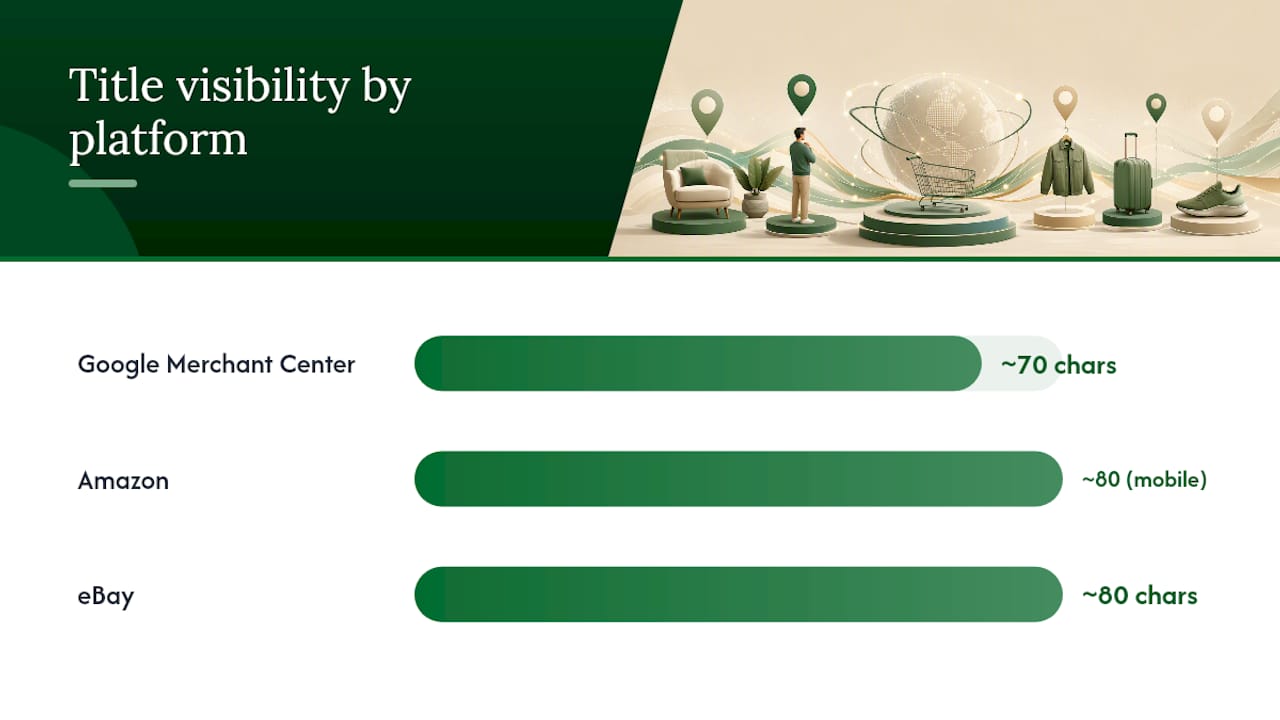
eBay’s practical limit is 80 characters, and brevity matters more there than on Google. Shoppers on eBay scan fast; a tight, specific title outperforms a padded one. Other marketplaces (Walmart, Target+) follow similar principles: lead with product type and key attributes, stay within display limits, and avoid promotional language.
| Platform | Character limit | Visibility window | Key rule |
|---|---|---|---|
| Google Merchant Center | 150 chars | ~70 chars | No promo text; structured_title for AI |
| Amazon | Varies by category | ~80 chars mobile | Title Case; category-specific caps |
| eBay | 80 chars | ~80 chars | Brevity; no promotional phrases |
Compliance checklist before any title goes live: Each variant has a distinct title. Language and country match the target feed. No promotional text. Separators are consistent (commas or pipes, not mixed). Casing follows platform rules.
How to optimize titles at scale, step by step
-
Scope your experiment. Start with the top 50–100 SKUs by revenue or ad spend. High-traffic products give you statistically meaningful data faster and protect your most important revenue while you test.
-
Pull your Search Terms report. Filter for queries with impressions but low CTR, or queries that convert well but don’t appear in your current titles. These are your primary keyword candidates.
-
Run keyword research. Use Ahrefs or SEMrush to find search volume and intent signals for your category. Cross-reference with your Search Terms data to prioritize terms that both match intent and already convert in your account.
-
Build titles using the template. Apply the [Brand] [Product Type] [Primary Keyword] [Key Attribute] [Variant] structure. Write the first 70 characters as if they’re the only characters that will display.
-
Stage the changes. Use feed rules or transformations in DataFeedWatch or a PIM like Salsify to apply changes to a test segment before pushing to the full catalog. Never overwrite your entire feed in one push.
-
Version control and rollback. Keep a copy of the original titles. Log every change with a timestamp and the reason. If CTR drops within the first week, you need to revert fast.
-
Deploy and monitor. Push the staged changes, set a calendar reminder for 14 days out, and check impressions and CTR daily for the first week. Query-level changes in the Search Terms report will tell you whether the new titles are matching different (and better) queries.
Operational deployment checklist:
- Tag the test segment in your feed manager for easy filtering
- Document the hypothesis (e.g., “adding ‘Wide Width’ to footwear titles will increase CTR by improving match to long-tail queries”)
- Set a minimum observation window of 2 weeks before drawing conclusions
- Assign one person to sign off on rollouts; avoid committee-driven title changes that dilute the test signal
For a broader look at how campaign structure interacts with feed-level changes, the Google Shopping ads optimization guide covers operational recommendations that pair well with title-level work.
Before/after examples and templates by vertical
Four reusable templates
- Brand-led (when brand drives search):
[Brand] [Product Type] [Primary Keyword] [Key Attribute] [Variant] - Tech/model-led:
[Product Type] [Model Number] [Compatibility] [Key Spec] [Brand] - Size/fit-led (apparel, footwear):
[Brand] [Gender] [Product Type] [Fit/Style] [Size/Color] - Variant-heavy (supplements, consumables):
[Brand] [Product Name] [Flavor/Form] [Quantity] [Key Claim]
Before/after examples
-
Apparel (before): “Women’s Jacket Blue” → (after): “Patagonia Women’s Fleece Jacket Lightweight Blue Size M” — added brand, material, and size within the first 70 characters; “Lightweight” signals the use case.
-
Electronics (before): “USB-C Cable” → (after): “Anker USB-C to USB-C Cable 6ft 100W Fast Charging for MacBook” — model-led structure; compatibility detail (“for MacBook”) targets a high-converting long-tail query.
-
Supplements (before): “Protein Powder Chocolate” → (after): “Optimum Nutrition Gold Standard Whey Protein Powder Chocolate 5lb” — brand front-loaded because it’s a primary search driver; quantity added for comparison shoppers.
-
Home goods (before): “Desk Lamp” → (after): “BenQ LED Desk Lamp Eye-Care Dimmable USB-C Charging Port” — key differentiating features (“Eye-Care,” “Dimmable”) placed before the USB-C spec, which is secondary.
-
Auto parts (before): “Brake Pads” → (after): “ACDelco Front Ceramic Brake Pads 2018-2022 Honda Accord” — compatibility is the primary purchase signal; year-make-model format matches how shoppers actually search.
-
Pet supplies (before): “Dog Food Grain Free” → (after): “Blue Buffalo Life Protection Grain-Free Dry Dog Food Chicken 30lb” — brand, formula name, and size all within 70 characters; “Grain-Free” front-loaded because it’s the primary filter shoppers use.
On US market localization: Use imperial measurements (oz, lb, in, ft) rather than metric. Write sizes as US sizing conventions (“Size 10,” not “EU 44”). Shoppers scanning Google Shopping results in the US expect these formats, and mismatched units create friction at the pre-click stage.
For broader on-site title and page optimization context, this product page optimization guide covers how title-first SEO connects to the full product page experience.
How to test title changes and which metrics prove a win
Experiment design
Run A/B tests by splitting a product category into two groups: a control group (original titles) and a test group (new titles). In Google Merchant Center, you can use supplemental feeds or feed rules to apply titles to a subset of products. For paid Shopping campaigns, use campaign experiments where the platform supports it.
Minimum test checklist:
- At least 30–50 products per group for statistical signal
- Minimum 2 weeks of observation; 4 weeks preferred for categories with weekly purchase cycles
- No other feed changes during the test window (price, availability, images)
- Document the start date and the exact title changes made
KPIs to track
- Impressions — did the new titles match more queries?
- CTR — are shoppers clicking more often when they see the new title?
- Conversion rate — are those clicks turning into purchases at the same or better rate?
- ROAS — the bottom-line signal; a title that improves CTR but tanks conversion is a net loss
- Query-level match changes — pull the Search Terms report before and after; new queries appearing is a positive signal, irrelevant queries appearing is a warning
Interpreting mixed signals
Higher impressions with lower CTR usually means the new title is matching broader, less relevant queries. Higher CTR with lower conversion rate is the most dangerous outcome: it means the title is attracting clicks that the product can’t fulfill. A shopper who clicks “Waterproof Trail Running Shoes” and lands on a road shoe will not convert.
Tracking the right conversion signals is a prerequisite for interpreting title test results accurately. If your conversion tracking is broken or incomplete, title test data is unreliable.
The testing and KPI framework from UENI recommends a 2–4 week observation window and emphasizes query-level analysis as the most reliable way to validate whether title changes improved matching quality, not just raw click volume.
Tools and automation patterns for scaling title optimization
Keyword research
- Ahrefs — keyword explorer for search volume, difficulty, and click-through rate estimates by query; useful for category-level keyword prioritization
- SEMrush — competitive keyword analysis and position tracking; the Keyword Gap tool identifies terms competitors rank for that your titles miss
- Google Merchant Center Search Terms report — the highest-priority input; shows exactly which queries triggered your Shopping ads and which converted
Feed management and PIMs
DataFeedWatch lets you build feed rules that prepend brand names, append variant attributes, standardize separators, and apply title templates across thousands of SKUs without touching your source data. The DataFeedWatch Shopping title guide covers ten practical rules including keyword placement, attribute inclusion, and editorial compliance.
Salsify operates as a PIM (product information management system) that centralizes product data and pushes it to multiple channels. For teams managing large catalogs across Google, Amazon, and retail partners, Salsify lets you maintain a single source of truth for product attributes and generate channel-specific title variants from that data.
AI-assisted title generation
Generative AI can draft title variants at scale, but governance is non-negotiable. Generate drafts, validate against the structured_title rules, run a human editorial QA pass, then push. The ChatGPT Ads for eCommerce guide covers governance approaches for AI-generated ad and feed copy that apply directly to title workflows.
Feed rule recipes that save the most time:
- Prepend brand to all titles where brand is absent
- Append size/color from dedicated feed attributes to titles missing variant detail
- Standardize separators (use commas consistently; remove pipes mixed with commas)
- Apply Title Case to Amazon feed; sentence case to Google feed
- Flag titles under 40 characters as incomplete for manual review
For ecommerce keyword selection that feeds directly into title templates, the ecommerce keyword research guide covers intent-focused discovery methods that translate well to title keyword prioritization.
Expert audit checklist: align titles with Shopping and Ads performance
Run this checklist against your top 50 SKUs before any major campaign push.
Technical compliance (fix these first):
- All titles are 1–150 characters
- AI-generated titles use
structured_titlewithtrained_algorithmic_media - No promotional text, unusual punctuation, or ALL CAPS words
- Grammar and spelling are correct
Attribute completeness:
- Product type is explicit in the title (not implied)
- Primary keyword appears within the first 40 characters
- At least one variant detail is present for products with multiple variants
- Brand appears where it’s a purchase signal
Front-load issues (high priority):
- Titles that start with brand when brand is not a primary search driver
- Titles where the product type appears after character 50
- Titles where the key variant (size, color, compatibility) is buried past character 70
Variant hygiene:
- Each variant (size, color) has a distinct title
- Variant titles differ by the specific attribute, not by a number suffix (“Product A1,” “Product A2”)
Grammar and editorial:
- Consistent separator style across the catalog
- No repeated words within a single title
- Sentence case for Google; Title Case for Amazon
KPI thresholds that signal a title problem:
- CTR below 0.5% on branded queries: title is probably not matching brand + product type searches
- Impression share dropping without bid changes: title may have lost keyword relevance after a feed update
- Title truncation on mobile: key attributes are past character 70
Pro Tip: When a title change increases impressions but conversion rate drops, pull the new queries that appeared in your Search Terms report. The new queries are almost always broader or less purchase-intent than your original match set. Tighten the title back toward the specific attribute that drove conversions originally.
Quarterly title reviews should be a standing calendar item. Assign one person to own the audit log and sign off on AI-generated title batches before they go live.
Common mistakes and red flags to avoid
- Keyword stuffing: “Running Shoes Men Trail Running Shoes Waterproof Running Shoes” — Google’s algorithm recognizes repetition and it does not improve matching; it signals low-quality feed data
- Promotional text in titles: “Best Price Running Shoes Free Shipping” — this triggers disapprovals in Merchant Center and looks unprofessional in Shopping results
- Inconsistent variant titles: Two variants of the same shoe with identical titles except for a SKU suffix; Google cannot distinguish them and may suppress one
- Burying the model number: For electronics and auto parts, the model number is often the primary search term; placing it after character 80 kills matching on the most valuable queries
- Misuse of capitalization: ALL CAPS words (except acronyms like “USB” or “LED”) violate Merchant Center editorial rules and can cause disapprovals
- Generic titles: “Blue Shirt Size M” with no brand, product type specificity, or keyword — matches almost nothing and converts even less
Quick QA before publishing any title change:
- Read the title aloud: does it describe the product accurately in plain English?
- Count the characters in the first 70: are the product type and primary keyword both present?
- Check for promotional language: any word that belongs in an ad headline, not a product description, should be removed
- Verify variant distinctness: if you changed one variant’s title, check all sibling variants
Marketplace-specific pitfalls:
- Amazon requires Title Case and prohibits special characters used decoratively; a title that passes Google’s rules may still violate Amazon’s
- eBay’s 80-character limit means you cannot carry over a Google-optimized 130-character title; write eBay titles separately, prioritizing the two or three most purchase-critical attributes
How the title optimization process connects to ad performance
Most eCommerce teams treat product titles as a catalog management task. That framing undersells what’s actually at stake. A title is the primary bid signal in a Shopping auction. It determines which queries trigger your ads, which shoppers see your listing, and whether the pre-click message aligns with what the landing page delivers.
The teams that get the most out of title work are the ones who treat it as an ongoing experiment, not a one-time cleanup. They run structured tests, track query-level changes, and connect title performance to ROAS at the campaign level. The teams that don’t are usually the ones wondering why their Shopping ROAS is flat despite competitive bids and good creative.
One pattern that shows up consistently: a catalog-wide title refresh that front-loads product type and primary keyword, combined with feed rule automation to enforce variant distinctness, tends to produce meaningful CTR improvements within the first 30 days. The gains compound when the title work is paired with landing page message alignment, because the shopper’s expectation set by the title is confirmed the moment they arrive on the product page.
North Country Consulting manages over $40 million in ad spend with an average ROAS of 8.7×. A significant portion of that performance comes from feed-level work, including title audits, structured feed rules, and systematic A/B testing, executed with senior oversight on every account.
North Country Consulting’s free Shopping title audit
If your Shopping campaigns are spending but underperforming, the feed is usually where the problem lives. North Country Consulting offers a free audit that covers title structure and keyword placement, feed compliance against Merchant Center rules, and a prioritized quick-win list you can act on immediately.
The audit is senior-led, not delegated to a junior analyst. You get a specific list of title changes, feed rule recommendations, and the reasoning behind each one. North Country Consulting manages Google Shopping and feed optimization for businesses spending $25,000 or more per month on Google Ads, with a flat-fee model and no long-term lock-in.
Request your free Google Ads audit and get a clear picture of where your titles are costing you impressions and revenue.
Official docs and recommended reading
- Google Merchant Center: Title and structured_title specification — the authoritative source for character limits, AI title rules, and editorial requirements
- DataFeedWatch: 10 Rules to Optimize Google Shopping Titles — practical rules covering keyword placement, attribute inclusion, and compliance
- ConvertCart: The PTQS Framework for eCommerce Title Optimization — the five-dimension scoring model for evaluating title quality
- SkuAnalyzer: Product Title Optimization for Google Shopping — best practices for title structure and expected CTR improvement
- UENI: Ultimate Guide to Product Title Optimization — testing methodology, KPI framework, and observation window guidance
- North Country Consulting: Google Shopping Ads Optimization Guide — operational recommendations that pair with title-level work
- Keyword discovery for eCommerce SEO — long-tail and intent-focused keyword discovery for title template selection
Sources
- Title title and structured title structured_title – Google Merchant Center Help
- Product Title Optimization for Google Shopping: Best Practices
- Ultimate Guide to Product Title Optimization