
Build one asset group per theme, product line, or conversion path, and give each group full asset coverage, an audience signal, and a single, correctly mapped final URL. Check Google’s asset requirements and your Ad Strength score before you launch. Then audit every existing asset group against that same standard today.
TL;DR:
- Building one asset group per theme, product line, or funnel stage helps improve ad relevance and reporting clarity, especially if each has a unique final URL.
- Text assets should be maximized beyond minimums to support multiple ad permutations, with images and videos also recommended for better reach and control.
- Segmentation of product feeds in retail campaigns via custom labels prevents performance issues from unfocused, oversized listing groups.
- Adding audience signals at launch and allowing up to two weeks for machine learning to optimize improves early results and attribution accuracy.
- Conducting a senior-led audit before campaign rebuild ensures proper structure, asset coverage, and URL mapping to avoid attribution and performance leaks.
Table of Contents
- What an asset group is and why structure matters
- Asset types, requirements, and recommended counts
- Practical structure patterns: product, theme, audience, or funnel-stage
- Listing groups, product feeds, and final-URL rules for retail PMax
- Audience signals, timing, and asset-group measurement
- Best practices, testing rhythm, and common mistakes to avoid
- Senior-led operational checklist and proof points
- Should marketers lean on PMax or keep channel campaigns separate?
- North Country Consulting’s free audit and senior-led PMax management
- Sources
- FAQ
What an asset group is and why structure matters
An asset group is the container that holds the headlines, images, videos, and logos Google’s system assembles into ads across Search, YouTube, Display, Gmail, and Discover. Every Performance Max campaign needs at least one asset group, and the system pulls from whatever assets live inside that group whenever it builds a placement for that audience or query.
Structure is not a filing exercise. It determines what Google’s machine learning has to work with when it decides which headline pairs with which image for which viewer. A group stuffed with assets for three unrelated product lines forces the algorithm to guess which combination fits a given search. A group built around one theme, one product, or one funnel stage gives the system a tighter, more coherent creative pool to draw from, and that consistency shows up in relevance and in the numbers you can actually read in reporting.
Mapping assets to a single final URL matters for the same reason. When a group serves five different landing pages, you lose the ability to tell which page drove which result. When it serves one, the asset report and your attribution model line up cleanly.
A few structural facts worth keeping in view:
- Each Performance Max campaign must contain at least one asset group; there is no strict upper limit that most advertisers reach in practice.
- Assets are grouped by theme, product line, or final URL, never by channel, since Google’s system chooses the channel automatically.
- Every asset group needs its own audience signal to guide early delivery, covered in more detail later in this guide.
- Reporting granularity depends on how tightly each group’s theme and final URL are defined.
Get the container right and everything downstream, from Ad Strength to attribution, gets easier to read.
Asset types, requirements, and recommended counts
Before you build a single asset group, know the specs Google enforces and the counts it recommends for maximum reach. The official asset group requirements set hard minimums, while Google’s best practices guidance lays out the counts that give the system the most room to test combinations.
Text assets carry the heaviest minimums. You need enough headlines and descriptions to support dozens of ad permutations, plus a business name and a clear final URL for every group. Google recommends filling every available slot rather than stopping at the minimum, since more inputs mean more combinations the system can test against different queries and placements.
Image and video assets round out the group. Google auto-generates video from your images and text when you don’t upload one, but a purpose-built video gives you control over pacing, branding, and message that auto-generation can’t replicate, and having at least one improves your reach into YouTube and Discovery placements according to Google’s video asset guidance.
| Asset type | Minimum required | Recommended count |
|---|---|---|
| Headlines | minimum required | recommended count |
| Long headlines | minimum required | recommended count |
| Descriptions | minimum required | recommended count |
| Business name | 1 | 1 |
| Logos | minimum required | recommended count, including square and landscape |
| Images | minimum required | recommended count, multiple orientations |
| Videos | Auto-generated if absent | recommended count |
Account-level assets, such as sitelinks and call or lead extensions, sit outside individual asset groups but still interact with them. Google can surface a sitelink or call extension alongside any asset group’s ad depending on the placement and query, so these account-level assets should stay consistent with the messaging and final URLs your groups are built around, rather than contradicting them. A logo mismatch or a sitelink pointing to a discontinued page undermines the coherence you built into the group itself.
Practical structure patterns: product, theme, audience, or funnel-stage
There is no single correct pattern, but three approaches cover most accounts, and the right one depends on your catalog, your landing pages, and what you’re trying to measure.
Pattern A: product-level groups. Build one asset group per SKU or product line when each product has its own dedicated landing page and a high enough average order value to justify granular creative. This works well for furniture, appliances, or B2B equipment where a buyer researching one item behaves very differently from a buyer researching another.
Pattern B: category or theme groups. When dozens or hundreds of SKUs share a landing page, or a category page serves as the natural conversion point, group by theme instead. A footwear retailer might run one group for running shoes and another for hiking boots rather than one group per shoe.
Pattern C: audience or funnel-stage groups. When messaging needs to differ for a cold audience versus a warm one, split by funnel stage. A top-of-funnel group can carry broader creative and a wider audience signal, while a bottom-of-funnel group carries direct-response messaging aimed at return visitors or cart abandoners.
Before picking a pattern, run through a short checklist:
- Does every product or category have a unique, working final URL, or do several share one page?
- Is average order value high enough to justify SKU-level creative investment?
- Is your product feed clean enough to support granular listing groups?
- Do you need funnel-stage reporting, or is a single blended view acceptable?
Whichever pattern you choose, avoid letting two asset groups point to the same final URL. That overlap creates internal competition and makes it impossible to tell which group’s creative actually drove a result.
Pro Tip: Start with theme-based groups if you’re unsure. It’s easier to split a theme into products later than to merge overlapping product groups after the data gets messy.
Listing groups, product feeds, and final-URL rules for retail PMax
Retail Performance Max campaigns work differently because they pull from a Merchant Center feed instead of a static asset list. By default, a listing group includes every product in your feed, which means an unsegmented account is showing every SKU through the same creative regardless of margin, seasonality, or merchandising priority.
Narrow that default using Merchant Center attributes such as product type, brand, or custom labels. According to Google’s listing group guidance, keeping listing groups under 1,000 per asset group avoids the performance degradation that can come with an oversized, unfocused product set. Custom labels are the most flexible way to do this: tag high-margin products, seasonal items, or bestsellers, and build listing groups around those tags rather than raw catalog structure.
Final URL selection interacts directly with listing groups. When URL expansion is enabled, Google can send traffic to a page other than the one linked in your feed if the system decides another page on your site better matches the query. That flexibility can help conversion volume, but it also means your listing-group segmentation only controls which products are eligible, not necessarily which URL the click lands on unless expansion is restricted.
Practical steps for segmenting a large catalog:
- Tag products in Merchant Center with custom labels tied to margin or merchandising priority before building listing groups.
- Use bulk editing in Google Ads to apply listing-group rules across large campaigns without manual entry per SKU.
- Review listing-group performance monthly and re-tag products whose margin or inventory status has changed.
Audience signals, timing, and asset-group measurement
Audience signals tell Performance Max where to start looking for buyers before it has enough conversion data to learn on its own. Add them at the asset-group level, using customer lists, custom segments built from search terms or competitor interest, or lookalike-style segments where available. According to Google’s audience signal guidance, new or updated lists take between 24 and 72 hours to populate, and it can take up to two weeks for the machine learning models to fully integrate a new signal into delivery.
That lag matters for how you read early results. A practical sequence:
- Add an audience signal to every asset group at launch, even a broad one, rather than leaving the field empty.
- Expect the first 24 to 72 hours to reflect audience population, not real performance signal.
- Hold judgment on asset-group-level results for up to two weeks while machine learning fully integrates the signal.
- Check the asset report to see which individual assets are pulling weight within a group, rather than judging the group as a single black box.
- Cross-reference asset-group findings with campaign-level attribution before making structural changes, since Performance Max optimizes toward the campaign goal, not toward any single group in isolation.
Aligning audience signals with actual buyer intent, rather than a generic list, tends to produce cleaner early data. Content-driven audience research, the kind described in audience-first content strategy, can help identify which segments to seed before launch rather than guessing.
Best practices, testing rhythm, and common mistakes to avoid
Ad Strength is your fastest inventory check. It flags missing headline variety, thin image coverage, or an absent video before you ever spend a dollar, so treat a “Poor” or “Average” rating as a checklist, not a suggestion, per Google’s best practices for asset groups.
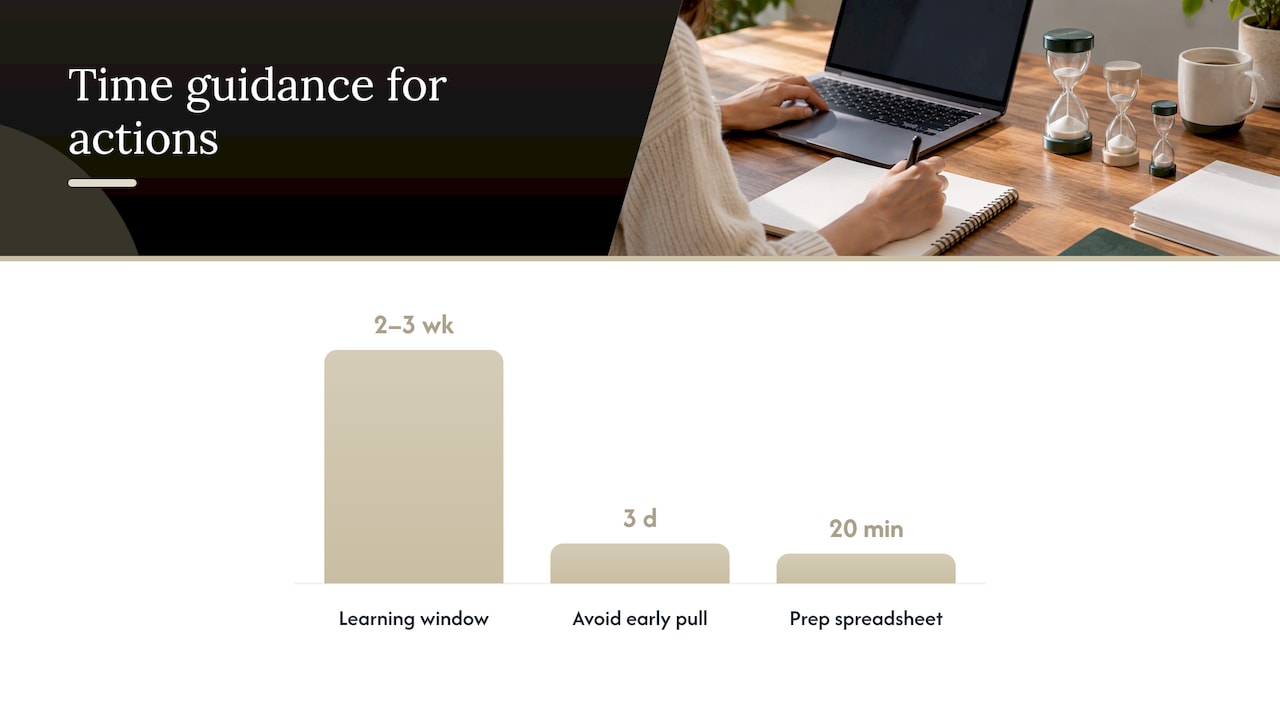
Once a group is live, resist the urge to react fast. Wait two to three weeks after any significant edit before judging results or replacing assets, since the system needs that window to relearn delivery patterns. Pulling an underperforming asset group after three days almost always mistakes normal learning-phase noise for a real signal.
The most common mistake beyond premature edits is judging every asset group by the same yardstick. Some groups function as audience builders that generate reach at a higher cost per acquisition, while others act as direct conversion drivers with tighter targeting. Cutting a broad-reach group because its return on ad spend looks weak next to a bottom-funnel group can shrink total reach and raise blended cost per acquisition across the whole campaign, a point worth weighing against broader bidding strategy guidance.
A few operational habits prevent most of these problems:
- Name every asset group with its theme, product line, or funnel stage, plus the launch date, so anyone auditing the account later understands intent without guessing.
- Label creative assets consistently across groups so the asset report can be compared apples to apples.
- Review the asset report on a fixed schedule, refreshing the lowest-performing text and image assets rather than the whole group.
- Keep a running log of final-URL assignments to catch overlap before it becomes a reporting headache.
Pro Tip: Build a simple spreadsheet mapping every asset group to its theme, final URL, and audience signal before launch. It takes twenty minutes and saves hours of later diagnosis.
Senior-led operational checklist and proof points
A practical launch checklist covers five items: confirm naming conventions before creating a single group, inventory every required asset type against Google’s minimums, seed an audience signal for every group at launch, map each group to one confirmed final URL, and build a reporting view that ties the asset report back to campaign-level goals. Skipping any one of these tends to surface as messy attribution three weeks later, when it’s harder to trace back to the cause.

This checklist is best applied under direct senior oversight rather than junior account management, with rebuilding of campaign architecture, conversion tracking, and reporting especially important for accounts spending significant amounts per month on Google Ads.
Should marketers lean on PMax or keep channel campaigns separate?
Performance Max earns its keep when a catalog is broad, landing pages are clean, and the priority is automated reach across channels without a dedicated team to build each one manually. Separate channel campaigns still make sense when a brand needs granular control over placement, message sequencing, or a channel Performance Max doesn’t serve well. Most mature accounts run both, keeping final URLs and audience signals distinct between the two so they never compete for the same query.
— Eric
North Country Consulting’s free audit and senior-led PMax management
Most marketers restructuring Performance Max asset groups run into the same wall: knowing the specs is one thing, rebuilding the account architecture around them under senior oversight is another. North Country Consulting’s free Google Ads audit reviews your existing asset-group structure, audience signal coverage, and final-URL mapping against the practices in this guide, then flags where the account is leaking spend.
| What the audit reviews | Why it matters |
|---|---|
| Asset group structure and coverage | Confirms full asset types before Ad Strength flags a gap |
| Audience signal placement | Checks signals are seeded at launch, not added late |
| Final-URL mapping | Catches overlap that muddies attribution |
Senior involvement means the person reviewing your account is the one making the structural call, not a junior analyst following a template. Start with the free audit or review North Country’s Google Ads management services directly.
FAQ
How many asset groups should a Performance Max campaign have?
There’s no fixed maximum, but each campaign needs at least one asset group. Most advertisers build one group per theme, product line, or funnel stage rather than defaulting to a single catch-all group.
What are the four main types of PMax assets?
The core asset types are text (headlines, long headlines, descriptions, business name), images, logos, and videos. Each type has its own minimum and recommended count detailed in Google’s asset group requirements.
What is the hierarchy of a Google Ads account?
A Google Ads account contains campaigns, campaigns contain asset groups (or ad groups in non-PMax campaign types), and asset groups hold the individual creative assets. In retail Performance Max, listing groups sit inside asset groups to segment the product feed.
What do Performance Max ads actually look like to users?
Performance Max ads take the shape of whatever placement they appear in, meaning a text ad on Search, a responsive display ad, a YouTube video ad, or a Discover feed card. Google’s system assembles the format automatically from the assets in the relevant asset group rather than showing one fixed ad design everywhere.
How long should you wait before replacing underperforming assets?
Wait two to three weeks after launching or editing an asset group before judging results, since the system needs that window to stabilize delivery. Replacing assets sooner risks reacting to learning-phase noise rather than a real performance signal, per Google’s best practices guidance.