
What is offline conversion tracking and why does it matter?
Offline conversion tracking connects real-world customer actions, like a phone sale, a signed contract, or an in-store purchase, back to the specific ad click that started the journey. Without it, your Google Ads account sees a lead form submission and nothing else. The actual revenue event stays invisible.
That gap is expensive. Smart Bidding algorithms can only optimize for what they can measure. If you’re feeding them lead counts instead of closed deals, you’re training them on the wrong signal. The result is campaigns that generate volume but not profit.
The core identifiers that make this work:
- GCLID (Google Click ID): Google assigns a unique GCLID to every ad click. Capture it at lead submission, store it in your CRM, and send it back when the deal closes.
- Hashed PII via enhanced conversions: Email addresses and phone numbers, hashed with SHA-256, let Google match conversions even when a GCLID is missing due to cookie blocking or cross-device activity.
- MSCLKID and FBCLID: Microsoft Ads and Meta use their own click IDs for the same purpose.
The business case is straightforward. Accurate attribution means your bidding strategy targets revenue, not just activity. Budget flows toward campaigns that actually close deals. North Country Consulting builds this infrastructure into every account we manage, because without it, even a well-structured campaign is flying partially blind.
How offline conversion tracking actually works
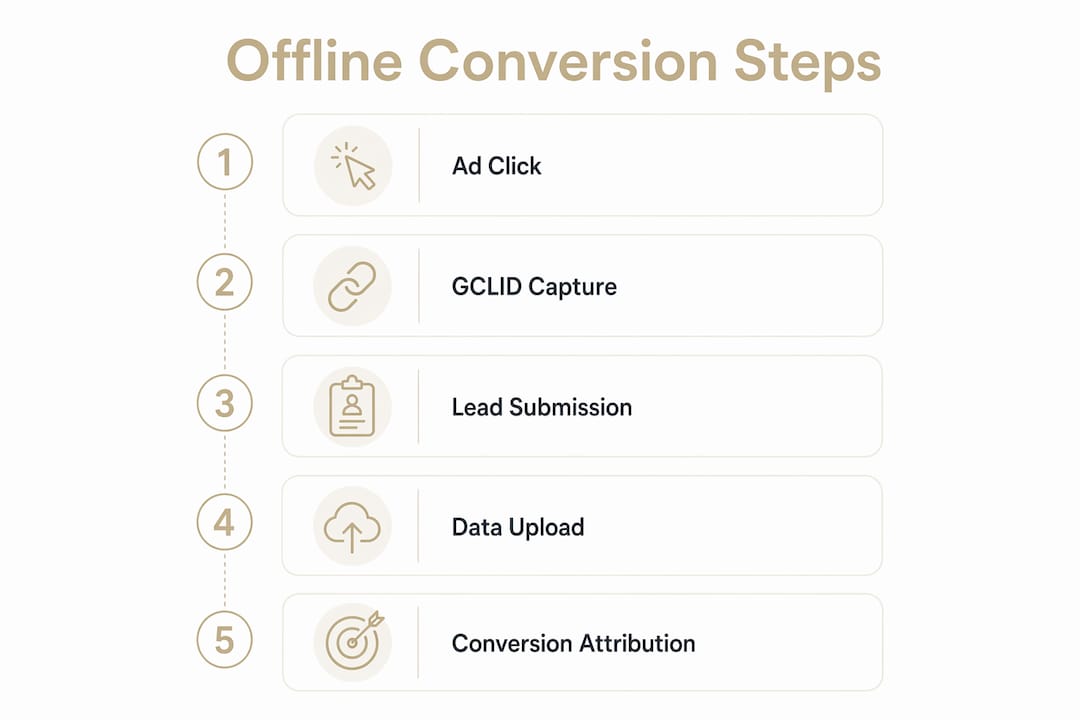
The mechanism starts at the ad click. When someone clicks your Google Ad, a GCLID gets appended to the landing page URL. Your website captures that ID, typically via a hidden form field or a JavaScript snippet, and stores it alongside the lead’s contact information in your CRM or database.

Later, when that lead converts offline, you send the GCLID back to Google along with the conversion name, value, and timestamp. Google matches it to the original click and records the conversion in your account. Imported conversions appear in your reports roughly three hours after upload.
When a GCLID isn’t available, enhanced conversions for leads fill the gap. You submit hashed email or phone data, and Google matches it against signed-in Google Account activity. This approach handles cross-device journeys and cases where cookies expired before the conversion occurred. Enhanced conversions also unlock engaged-view and cross-device attribution that standard GCLID imports cannot capture.
Key timing constraints:
- GCLID-based uploads must occur within 90 days of the original click.
- Enhanced conversion uploads using hashed PII must occur within 63 days.
- Uploads outside these windows are rejected outright.
Pro Tip: Always send both the GCLID and hashed PII in the same upload request when you have both. Google uses whichever identifier produces the strongest match, which raises your overall attribution rate.
How to set up offline conversion tracking step by step
Define your conversion actions first
In Google Ads, go to Goals > Conversions > New conversion action > Import. Choose “Manual import using API or uploads” and select “Track conversions from clicks.” Name each action to reflect a specific funnel stage, such as “Qualified Lead” or “Closed Deal.” Create a separate conversion action for each stage you want to measure.
Wait 4–6 hours after creating a new conversion action before uploading data. Early uploads can take up to two days to appear in reports.
Capture and store GCLIDs at lead submission
Add a hidden form field to every lead form on your site. Use a JavaScript snippet, or Google Tag Manager, to read the GCLID from the URL and populate that field on page load. Store the GCLID in your CRM alongside the contact record. This single step is where most advertisers fail. If the GCLID never makes it into your CRM, the rest of the process breaks.
Choose your upload method
| Method | Reliability | Scalability | Effort |
|---|---|---|---|
| Manual CSV upload | Low | Low | High |
| CRM native integration (Salesforce, HubSpot) | Medium | Medium | Low |
| Middleware automation (Zapier) | Medium | Medium | Medium |
| Data Manager API (Google) | High | High | Medium |
| Custom server-side webhook | High | Very High | High |
Manual CSV uploads work for testing but fail at scale. They introduce latency, require manual preparation, and have no built-in deduplication or error alerts. For any high-spend account, automation is the only practical path.
Automate with Data Manager or server-side integration
Google’s Data Manager accepts both GCLID and hashed PII uploads without requiring custom API code. Connect your CRM directly, or use an SFTP connector for file-based delivery. For multi-platform needs, a server-side solution like FunnelTrack centralizes offline data and delivers it to Google, Meta, and Microsoft Ads simultaneously, with deduplication handled at the server level.

Note: Legacy Google Ads API conversion import endpoints were deprecated on June 15, 2026. Any integration built on the old API must migrate to Data Manager to avoid losing data ingestion entirely.
Validate your imports
Use the “All conv. (by conv. time)” column in your Campaigns report, segmented by conversion action, to confirm uploads are registering. Cross-reference the upload results file against your CRM records. Common errors include conversion timestamps that predate the click, GCLIDs older than 90 days, and conversion action names that don’t match exactly.
For a deeper walkthrough of Google Ads conversion setup, North Country Consulting covers the full validation process.
Which platforms support offline conversion imports?
Google Ads is the most mature platform for this. GCLID imports, enhanced conversions for leads via Google Tag Manager or the Google tag, and Data Manager API all give you multiple paths depending on your technical setup. The enhanced conversions for leads approach is now Google’s recommended starting point for any advertiser who hasn’t already built a GCLID pipeline.
Microsoft Ads supports offline conversion imports via MSCLKID, with hashed email and phone matching as a fallback. For B2B advertisers where Microsoft drives real pipeline, the setup mirrors Google’s process closely enough that a parallel implementation is worth the effort.
Meta (Facebook) uses the Conversions API for server-side offline event delivery. Browser-based pixels miss a growing share of conversions due to iOS restrictions and ad blockers. Server-to-server delivery via the Conversions API bypasses those constraints entirely, using hashed first-party data to match events back to ad interactions.
FunnelTrack sits above all three platforms as a server-side data layer. It collects offline events from your CRM, payment processor, or booking system, matches them to click IDs or hashed identifiers, and delivers to multiple ad platforms in real time. The deduplication logic runs centrally, which prevents the same conversion from being counted twice across platforms.
CRM and automation tools round out the ecosystem. Salesforce and HubSpot both have native Google Ads integrations that push closed deals back to the platform automatically. Zapier connects CRMs and booking tools to ad platform APIs without developer involvement, though it hits rate limits at high volume and requires separate workflows per platform.
Privacy, data quality, and best practices
Hashing is not optional. Before any PII leaves your systems, normalize and hash email addresses, phone numbers, first names, last names, and street addresses using SHA-256. Google’s API rejects unhashed data, and submitting raw PII violates both Google’s policies and applicable privacy regulations.
Consent signals must travel with the conversion event. If a user declined tracking during their original web session, that preference should be reflected in the consent field of your upload request. Ignoring this creates compliance exposure and can result in conversions that Google won’t attribute.
Deduplication prevents inflated reporting. Google automatically deduplicates uploads with identical GCLID, conversion name, and timestamp combinations. For additional protection, include an order ID or transaction ID in every upload. This makes it straightforward to retract or adjust a conversion later without hunting through raw data.
Pro Tip: Switch to enhanced conversions for leads rather than maintaining a legacy GCLID-only pipeline. The match rate improvement is meaningful, and the setup through Data Manager is simpler than maintaining custom API code.
Upload schedules matter more than most advertisers realize. A nightly automated upload keeps Smart Bidding well-fed without manual intervention. Letting uploads lapse for even a week creates a data gap that distorts bidding signals and can take weeks to correct.
Expert strategies to maximize ROI from offline data
Offline conversion data does more than fill a reporting gap. Feeding it into Smart Bidding shifts the algorithm from optimizing for lead volume to optimizing for revenue outcomes. That distinction changes which keywords get budget, which audiences get bid adjustments, and which campaigns scale.
Advertisers who combined GCLIDs with first-party hashed data uploads saw a median 10% increase in conversions compared to those using standard offline imports alone. For a high-spend account, that lift compounds quickly.
Practical steps that move the needle:
- Assign conversion values by deal stage. A qualified lead is worth less than a closed deal. Passing actual revenue values, or margin-based estimates, lets Target ROAS bidding optimize for profit rather than raw conversion count.
- Segment conversion actions by funnel stage. Bid to one stage, typically the closed deal, but report on all stages. This gives you visibility into where the funnel leaks without confusing the bidding algorithm.
- Audit your GCLID capture rate regularly. Pull a sample of recent CRM leads and check what percentage have a stored GCLID. A capture rate below 80% usually points to a form configuration issue or a page where the tracking script isn’t firing.
- Validate after every CRM or website change. A CRM migration or form redesign can silently break GCLID capture. Build a monthly check into your account hygiene routine.
For accounts spending $25K or more per month, the Smart Bidding connection to offline data is where the real performance gains live. North Country Consulting’s senior-led approach rebuilds attribution infrastructure before touching campaign structure, because bidding on the wrong signal produces the wrong results regardless of how well the campaigns are built.
If your Google Ads account isn’t converting at the rate you’d expect, the problem is often measurement, not targeting. North Country Consulting’s Google Ads management services include full attribution audits that identify exactly where offline data is missing or misconfigured.
Key Takeaways
Offline conversion tracking is the single most direct way to connect ad spend to real revenue, and enhanced conversions for leads is now the recommended implementation path for every Google Ads account.
| Point | Details |
|---|---|
| GCLID capture is the foundation | Store the GCLID in your CRM at every lead submission or the entire attribution chain breaks. |
| Upload windows are strict | GCLID-based uploads must occur within 90 days; enhanced conversion uploads using hashed PII must occur within 63 days. |
| Enhanced conversions outperform legacy imports | Combining GCLID with hashed PII produced a median 10% increase in conversions compared to standard offline imports alone. |
| Automation beats manual uploads | Manual CSV uploads introduce latency and errors; Data Manager API or server-side tools are required at scale. |
| Offline data feeds better bidding | Smart Bidding optimizes for revenue, not just leads, when offline conversion values flow back to the platform. |