
Dynamic number insertion (DNI) is a call tracking technology that displays unique phone numbers to website visitors based on their traffic source, letting you tie every inbound call to the exact campaign, keyword, or channel that drove it. Without DNI, phone calls are a black box. You know someone called, but you have no idea whether they came from a Google Ads click, an organic search, or a Facebook post. With it, every call carries full attribution data, the same way a form submission does.
Here is what DNI makes possible for marketing and sales teams:
- Precise call attribution: Connect each call to the specific campaign, ad group, or keyword that generated it.
- Real-time data: The number swap happens in milliseconds, before the visitor notices anything changed.
- Full session context: Calls carry traffic source, landing page, referrer URL, and Google Ads click ID (gclid) data.
- Unified attribution: Phone leads slot into the same analytics model as form fills and purchases.
- Provider options: CTM (CallTrackingMetrics), WhatConverts, and Marchex are the leading U.S.-based platforms offering DNI today.
How does dynamic number insertion actually work?
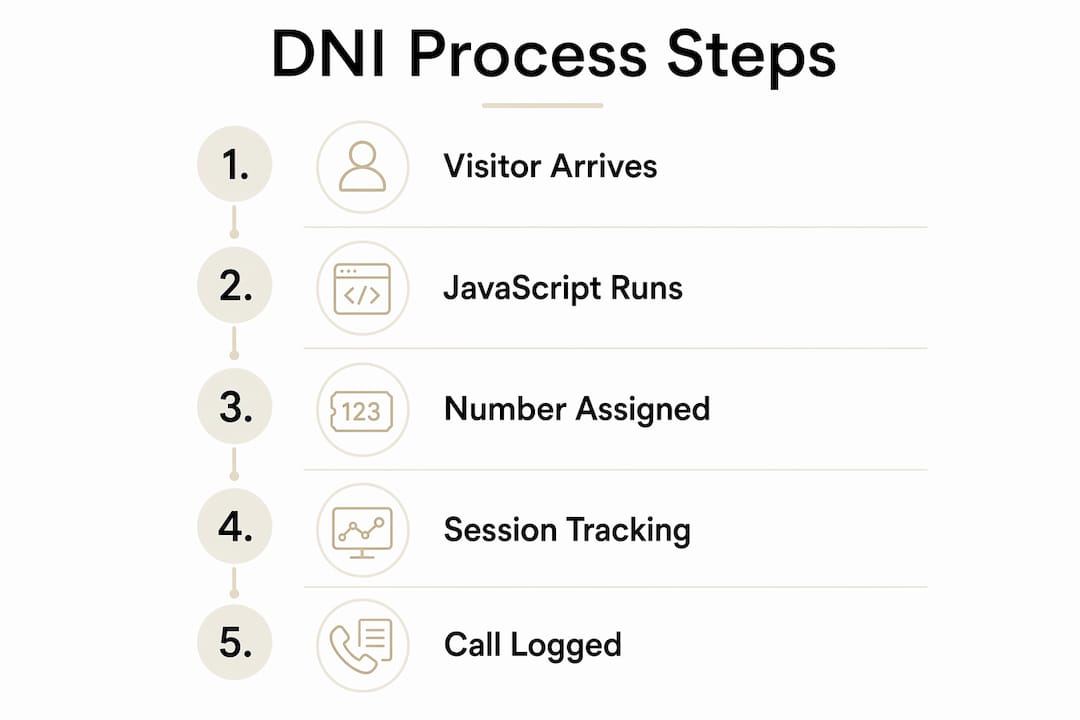
A small JavaScript snippet, placed in your site’s header or footer, runs on every page load. When a visitor arrives, the snippet reads UTM parameters, the referrer URL, and the gclid from a Google Ads click. Based on that data, it pulls a unique tracking number from a managed pool and swaps it in for your default business number. The visitor sees a local or toll-free number that looks normal. When they call, the platform logs the full session context behind that number.
Session persistence is what separates DNI from simpler tracking methods. The assigned number stays with the visitor across every page they browse, not just the landing page. If they visit five pages over 30 minutes and then call, the attribution still traces back to the original traffic source. Session windows typically run 20–60 minutes; once a session expires, the number returns to the pool for reassignment.
The snippet targets phone number elements using CSS classes, data attributes, or automatic pattern detection. You configure which elements get swapped, which means a site with multiple phone numbers in the header, footer, and contact page can track each one independently.
Pro Tip: Test your DNI setup by visiting your site with different UTM parameters appended to the URL. Each source should display a different tracking number. If the number does not change, check that the JavaScript snippet fires on all pages and that your UTM parameters match the rules you configured.
Number pools are the cost lever in any DNI setup. The pool must be large enough to cover peak concurrent visitors, not total daily visitors. A site with 2,000 daily unique visitors might have 15–50 simultaneous visitors at peak, which means a pool in that range is the right starting point. Too small and some visitors see your untracked default number, losing attribution. Too large and you pay for idle numbers.
Why DNI matters for sales and marketing attribution
DNI transforms phone calls from anonymous events into measurable conversion data, which changes how you allocate budget. When you can see that a specific Google Ads keyword drives 40% of your inbound calls but only 15% of your form fills, you have a real reason to bid differently on it.
The benefits run across the full funnel:
- Budget optimization: Identify which campaigns generate phone leads, not just clicks, and shift spend accordingly.
- Keyword-level insight: With Google Ads integration via gclid, you can attribute calls to the exact search term that triggered the ad.
- Sales team context: Reps see caller source data before answering, which improves how they open the conversation.
- Lead qualification: Marketing source data helps sales prioritize follow-up based on which channels produce higher-intent callers.
- Content decisions: Knowing which blog posts or landing pages drive calls tells you where to invest in content, not just which pages get traffic.
- Marketing and sales alignment: Both teams work from the same call data, which closes the gap between “leads generated” and “revenue closed.”
For service businesses running Google Ads, this level of attribution is often the difference between a campaign that looks expensive and one that clearly pays for itself.
What to look for in a DNI platform
Not every DNI solution handles the same use cases equally well. These are the capabilities that separate a reliable platform from one that creates attribution gaps:
- Flexible snippet targeting: The JavaScript should support CSS class, data attribute, and auto-detection methods so it works across any site architecture.
- Full traffic source detection: UTM parameters, referrer URLs, and gclid support are all required for complete attribution across paid and organic channels.
- Scalable number pools: Pool size should scale with peak concurrent visitors, with the ability to add numbers quickly during traffic spikes.
- Session persistence: The platform must maintain number assignment across page views for the full session duration, not just the landing page.
- Google Ads and GA4 integration: Call data feeds into campaign automation and conversion modeling only when the platform connects directly to your ad accounts.
- CRM integration: Salesforce and HubSpot connections let call data update contact records and trigger follow-up workflows automatically. CTM’s HubSpot integration, for example, creates or updates a contact record for every unique caller, including full session data.
- Cookieless tracking support: As browser privacy restrictions tighten, platforms that offer cookieless or first-party tracking methods maintain attribution accuracy where cookie-based methods fail.
- Real-time reporting: Attribution data should be available immediately after a call, not in a next-day batch report.
Leading DNI providers in the U.S.: a side-by-side look
Three platforms dominate the U.S. market for call tracking with DNI. Each takes a different angle.

| Provider | Core Services | Specializations | Unique Features | Best For | Rating |
|---|---|---|---|---|---|
| WhatConverts | Lead tracking for calls, forms, chats, and transactions; lead management and attribution reporting | PPC and SEO campaign attribution | Ranked on G2 for call tracking and marketing attribution; free trial available | PPC and SEO marketers needing full lead reporting | 4.9★ (74 reviews) |
| CTM (CallTrackingMetrics) | Call tracking, DNI, conversation intelligence, lead routing, softphone, pipeline tracking | Sales and marketing alignment, omnichannel teams | AskAI, real-time coaching, trigger-based automation, HubSpot and Salesforce sync | Marketing teams needing AI-driven conversation intelligence | 4.1★ (88 reviews) |
| Marchex | Call tracking, AI conversation analysis, marketing optimization, CSAT and agent performance | Automotive and home services | Customer intent analysis, agent performance scoring, proactive data-driven strategy tools | Automotive and home services businesses | 4.1★ (13 reviews) |
WhatConverts earns its G2 ranking through depth of lead management. Beyond call tracking, it handles form fills, chat conversations, and transactions in a single attribution view, which makes it the strongest option for agencies managing PPC and SEO clients who need to report on every lead type, not just calls.
CTM (CallTrackingMetrics) goes further on the AI side. Its AskAI feature surfaces buying motivation insights from call transcripts, and its real-time coaching tools let managers flag calls as they happen. For teams running inbound and outbound operations together, CTM’s omnichannel architecture handles both without requiring separate platforms.
Marchex is purpose-built for two verticals. Its conversation intelligence focuses on customer intent signals specific to automotive dealerships and home services companies, where call quality and agent performance directly affect close rates. If your business sits outside those verticals, the platform’s industry-specific tooling is less relevant.
Expert implementation advice for getting DNI right
The most common DNI failure is not a software bug. It is a setup mistake that goes undetected
for weeks.
- Size the pool correctly from the start. Base your pool on peak concurrent visitors, not daily totals. A pool that runs out during a traffic spike means some visitors see your untracked default number, and those calls disappear from your attribution data entirely.
- Place the snippet on every page. Incorrect snippet placement is the leading cause of fragmented session data. If the snippet misses a page, a visitor who browses to that page loses their tracking number assignment.
- Monitor pool utilization regularly. If utilization consistently exceeds 80%, add numbers. If it stays below 30%, reduce the pool to cut costs. Most platforms surface this in a dashboard view.
- Use Google Tag Manager for deployment. GTM lets you fire the DNI snippet as a custom HTML tag triggered on all pages, which eliminates the risk of missing pages during a site update.
- Test across traffic sources before going live. Simulate visits from paid search, organic, and direct by appending different UTM parameters, then confirm each source displays the correct tracking number.
- Account for NAP consistency. Search engine crawlers typically see your default number because DNI runs through JavaScript. Your structured data and meta tags stay unchanged, so local SEO is not affected.
Pro Tip: Consider cookieless tracking methods within your DNI setup to maintain attribution accuracy as browser privacy restrictions tighten. Platforms that support first-party session identifiers or server-side tracking preserve data in environments where third-party cookies are blocked.
For a full walkthrough of connecting DNI to your Google Ads account, the Google Ads call tracking setup guide covers the technical steps from snippet installation through conversion import.

North Country Consulting manages the attribution layer, not just the ads
If you are spending $25,000 or more per month on Google Ads, the DNI platforms above give you the data. What most businesses still lack is someone who knows how to act on it.
North Country Consulting is a senior-led Google Ads consultancy that builds call tracking and attribution directly into account structure, not as an afterthought. The team has managed over $40 million in ad spend with an average return of 8.7×, and every engagement includes a rebuilt attribution model that accounts for call conversions alongside form fills and purchases. A free Google Ads audit identifies where your current setup is losing revenue, including attribution gaps that DNI alone cannot fix without the right campaign architecture behind it.
Key Takeaways
Dynamic number insertion turns anonymous phone calls into fully attributed marketing data, making it one of the highest-leverage tools for any team running paid search or multi-channel campaigns.
| Point | Details |
|---|---|
| DNI works via JavaScript | A snippet detects traffic source and swaps your business number with a unique tracking number in milliseconds. |
| Session persistence is critical | The assigned number follows the visitor across all pages; incorrect snippet placement breaks this and loses attribution. |
| Pool size drives accuracy | Size your number pool to peak concurrent visitors, not daily totals, to avoid attribution gaps during traffic spikes. |
| Platform choice depends on use case | WhatConverts leads for PPC/SEO attribution; CTM for AI-driven conversation intelligence; Marchex for automotive and home services. |
| North Country Consulting | Builds DNI and call attribution into Google Ads account structure for high-spend advertisers, with a free audit to identify gaps. |