
For most campaigns, use Optimize. That is the short answer. Google’s machine learning will favor the ad most likely to generate a click or conversion at each auction, and for ongoing campaigns that is exactly what you want. Switch to Rotate indefinitely only when you are running a controlled creative test with a defined start date, a defined end date, and a clear hypothesis.
Two quick exceptions worth noting:
- Very low-traffic ad groups: When impressions are thin, even rotation gives each variant enough exposure to accumulate meaningful data before the algorithm picks a winner prematurely.
- Legally required exposure parity: Some regulated industries need documented proof that each creative received comparable delivery. Rotate indefinitely is the closest setting available, though it can only approach an even split and does not guarantee exact parity.
One more thing to lock in before you touch any setting: if you are running Smart Bidding strategies like Target CPA, Target ROAS, or Maximize Conversions, the rotation setting you choose is largely irrelevant. Smart Bidding automatically enforces Optimize behavior regardless of what the UI shows.
Table of Contents
- What is ad rotation and why does it matter?
- Which Google Ads rotation options should you use?
- How does Google actually decide which ad to show?
- How to set ad rotation in Google Ads
- How to run a controlled A/B test using ad rotation
- How Smart Bidding overrides your rotation settings
- Common misconceptions about ad rotation (and how to fix them)
- What to do after you have a winning creative
- Key Takeaways
- The part most guides skip about rotation testing
- North Country Consulting manages rotation, testing, and the full optimization cycle
- Useful sources to check next
What is ad rotation and why does it matter?
Ad rotation controls which ad Google enters into each auction when an ad group contains multiple creatives. It does not guarantee impressions. It sets a preference for how Google weighs each ad at the moment of auction entry.
That distinction matters in practice. You might have three ads in an ad group and assume they will each receive roughly equal traffic. Under Optimize, the ad with the strongest expected click-through rate (CTR) or conversion probability will dominate quickly. Under Rotate indefinitely, Google enters ads more evenly into auctions, but ad quality, bids, and competition still determine which ads actually win impressions.
Google Ads Help defines the two current options clearly:
- Optimize: Prioritizes ads expected to perform better for clicks or conversions based on accumulated signals.
- Rotate indefinitely: Delivers ads more evenly into the auction without adjusting bids or compensating for quality differences.
Why does the setting matter? Because it shapes how fast your data accumulates per variant, how quickly the algorithm commits to a winner, and whether your test results are actually valid. Getting this wrong means either wasting budget on underperforming creatives or drawing conclusions from a test that was never set up to produce clean data.
Which Google Ads rotation options should you use?
Google simplified rotation to two settings after retiring the older “Rotate evenly for 90 days” and “Optimize for clicks” options. Here is what each one does and when to reach for it.
Optimize
This is the default, and for good reason. The algorithm weighs signals like expected CTR, ad relevance, landing page experience, and historical conversion data to decide which ad to serve at each auction. As data accumulates, delivery shifts more heavily toward the statistically stronger ad. If ads perform similarly or traffic is low, delivery stays relatively even under this setting.
Use Optimize for:
- Ongoing campaigns where you want Google to maximize performance automatically.
- Any campaign running Smart Bidding (it will default here anyway).
- Ad groups where you have already identified a winning creative and want to let it run.
Rotate indefinitely
This setting enters ads into auctions more evenly, but it does not adjust bids or compensate for quality gaps. An ad with a significantly lower Quality Score will still lose auctions at a higher rate, so your impression split will often fall short of an even split even with this setting active.
Use Rotate indefinitely for:
- Short, controlled A/B tests with a predefined test window.
- Situations where you need to collect comparable data on two or more creative variants before declaring a winner.
Pro Tip: Set a calendar reminder the day you activate Rotate indefinitely. Without a hard end date, it is easy to leave this setting running for months, which wastes budget on underperforming ads and produces no actionable conclusion.
How does Google actually decide which ad to show?
Every search triggers an auction. Google evaluates every eligible ad in the ad group and assigns each one an Ad Rank based on bid, Quality Score components (expected CTR, ad relevance, landing page experience), auction-time signals like device and location, and the ad’s expected impact from extensions.

Rotation affects auction entry preference, not the auction outcome itself. Under Optimize, Google weights entry toward the ad it predicts will perform better. Under Rotate indefinitely, it weights entry more evenly. But once ads enter the auction, standard ranking mechanics apply. A lower-quality ad can still lose even when it was “supposed” to show.
The old “Rotate evenly for 90 days” setting, visible in the Google Ads API as ROTATE, would serve ads evenly for 90 days and then shift to optimized delivery. That option no longer appears in the standard UI. The two-option model (Optimize or Rotate indefinitely) is what advertisers work with today.
Key point: Serving becomes weighted toward statistically stronger ads as data accumulates. Low-volume ad groups may see relatively even delivery under Optimize simply because there is not enough data to differentiate.
How to set ad rotation in Google Ads
Setting rotation takes about 60 seconds. Here is the standard path through the UI, plus the bulk workflow for managing multiple campaigns at once.
Single campaign:
- Sign in to Google Ads and click Campaigns in the left navigation.
- Select the campaign you want to edit.
- Click Settings in the left panel.
- Scroll to Ad rotation and expand the section.
- Select Optimize or Do not optimize: Rotate ads indefinitely.
- Click Save.
Bulk change across multiple campaigns:
- From the Campaigns page, check the boxes next to all campaigns you want to update.
- Click Edit in the toolbar above the table.
- Select Change ad rotation.
- Choose your setting and confirm.
Ad rotation settings are also available at the ad group level, which overrides the campaign-level setting for that specific group. This is useful when you want most of a campaign on Optimize but need one ad group in Rotate indefinitely for a test.
Pro Tip: Avoid changing rotation settings mid-flight on a high-spend campaign. Switching modes resets the learning data for those ads, which can cause a temporary performance dip while the algorithm recalibrates. Time changes to coincide with a new creative launch, not an existing one mid-run.

How to run a controlled A/B test using ad rotation
A valid creative test has four components: a clear hypothesis, a defined metric, enough traffic to reach significance, and a hard stop date. Here is the workflow.
- Write your hypothesis. Example: “Headline A emphasizing price will produce a higher conversion rate than Headline B emphasizing speed for our target keyword set.”
- Choose your primary metric. CTR tells you about creative appeal; conversion rate tells you about business impact. Pick one before the test starts. For most advertisers, conversion rate is the right primary metric.
- Set up the ad group. Create exactly two ad variants (one variable changed, everything else identical). Set the ad group to Rotate indefinitely.
- Verify conversion tracking. Garbage in, garbage out. Confirm your conversion tracking is firing correctly before the test starts.
- Run the test to your sample size target. Use the table below as a starting point.
- Declare a winner and switch to Optimize. Once you hit your target, pause the losing ad and change the setting back to Optimize.
| Traffic tier | Min. impressions per variant | Min. clicks per variant | Suggested test duration |
|---|---|---|---|
| Low | — | — | 4–6 weeks |
| Medium (500–— imp/day) | — | — | 2–3 weeks |
| High (—+ imp/day) | — | — | 1–2 weeks |
These are minimums for detecting moderate effect sizes. If your expected difference between variants is small, you need more data.
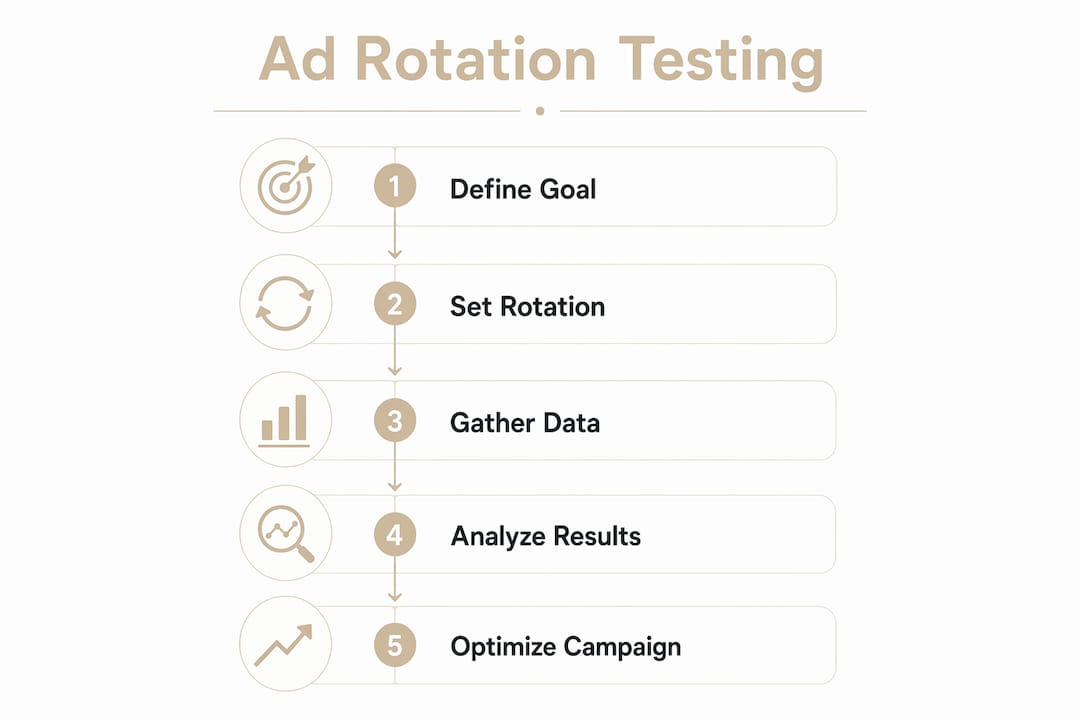
Stopping rules: Do not stop early because one ad looks better after three days. Early data is noisy. Commit to your sample size target. If neither variant reaches significance after double your planned duration, the difference may not be meaningful enough to act on.
Pro Tip: Do not touch bids, audiences, or match types during a test. Any change to those variables contaminates the results. The only variable that should differ between variants is the creative element you are testing.
How Smart Bidding overrides your rotation settings
Smart Bidding and manual rotation settings do not coexist cleanly. When Target CPA, Target ROAS, Maximize Conversions, or Maximize Conversion Value is active, Google’s bidding algorithm automatically prioritizes the ad most likely to hit the conversion goal at each auction. The rotation setting in the UI becomes a secondary signal at best.
Practical implications:
- You cannot reliably force even rotation when Smart Bidding is active. The bidding algorithm will override it.
- Running a creative test inside a Smart Bidding campaign conflates two variables: the creative and the bid strategy. You cannot isolate creative performance cleanly.
- Machine learning models that prioritize conversion probability will naturally favor the ad that fits the auction context, not the one you manually designated.
The cleanest solution is to run creative tests in a manual bidding environment or use Google Ads Experiments, which splits traffic at the campaign level and gives you a controlled comparison. Once you have a winner, migrate that creative into your Smart Bidding campaign.
Pro Tip: If switching to manual bidding for a test is not practical, use Google Ads Experiments with a 50/50 traffic split. It is the most reliable way to isolate creative performance when Smart Bidding is running.
Common misconceptions about ad rotation (and how to fix them)
Myth: Rotate indefinitely means exactly 50/50 impressions.
False. It means ads enter auctions more evenly. Auction outcomes still depend on Quality Score, bid competitiveness, and ad relevance. A weaker ad will lose more auctions even under this setting, so delivery may be only approximately even in practice.
Myth: Optimize always picks the best ad immediately.
Not quite. Serving shifts toward stronger ads as data accumulates. In low-traffic ad groups, delivery may stay relatively even for weeks because there is not enough signal to differentiate.
Myth: Changing rotation settings is harmless.
Switching modes resets learning data. In high-spend accounts, that can produce a measurable performance dip during recalibration.
Troubleshooting checklist for uneven serving:
- Confirm the rotation setting at both campaign and ad group levels (ad group overrides campaign).
- Check whether Smart Bidding is active (it will enforce Optimize regardless of your setting).
- Review Quality Scores across variants. A large quality gap will skew delivery even under Rotate indefinitely.
- Look at bid competitiveness. A lower bid on one ad means fewer auction wins, not a rotation problem.
- Check for recent creative or campaign changes that may have triggered a learning reset.
If ads are still serving unevenly after confirming all of the above, the most likely culprit is a quality differential between your ads, not a settings error.
What to do after you have a winning creative
A test result is only useful if you act on it cleanly. Here is the post-test workflow:
- Pause the losing ad. Do not delete it. Keep it for reference and future iteration.
- Switch the ad group back to Optimize. Let the algorithm reinforce the winner.
- Give the account a recalibration window. Expect 1–2 weeks of slightly variable performance as learning resets.
- Set a monitoring cadence. Check CTR, conversion rate, and CPA weekly for the first month after the switch.
- Schedule the next test. Creative fatigue is real. Plan your next test cycle before performance starts to drift.
Monitoring checklist:
- CTR trending down week over week? Time for a new headline test.
- Conversion rate stable but CPA rising? Check landing page performance and bid strategy.
- Impression share dropping? Bid competitiveness or Quality Score may have shifted.
Pro Tip: Schedule creative refreshes around natural campaign checkpoints like a new product launch or a seasonal push. Avoid mid-quarter creative swaps on high-spend campaigns. Aligning changes with seasonality adjustments minimizes learning noise and gives you cleaner before/after data.
Key Takeaways
Use Optimize for ongoing campaigns and Rotate indefinitely only for time-boxed creative tests; Smart Bidding overrides manual rotation regardless of your UI setting.
| Point | Details |
|---|---|
| Default to Optimize | Use Optimize for all ongoing campaigns; it maximizes performance as data accumulates. |
| Test with Rotate indefinitely | Switch to even rotation only for controlled tests with a defined end date and hypothesis. |
| Smart Bidding overrides rotation | Target CPA, Target ROAS, and Maximize Conversions enforce Optimize behavior automatically. |
| Sample size before stopping | Reach at least — clicks per variant (more for low-traffic groups) before declaring a winner. |
| North Country Consulting | Senior-led management with strong average ROAS and substantial managed spend applies these testing frameworks to high-spend accounts. |
The part most guides skip about rotation testing
Most articles on ad rotation stop at “use Optimize for performance, Rotate indefinitely for tests.” That is correct but incomplete. The real problem is that advertisers run tests without controlling for the variables that actually contaminate results.
The biggest one is bid strategy. Running a creative test inside a Smart Bidding campaign while leaving Target CPA active means the algorithm is simultaneously optimizing bids toward the ad it predicts will convert. You are not testing creative. You are testing creative plus whatever bid adjustments the algorithm made that week. Those are not separable.
The second issue is test duration. Most advertisers stop too early. Three days of data showing Ad A at a 4.2% CTR versus Ad B at a 3.8% CTR is not a result. It is noise. The gap needs to hold across enough impressions and clicks to be statistically meaningful, and that usually takes longer than it feels like it should.
The third issue is creative isolation. Changing the headline, the description, and the CTA in the same test tells you nothing about which change drove the result. One variable per test. Always.
Agency-level processes reduce these errors not because agencies are smarter, but because they have checklists and review cycles that catch the obvious mistakes before they run for three weeks and waste budget. That is what senior oversight actually buys you.
North Country Consulting manages rotation, testing, and the full optimization cycle
Running a clean creative test while keeping a high-spend account performing is harder than it looks. The rotation setting is the easy part. The hard part is controlling for Smart Bidding interference, maintaining statistical discipline, and knowing when to stop a test versus when to let it run.
North Country Consulting manages Google Ads accounts with significant monthly budgets and a strong track record of high return on ad spend across a large portfolio. The work includes senior-led creative testing frameworks, full account restructuring, attribution model rebuilding, and conversion tracking audits that catch the measurement errors that make test results unreliable.
A free Google Ads audit identifies where your current rotation setup, bidding strategy, and creative testing process are leaving performance on the table. Request one and get a specific, prioritized list of what to fix first.
Useful sources to check next
- Use ad rotation — Google Ads Help: Official documentation covering both rotation settings, how to apply them, and expected behavior under each.
- Fix unevenly serving ads — Google Ads Help: Google’s own troubleshooting guide for uneven impression delivery, including causes and recommended fixes.
- Introducing a better, simpler ad rotation — Google Blog: The original product announcement explaining why Google moved to two rotation options and the rationale for defaulting to Optimize.
- What is Ad Rotation? — AdLibrary Glossary: A concise conceptual explainer covering rotation definitions and testing best practices.