
Audience signals are suggestions you feed to Google’s Performance Max so its AI can find your best customers faster. They are not hard targeting, and Google can and will serve ads outside them when the system spots a likely buyer. The single best first move: confirm conversion tracking is accurate, then upload a clean Customer Match list plus several relevant custom segments before you touch anything else.
TL;DR:
- Audience signals are suggestions that speed up Google’s AI exploration, but the system is free to serve ads outside these inputs based on its own analysis.
- First-party customer lists, in-market segments, and custom keyword or URL segments are the most impactful signals, especially for new campaigns or product launches.
- Signals should be carefully built, limited to three to five high-quality inputs, and added to asset groups with clear naming to maximize effectiveness.
- It takes 24 to 72 hours for lists to populate and up to two weeks for signals to influence targeting, with at least six weeks needed to evaluate their true impact.
- A thorough account audit is recommended before optimizing signals, as foundational issues like poor tracking or creative flaws will undermine any signal efforts.
Table of Contents
- What Audience Signals Are and How Performance Max Uses Them
- Audience Signal Types and Which Inputs to Prioritize
- How to Add Audience Signals to a Performance Max Asset Group
- Best Practices and Common Mistakes With Audience Signals
- How to Evaluate Signal Impact: Reports and Realistic Timelines
- How North Country Consulting Applies Audience Signal Strategy
- When Audience Signals Won’t Fix a Broken Account
- Get a Free Audit Before You Touch Another Signal
- Official Docs and Reads Worth Bookmarking
- Sources
- FAQ
What Audience Signals Are and How Performance Max Uses Them
Audience signals in Performance Max are directional hints, not fences. You tell Google’s AI “start looking here,” and the system uses that starting point to speed up its own exploration across Search, Display, YouTube, Gmail, Maps, and Discover. Google’s own documentation on audience signals for Performance Max frames them exactly this way: a set of suggested inputs, not a restriction.
That distinction confuses a lot of advertisers who spent years on Search or Display campaigns, where audience targeting locks impressions to a defined group. Performance Max works differently. Feed it a signal, and the algorithm treats it as a hypothesis to test, not a boundary to respect. If the model finds a converter who looks nothing like your signal, it will still bid on that person.
Search themes get lumped in with audience signals constantly, and they are not the same tool. Search themes are suggestions about the queries someone might type, useful when your landing pages don’t fully describe what you sell or when you’re launching a product with no search history yet, according to Google’s guidance on search theme use cases. Audience signals describe who might buy, not what they might type. A retailer launching a new skincare line might use search themes like “overnight retinol serum” while feeding audience signals built from past skincare purchasers. Different jobs, same asset group.
The controls that actually move performance sit elsewhere. Conversion tracking quality, your bid strategy (Maximize Conversions versus Target ROAS, for instance), and the asset group’s creative and feed data all outrank signals in terms of raw influence. Search Engine Land’s analysis of PMax audience signals makes this point directly: signals are suggestions, and the primary levers remain tracking, bidding, and assets.
Where signals genuinely earn their keep:
- New campaigns with no conversion history, where the AI has nothing to learn from yet.
- Product launches, where you want to nudge exploration toward a plausible early audience.
- Accounts with rich first-party data, like a SaaS company with a well-segmented customer list ready for Customer Match.
Outside those situations, signals matter less than getting the fundamentals right.
Audience Signal Types and Which Inputs to Prioritize
Performance Max accepts four categories of signal input, and they are not interchangeable in terms of value. Google’s audience signals documentation lists first-party data, Google’s own segments, custom segments, and demographics as the supported inputs.
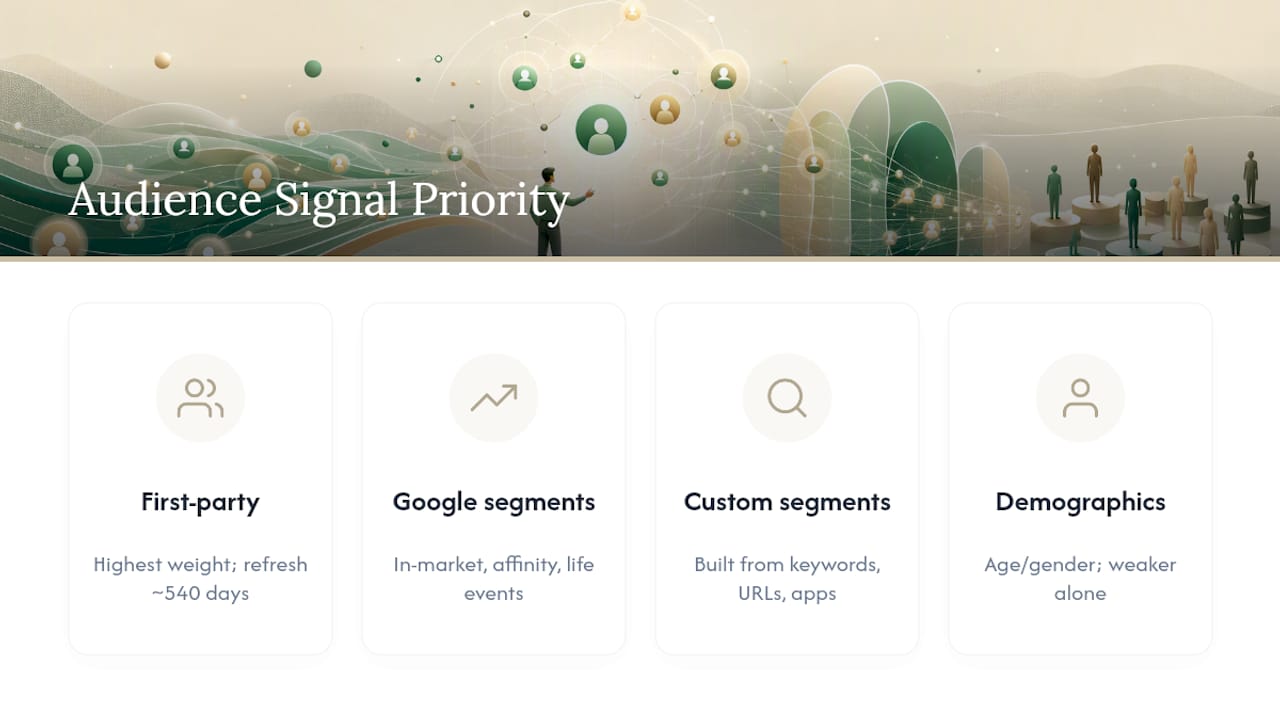
First-party lists carry the most weight because they come from your actual customers. Customer Match lets you upload hashed emails, phone numbers, or mailing addresses tied to real buyers, while remarketing lists pull from site visitors tagged by your Google tag. Lists need a minimum number of matched users to qualify, and Google requires refreshing them roughly every 540 days to stay eligible, per the audience signal setup guide. A stale list from two years ago full of former customers who already churned does more harm than good.
Google segments cover in-market audiences, affinity audiences, detailed demographics, and life events. In-market segments work well for anything with a clear purchase intent window, like a used car or a mattress. Affinity segments suit brand awareness pushes where you’re targeting lifestyle categories rather than active shoppers. Life events, like a recent move or a new job, fit services tied to transitions, such as moving companies or career coaching.
Custom segments are where a lot of the real optimization happens. You build these from keywords people might search, URLs of websites they visit, or apps they use. A B2B software company selling to accountants might build a custom segment from URLs like professional accounting associations or QuickBooks integration partner pages.
Demographics and additional segments round out the list but come with a caution: narrow demographic signals on their own tend to underperform richer, behavior-based inputs. Age and gender data help refine, but they rarely carry a campaign alone.
Pro Tip: Three to five well-chosen custom or first-party signals almost always outperform a crowded list of ten mediocre ones. The AI treats a bloated signal set as noise, according to practitioner analysis from Search Engine Land, which found that quality and quantity work against each other past a certain point.
How to Add Audience Signals to a Performance Max Asset Group
Adding a signal takes a few minutes. Getting it right takes a bit more discipline.
- Open your Performance Max campaign and go to the asset group you want to edit.
- Click Audience signals in the asset group settings.
- Select Edit audience signal or create a new one if none exists yet.
- Name the signal clearly. Use a convention like “Signal_ProductLine_Segment” so anyone auditing the account later understands its purpose at a glance.
- Add your inputs: upload or select a Customer Match list, choose Google segments, or build a custom segment from keywords, URLs, or apps.
- Save the asset group.
If you’re uploading a new Customer Match list for the first time, expect a 24 to 72 hour population window before Google finishes matching your data against its user base, according to the audience signal setup instructions. The list won’t show usable match rates immediately, and checking it an hour after upload will just show an incomplete count.
A few troubleshooting notes worth keeping handy:
- A list stuck at zero matched users after 72 hours usually means the underlying data (emails, phone numbers) wasn’t formatted or hashed correctly during upload, or the list is too small to meet Google’s eligibility threshold.
- iOS-heavy customer lists sometimes populate more slowly than Android-heavy ones because of how identifiers map across ecosystems, so don’t panic at a slower ramp on lists skewed toward Apple devices.
- Custom segments built from URLs need enough distinct URLs to give Google real signal. Five URLs from one small blog won’t do much; twenty URLs across relevant industry sites will.
Naming and organizing signals matters more once an account has six or eight asset groups running simultaneously. Without a clear naming system, nobody, including you in three months, will remember why a particular segment was added.
Best Practices and Common Mistakes With Audience Signals
The mistakes advertisers make with audience signals usually come from either sloppiness or overconfidence, not lack of knowledge.
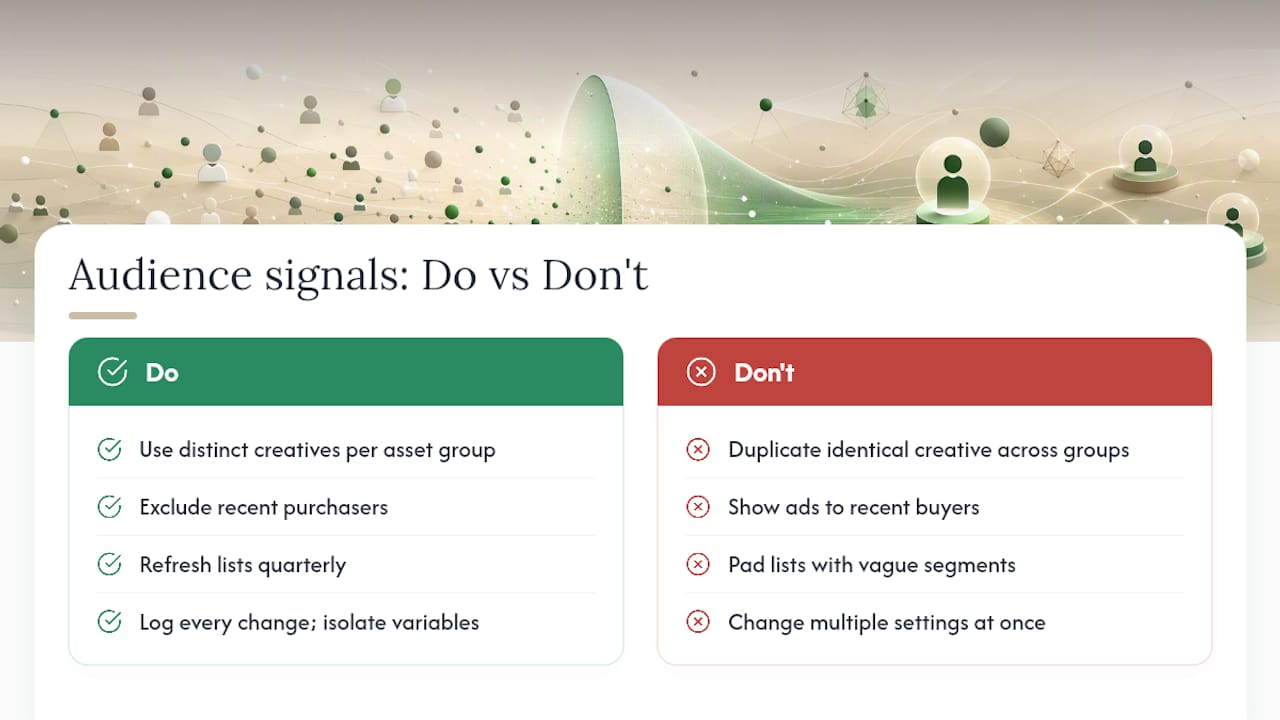
Don’t duplicate identical creative across asset groups. If two asset groups run the same headlines, descriptions, and images with only the audience signal changed, you’re fragmenting the AI’s learning rather than testing anything meaningful. Performance Max needs distinct combinations to actually learn something new; identical assets with different signals just split your budget and confuse attribution.
Exclude recent purchasers from prospecting. If someone bought a $200 jacket yesterday, showing them the same jacket ad today wastes spend that could go toward finding a new buyer. Layer in exclusion lists built from recent purchase data to plug that leak.
Keep lists fresh. A Customer Match list built from a database export eighteen months ago is quietly rotting. Refresh cadence matters, and Google’s own eligibility rules require it roughly every 540 days per the audience signal guidelines, but waiting until the deadline is a mistake. Quarterly refreshes for active e-commerce accounts keep signals relevant to who’s actually buying now, not who was buying a year and a half ago.
Document every change and test one variable at a time. Change the bid strategy and the audience signal in the same week, and you’ll never know which one moved the needle. Google’s own optimization guidance recommends logging changes and isolating variables for exactly this reason.
Limit the number of low-quality signals. A signal list padded with vague affinity segments to “cover more ground” usually backfires. Fewer, sharper inputs beat a scattershot approach.
Pro Tip: Keep a simple change log, even a shared spreadsheet, noting the date, what changed, and why. Six weeks later, when conversion value dips or spikes, you’ll have an actual record instead of a guess.
How to Evaluate Signal Impact: Reports and Realistic Timelines
Three reports tell you whether a signal is earning its place: the Insights page, the Signals label inside asset group reporting, and the combinations report. The Insights page shows which audience segments and search categories are trending toward conversions across your account. The Signals label, visible when you drill into an asset group, shows which specific signal inputs the AI is leaning on. The combinations report, per Google’s guidance on multiplying conversions, shows which specific asset and audience pairings are actually driving results.
Watch conversions, conversion value, and cost per conversion at the asset group level, and cross-reference against the “top signals” data in your bid strategy report to see whether the AI is actually leaning into the inputs you gave it or largely ignoring them in favor of its own exploration.
Timing expectations matter as much as the reports themselves:
| Stage | Timeframe |
|---|---|
| New or updated list population | 24 to 72 hours |
| Machine learning integration of new signals | Up to 2 weeks |
| Recommended minimum test window before judging results | 6 weeks |
Those figures come directly from Google’s audience signal documentation and its broader Performance Max optimization guidance. Judging a signal change after four days tells you nothing except that the list hasn’t finished populating.
For anything resembling a real experiment, run a control asset group without the new signal alongside a test group with it, and give both the full six weeks before comparing conversion value and cost per acquisition. Log the start date, the exact change, and your baseline numbers before you touch anything, following the single-variable discipline Google recommends. Skipping that step is how advertisers end up attributing a seasonal sales bump to a signal that had nothing to do with it.
How North Country Consulting Applies Audience Signal Strategy
The Performance Max approach builds around senior-led account management rather than junior staff running template playbooks. Accounts get direct oversight from experienced operators, which shows up in how signal strategy gets built: written documentation, deliberate list hygiene, and a refusal to treat audience signals as a substitute for clean conversion tracking.
That kind of result depends on getting the fundamentals right first: attribution models that actually reflect reality, call tracking that captures offline conversions, and asset groups structured around genuine differences rather than superficial variations.
For advertisers wondering whether their own signal setup and account structure hold up, North Country Consulting’s free Google Ads audit reviews conversion tracking accuracy, signal quality, and campaign architecture, then flags specific areas where spend is leaking or where the AI is starved of the data it needs to perform.
— Eric
When Audience Signals Won’t Fix a Broken Account
Audience signals get credited with far more power than they actually have. They speed up learning. They cannot fix a conversion tag that’s firing on the wrong page, a product feed missing half its images, or creative that nobody would click twice.
If your account has foundational problems, fix those first. A perfectly curated Customer Match list feeding into a campaign with broken conversion tracking is like handing someone a detailed map while blindfolding them. The AI can’t optimize toward a goal it can’t measure accurately.
Once tracking, feed quality, and creative are solid, signals become a real lever rather than a distraction. That’s usually the point where a senior-led audit earns its cost. Not to add more signals, but to confirm the fundamentals underneath them are actually sound. If Performance Max’s structure itself is the issue, no amount of signal tuning fixes that.
Get a Free Audit Before You Touch Another Signal
This service is designed for advertisers who’ve outgrown DIY optimization and need someone accountable for the whole account, not just the audience signal tab. If you’re spending $25,000 or more a month on Google Ads and suspect your tracking, feed quality, or account structure is quietly capping your Performance Max results, a signal fix alone won’t move the needle.

The free Google Ads audit reviews conversion tracking accuracy, asset group structure, and signal quality, then flags exactly where spend is leaking before you spend another dollar guessing. Accounts receive senior-level attention rather than being managed by junior account managers following checklists. If your team also runs or is considering ChatGPT Ads, the same senior oversight applies to pixel setup, campaign structure, and cross-channel attribution. Start with the audit, see what it finds, and decide from there whether ongoing Performance Max management makes sense for your account.
Official Docs and Reads Worth Bookmarking
- About audience signals for Performance Max campaigns, Google’s core definition and supported input types.
- Add audience signals, the step-by-step UI guide with list eligibility and timing details.
- Multiply conversions with Performance Max, Google’s operational best-practices guidance.
- Google Ads PMax: The truth about audience signals and search themes, a practitioner’s breakdown of what signals actually control.
- Audience targeting explained, broader context on audience strategy across channels.
Sources
- About audience signals for Performance Max campaigns – Google Ads Help
- Add audience signals – Google Ads Help
- Google Ads PMax: The truth about audience signals and search themes – Search Engine Land
- Multiply conversions with Performance Max – Google Ads Help
FAQ
What Does Performance Max Mean in Google Ads?
Performance Max is a goal-based Google Ads campaign type that automatically serves ads across Search, Display, YouTube, Gmail, Maps, and Discover from a single campaign. Instead of manually setting placements, you supply assets, conversion goals, and audience signals, and Google’s AI decides where and to whom to show ads.
Is Performance Max Worth It?
For advertisers with solid conversion tracking and enough budget to generate meaningful data, Performance Max often outperforms manually managed campaigns because it can shift spend across channels in real time. It tends to underperform for accounts with messy tracking or thin product feeds, which is why a structural review before scaling spend matters more than which signals you add.
What Gets Automatically Optimized in a Performance Max Campaign?
Performance Max automatically optimizes bidding, budget allocation across channels, ad creative combinations, and placement decisions based on your conversion goal. Audience signals and search themes guide the starting point, but the system continues adjusting all of these elements throughout the campaign’s life.
What Do Performance Max Ads Look Like?
Performance Max ads adapt their format to whatever channel they appear on, showing as responsive search ads on Google Search, display banners on partner sites, in-stream or Shorts placements on YouTube, and native-style ads inside Gmail and Discover. The system builds these formats automatically from the images, headlines, descriptions, and videos you upload as assets.
How Long Does It Take for Audience Signals to Start Working?
New or updated audience lists typically take 24 to 72 hours to populate, while the machine learning models can take up to two weeks to fully integrate a new signal into targeting decisions. Give any signal change a minimum six-week window before judging its impact on conversions or cost per acquisition.