
One platform fact governs everything else: Google calculates a monthly spending limit equal to your average daily budget multiplied by 30.4, so daily decisions compound fast. Tools like Investment Strategy and expert audits both help catch misallocation before it costs a full month of spend.
TL;DR:
- Most accounts should prioritize recalculating required daily spend every few days to catch pacing issues early and avoid overspending or underspending.
- Increasing daily budgets on Smart Bidding campaigns often does not lead to higher spend unless targets are realistic, as the algorithm treats targets as primary constraints.
- Separating budgets for acquisition and retention campaigns prevents one segment’s performance from misleading the platform’s bid automation.
- Account hygiene, including accurate tracking and attribution, is essential to proper budget allocation; fixing these issues often resolves perceived spending problems without adjusting budgets.
- Relying solely on fixed percentage splits for budgets is ineffective; regular pacing recalculations and target audits are crucial for predictable scaling and efficient spend.
Table of Contents
- How Google Ads Budgets and Bidding Actually Work
- A Practical Framework for Allocating Budget by Objective
- Budget Pacing Formulas That Keep Spend On Track
- When Should You Scale or Reallocate Ad Budget?
- Which Google Ads Tools Actually Help With Allocation?
- What Senior-Led Account Reviews Catch That Dashboards Miss
- The Uncomfortable Truth About Budget Allocation Advice
- Get a Free Strategy Audit Before You Reallocate Another Dollar
- Sources
- FAQ
How Google Ads Budgets and Bidding Actually Work
Every campaign in Google Ads runs on an average daily budget, but the number that determines your real financial exposure is the monthly spending limit. Google multiplies your daily budget by 30.4 (the average days per month) to calculate that ceiling, and it will let campaigns overdeliver on individual high-traffic days as long as the monthly total never exceeds it, according to Google’s budgets overview. That flexibility is useful, but it also means a “small” daily bump of $10 translates to roughly $304 more in monthly exposure across a full billing cycle.
Shared budgets let multiple campaigns draw from one pool, which improves utilization when campaigns chase the same goal and use compatible bidding. Google notes that shared budgets work across Search, Shopping, Display, and Video, but they are not compatible with every campaign type or with experiments running in parallel.
Bidding strategy determines whether extra budget actually gets spent. Google’s guidance on bids and budgets explains that Maximize Clicks and Manual CPC will generally use up available budget as long as auctions are winnable, while Smart Bidding strategies like target CPA or target ROAS treat the efficiency target as the real constraint.
- Raising a daily budget on a Smart Bidding campaign with an unrealistic tCPA often does nothing, because the algorithm will not spend past the point where it believes it can hit that target.
- Manual CPC campaigns spend more predictably against budget increases, but lack the auction-time signal advantages Smart Bidding uses.
- Shared budgets mask individual campaign pacing, making it harder to spot underperformers.
If you’ve doubled a campaign’s budget and spend hasn’t moved, the bottleneck usually isn’t the budget field at all. It’s the target sitting above it, a pattern covered in more detail in this breakdown of Smart Bidding strategies.
A Practical Framework for Allocating Budget by Objective
Splitting an account’s budget by campaign type, rather than by gut feel, is what separates accounts that scale predictably from ones that lurch between overspend and stagnation. Six categories cover almost every account: branded capture, non-branded prospecting, mid-funnel consideration, remarketing and recovery, performance channels (Shopping, Performance Max, Video), and a testing reserve.
Two starter templates work as a baseline, then get adjusted against your own conversion rates and customer lifetime value:
- Early-stage accounts (limited conversion history): 15% branded, 45% prospecting, 15% mid-funnel, 10% remarketing, 15% testing reserve.
- Mature accounts (12+ months of conversion data): 10% branded, 35% prospecting, 15% mid-funnel, 20% remarketing, 10% performance channels, 10% testing reserve.
Businesses with high lifetime value, like B2B SaaS or service companies with long contracts, generally push more weight into remarketing and mid-funnel content, since a single recovered lead can be worth months of ad spend. Ecommerce accounts with tight margins often shift weight toward Shopping and Performance Max, where product-level signals do more work than manual targeting ever could.
Keeping acquisition and retention budgets separate matters more than most advertisers realize. Blending new-customer and returning-customer traffic into one campaign muddies the conversion signal Smart Bidding relies on, and the algorithm tends to favor whichever segment converts cheapest, usually retention. That quietly starves prospecting even when the campaign “looks” like it’s performing well. Separate budgets and separate bid strategies keep each signal clean, a distinction covered further in this guide to setting budgets across multiple campaigns.
Pro Tip: Size your testing reserve as a fixed dollar amount, not a percentage that floats with total spend. A reasonably sized test budget lets you rotate audiences, ad copy, or new match types using tools like the Google Ads Generator: RSA Headlines & Descriptions without pacing math changing every time you scale the core account.
Budget Pacing Formulas That Keep Spend On Track
Pacing is the discipline of matching actual spend to planned spend across a billing period, and the core formula is simple: (Total period budget − month-to-date spend) / remaining days = required daily spend. Recalculating this every few days catches drift before it becomes a crisis, according to Adsales.
Promotional periods need weighted pacing instead of a straight line, since spend during a five-day sale should front-load rather than spread evenly across the month.
| Account type | Check frequency | Action trigger |
|---|---|---|
| High-spend ($25K+/month) | Daily | Variance beyond 10% of required daily spend |
| Steady mid-spend accounts | Weekly | Variance beyond 15% sustained over multiple days |
| Seasonal or promo campaigns | Daily during promo window | Any deviation from weighted pacing curve |
Pacing alone isn’t the whole picture. A campaign running hot can still be worth protecting if it’s delivering your best CPA or ROAS, which is why pacing checks should always run alongside an efficiency metric rather than as a standalone rule, a point Campaigner makes clearly.
When a campaign is over-pacing:
- Lower bids or tighten bid caps on the offending campaign, not the whole account.
- Shift budget from underperforming campaigns rather than cutting the winner.
When a campaign is under-pacing:
- Expand keyword coverage or loosen overly narrow audience targeting.
- Raise the daily cap only after confirming the bid strategy isn’t the actual constraint, an issue explored in this guide to budget pacing problems.
When Should You Scale or Reallocate Ad Budget?
Before increasing any budget, confirm that your Smart Bidding targets are realistic for current market conditions. A tCPA or tROAS set too aggressively will throttle delivery regardless of how much budget sits behind it, since the algorithm treats the efficiency target as the primary constraint and budget as secondary, per Search Engine Land’s analysis of PPC scaling.
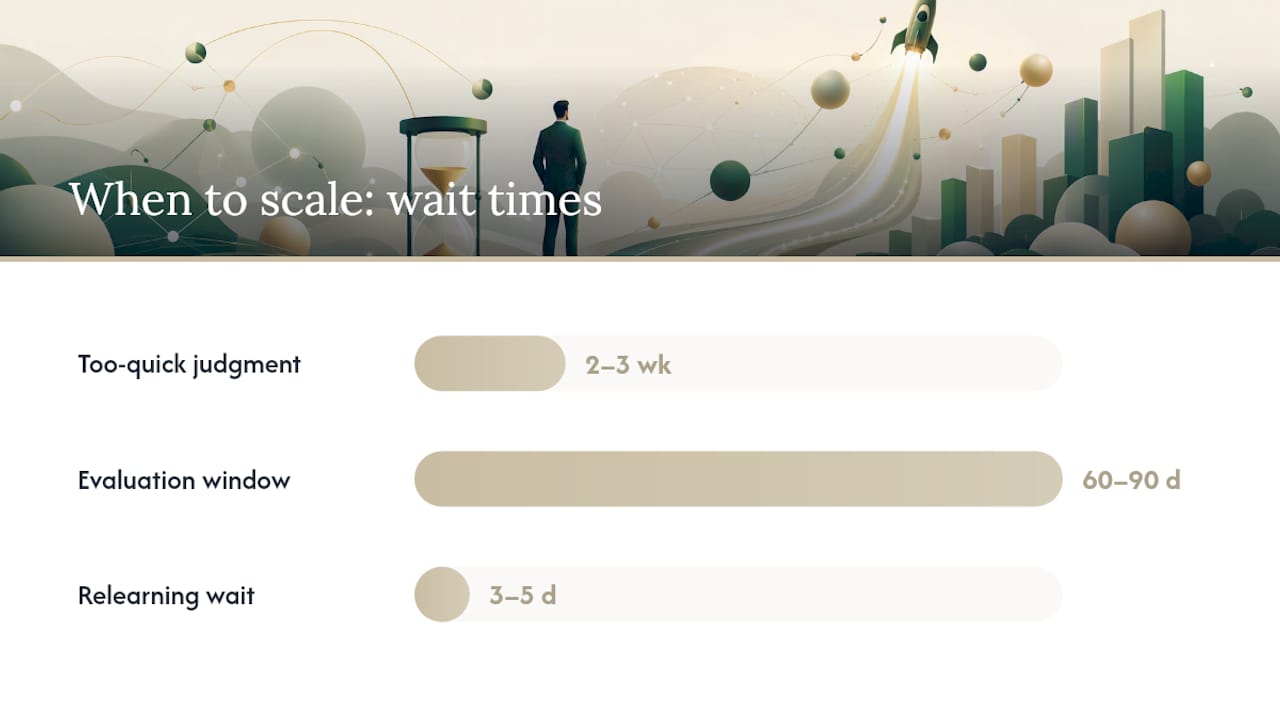
For accounts with long sales cycles, judging a budget change inside two or three weeks almost guarantees the wrong conclusion. Evaluate on 60 to 90 day windows so attribution has time to accumulate before you pause or cut a campaign that just needed more time.
Safe scaling follows a pattern:
- Increase budget gradually in steps, avoiding sudden doublings, and watch CPA or ROAS for several days before the next step.
- Hold creative, landing pages, and audience settings steady during a scaling test so you know the budget change caused the result.
- Diagnose in sequence: verify tracking accuracy first, then attribution windows, then targets, and only then look at the budget line itself.
Pro Tip: If CPA spikes right after a budget increase, resist the urge to immediately cut budget back. Give it three to five days. Smart Bidding often needs a short relearning period after a meaningful spend change, and reversing too fast just resets the clock.
More on managing this transition in scaling Google Ads without losing efficiency.
Which Google Ads Tools Actually Help With Allocation?
Three built-in tools cover most allocation decisions, and each serves a different timeframe. Investment Strategy, found under Recommendations, suggests where additional budget would generate the most incremental clicks, conversions, or value. It’s built for adding spend to an already-working setup, not for restructuring a broken account.
Performance Planner handles longer-range forecasting, projecting outcomes up to 18 months out and supporting cross-campaign what-if scenarios before you commit real dollars, according to Google’s documentation on both tools.
The Budget Report and transaction history validate what actually happened against what was planned, which matters for catching billing anomalies or confirming a pacing fix worked.
A 15 to 30 minute forecast session should cover:
- Pull month-to-date spend by campaign and calculate required daily spend for the remainder.
- Check Investment Strategy for any flagged incremental opportunities.
- Run a quick Performance Planner scenario if a budget change is being considered.
- Scan the Budget Report for unexpected charges or shared-budget drain.
What Senior-Led Account Reviews Catch That Dashboards Miss
Most budget allocation problems trace back to account hygiene issues that never show up on a spend dashboard. North Country Consulting’s audit process checks conversion tracking accuracy, attribution model consistency, account structure, and call tracking integration before touching a single budget number, because a broken conversion action will send Smart Bidding chasing the wrong signal no matter how well the budget is split.
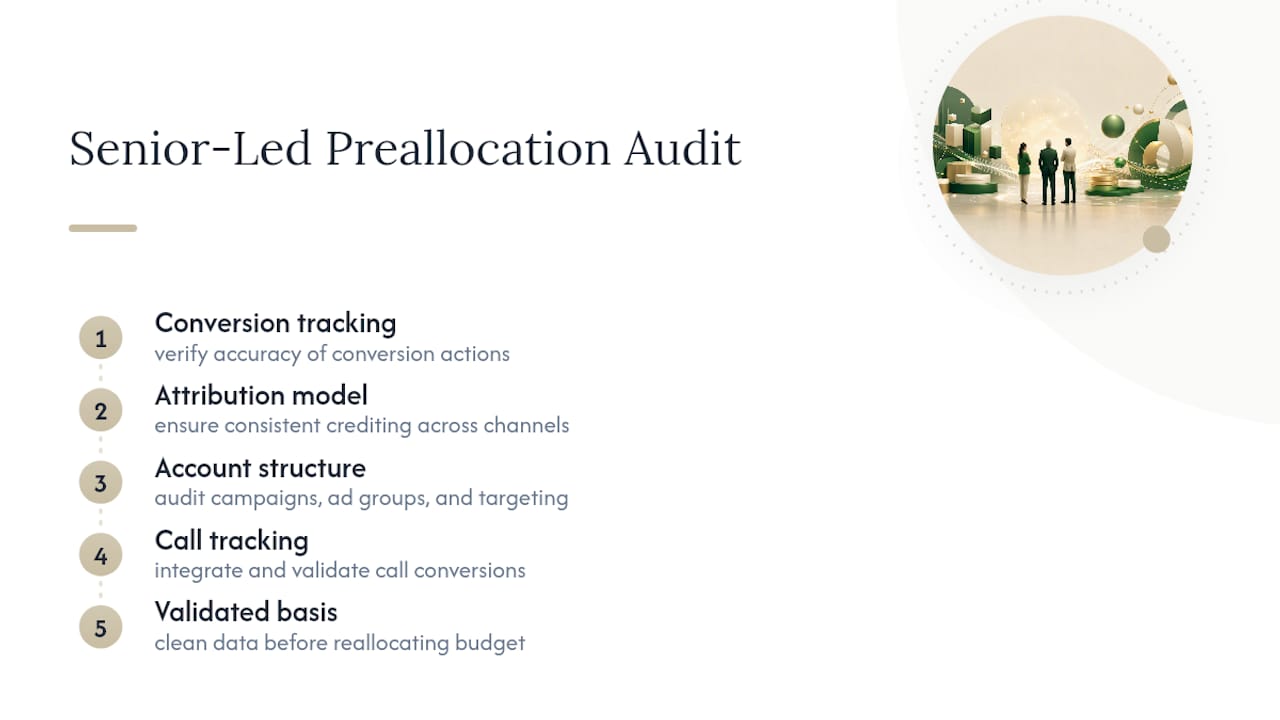
Fixing attribution before reallocating often changes the entire picture. An account that looked like it needed more prospecting budget sometimes just needed cleaner tracking, since the “underperforming” campaign was quietly winning conversions the platform wasn’t crediting it for.
Persistent pacing variance, chronic overspend despite correct caps, or underdelivery that won’t resolve after target adjustments are the clearest signals that the issue sits deeper than a budget field.
The Uncomfortable Truth About Budget Allocation Advice
Most budget allocation guidance treats the split itself as the hard part, some magic ratio of branded to prospecting to remarketing that will unlock performance. It won’t. The percentages in this article are starting points, not answers, because the real determinant of whether an allocation works is whether your Smart Bidding targets match what the market will actually deliver.
I’d argue the industry spends too much time on allocation templates and not nearly enough on target auditing. An account can have a textbook-perfect budget split and still underperform badly if the tCPA was set based on last year’s costs. Conversely, a rough allocation with well-calibrated targets and disciplined pacing checks will usually outperform a “perfect” split running on stale assumptions.
If you take one thing from this, prioritize the pacing formula over the allocation percentages. Recalculating required daily spend every few days catches problems in real time; a static percentage split, set once and forgotten, just tells you where the money was supposed to go before things drifted.
— Eric
Get a Free Strategy Audit Before You Reallocate Another Dollar
Reallocating budget without fixing what’s underneath it just moves the same problems to a different campaign. If your account shows pacing variance that won’t settle, Smart Bidding targets that seem to cap spend no matter what you try, or spend that’s growing without a matching lift in results, the issue is usually upstream of the budget field itself.

A free strategy audit reviews conversion tracking, attribution setup, account structure, and current pacing behavior, then flags where budget is likely being wasted and where it should move instead. It’s geared toward businesses spending significant amounts on Google Ads or ChatGPT Ads, seeking a senior-level second opinion, rather than another generic checklist. Request the free Google Ads audit and find out whether your allocation problem is really a budget problem at all.
Sources
- Investment Strategy and Performance Planner – Google Ads Help
- PPC Budget Pacing Guide: Monitor and Adjust Monthly Spend
FAQ
How Much Should I Budget for Google Ads?
There’s no universal number. Budget should be set from your target cost per acquisition multiplied by expected conversion volume, then adjusted using pacing data after the first few weeks of real spend. Businesses spending at lower monthly amounts typically need tighter campaign focus, while larger accounts benefit from the objective-based splits covered above.
Is $20 a Day Good for Google Ads?
$20 a day works for narrow, local, low-competition campaigns, but it’s often too thin for competitive keywords or Smart Bidding strategies that need enough daily volume to learn efficiently. A daily budget that limits you to one or two clicks rarely gives Smart Bidding the signal it needs.
Is $500 a Month Enough for Google Ads?
A few hundred dollars a month can work for hyper-local businesses or long-tail keyword campaigns, but it’s usually too low for competitive industries or for running Smart Bidding strategies that need conversion volume to optimize. It’s a reasonable starting point for testing a single, tightly scoped campaign, not for a full-funnel strategy.
How Often Should I Check Google Ads Pacing?
Check daily for accounts spending at higher monthly levels, weekly for steady mid-spend accounts, and always during any promotional window where spend is expected to spike.