
Change history analysis is the process of mapping Google Ads change logs against performance data to find defensible, edit-level causes for a metric shift. For a senior-led audit, the deliverables are specific: a timestamped timeline of high-impact edits; ranked causation hypotheses with confidence scores; a prioritized remediation plan; and governance recommendations to prevent recurrence. The three primary tools are Google Ads change history (up to two years of UI-accessible edits), the Change Status and Change Events endpoints in the Google Ads API, and the forensic methodology a senior reviewer applies to connect those logs to business KPIs.
- Timeline of edits: Who changed what, and when, relative to the performance inflection point
- Causation hypotheses: Ranked by confidence, not just chronology
- Remediation plan: Specific reversals or adjustments, not generic recommendations
- Governance checklist: Access controls, naming conventions, and runbooks to reduce future incidents
Key Takeaways
Change history analysis is most effective when it is symptom-driven, structured around a confidence-scored hypothesis framework, and paired with Auction Insights and Search Terms data to rule out external causes.
| Point | Details |
|---|---|
| Start with the symptom | Define the metric, date, and business context before opening the change log. |
| Prioritize high-impact change types | Bidding strategy, budget, conversion actions, and campaign status explain most performance shifts. |
| Score hypotheses before acting | Rate each edit High, Medium, or Low confidence; reverse only the highest-confidence cause first. |
| Use API for scale | Query change_status for broad MCC scans; use Change Events for field-level detail within 30 days. |
| North Country Consulting | Offers a free senior-led audit with a forensic timeline and three prioritized remediation actions for accounts spending $25K+/month. |
Table of Contents
- How to open change history and run a first-pass review
- Which change types most often explain performance shifts
- How auditors link edits to performance shifts
- How to remediate, when to undo, and governance to prevent recurrence
- Using the Google Ads API to scale change reviews for large accounts
- Senior-led audit template: checklist and deliverables
- When change-history analysis solves the problem — and when it cannot
- How performance chart annotations connect to change history
- Interpreting simultaneous changes on performance shifts
- Integrating change history with other Google Ads reports
- Why senior review changes what you find
- North Country Consulting’s free audit for high-spend accounts
- Sources
How to open change history and run a first-pass review
The Change history panel lives at Campaigns > Change history in the Google Ads UI. Three tabs give you different angles on the same data: By user (who made edits), By campaign (which campaigns were touched), and Performance (edit markers overlaid on your key metrics).
- Set your date range first. Start broad — 60–90 days — then narrow once you spot the inflection point.
- Filter by change type. Prioritize: bidding strategy, budget, campaign status, conversion actions, and audience edits.
- Use the “By campaign” tab to identify which campaigns had the most edits in the window.
- Select the changes that overlap with your performance drop, then click “Go to” to pull a filtered view of only the affected campaigns or ad groups and their performance data.
- Export the filtered log to CSV for offline annotation and stakeholder sharing.
Pro Tip: Scope your export before you pull it. Accounts with heavy automation can generate thousands of rows; filter to the three to five campaigns that drive the majority of spend before exporting, or you’ll spend more time cleaning data than analyzing it.
Which change types most often explain performance shifts
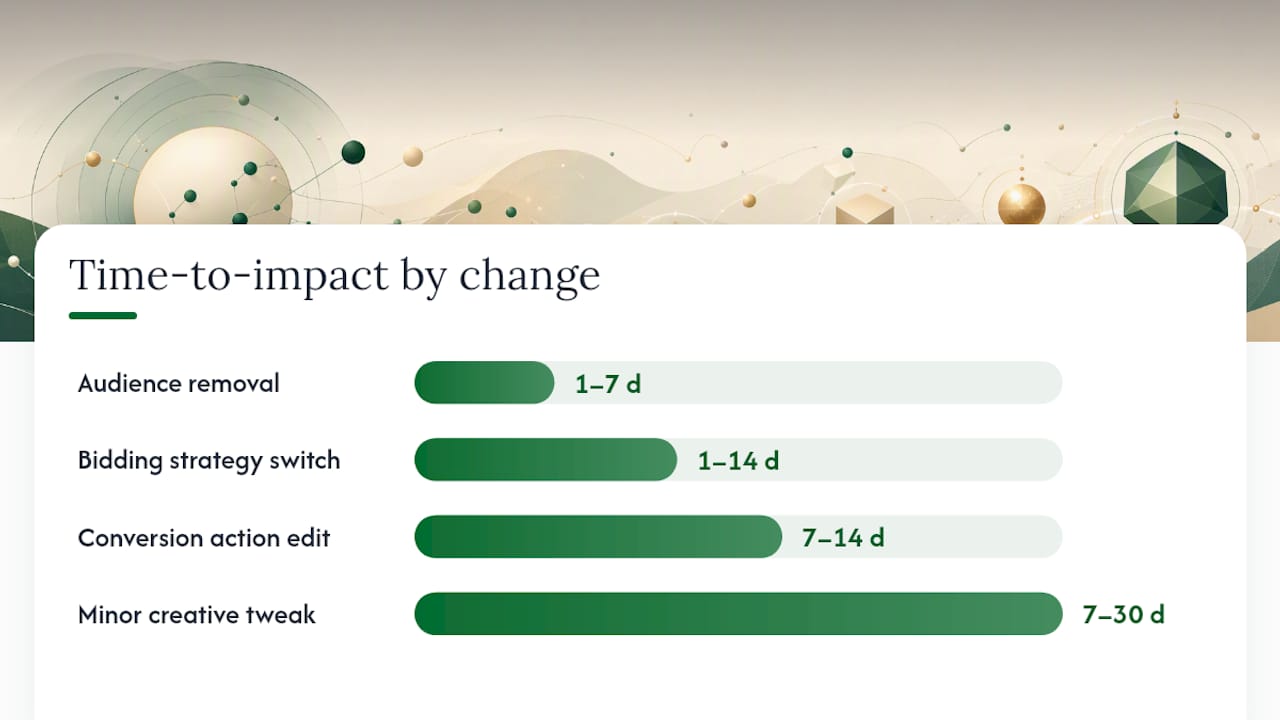
Not every edit in the log matters. Budget, bidding strategy, and conversion-action changes tend to produce the largest and fastest performance effects. Audience removals and experiment launches follow closely, often with a one-to-seven-day lag before the signal shows up in conversion data.
High-impact changes (investigate first):
- Bidding strategy changes: Switching from manual CPC to Target CPA or Target ROAS triggers a learning period that can suppress conversion volume for one to two weeks.
- Budget changes greater than 20%: Sudden increases or cuts alter delivery pacing immediately. Automated alerts should flag any budget edit above this threshold.
- Campaign status changes: Pausing or enabling a campaign is the bluntest instrument in the account and shows up in spend data within hours.
- Conversion action edits: Changing which actions count as conversions rewires Smart Bidding’s optimization signal. The effect can take weeks to fully surface.
- Audience additions or removals: Especially for Performance Max and Display campaigns, audience changes alter who sees ads without changing any visible setting.
- Experiment launches or conclusions: Experiments split traffic and budget; their start and end dates are common false-positive causes of apparent performance shifts.
- Major ad or landing-page URL changes: A broken or redirected URL kills conversion rate instantly.
Lower-priority edits (check only after ruling out the above):
- Minor ad copy tweaks on non-primary ads
- Negative keyword additions that affect less than 1% of query volume
- Label changes and annotation-only edits
| Change type | Typical time-to-impact | Effect size |
|---|---|---|
| Bidding strategy switch | 1–14 days (learning period) | High |
| Budget cut or increase >20% | Immediate | High |
| Campaign status change | Immediate | High |
| Conversion action edit | 7–14 days | High |
| Audience removal | 1–7 days | Medium |
| Ad or URL change | Immediate | Medium–High |
| Minor creative tweak | 7–30 days | Low |
How auditors link edits to performance shifts
Forensic change-history work is most effective when it is symptom-driven: start with a metric movement, shortlist the resources that changed near that date, then pull detailed chronological events for those resources.
Step-by-step methodology:
- Define the symptom. Name the metric (CPA, ROAS, conversion volume), the date it shifted, and the business context (product launch, seasonality, budget cycle).
- Set the analysis window. Use the symptom date minus 14 days as the left boundary; extend right until performance stabilizes or the audit date.
- Run a broad Change Status scan. This returns the most recent change for each resource in the window — fast, high-level, and useful for identifying which campaigns were touched at all.
- Shortlist campaigns. Focus on the three to five campaigns that account for the majority of spend or conversion volume in the affected period.
- Pull detailed Change Events for the shortlist. Sort oldest to newest. Translate each field-level edit into a business-impact statement: a bid strategy change becomes “potential 7–14 day learning period starting [date]”; a conversion-action edit becomes “Smart Bidding optimization signal changed on [date].”
- Score each hypothesis. Use a simple confidence framework before presenting to stakeholders.
| Confidence | Criteria |
|---|---|
| High | Edit timing aligns within 48 hours of metric shift; no competing explanation |
| Medium | Edit timing plausible; one or more alternative explanations exist |
| Low | Edit present in window but timing or magnitude doesn’t align cleanly |
Pro Tip: When multiple changes cluster in a 48-hour window, score each independently first, then assess their combined effect. Stacked changes are harder to untangle but are also the most common cause of the “we changed everything at once” incidents that senior auditors see most often.
How to remediate, when to undo, and governance to prevent recurrence
Change history supports undo for most edits within 30 days. Undo is unavailable when related items have been removed since the original change, or when another user has already undone the same edit. The UI will display “Changes can’t be undone” in those cases.
Safe remediation steps:
- Snapshot current metrics before touching anything. You need a clean before/after baseline.
- Reverse one change at a time, starting with the highest-confidence hypothesis.
- Wait 48–72 hours between reversals for bidding strategy changes; Smart Bidding needs time to re-stabilize.
- Document every reversal in a shared change log with the rationale, the reviewer’s name, and the expected outcome.
- Set a monitoring cadence: daily spend checks for the first week, then weekly until performance normalizes.
Governance actions to prevent recurrence:
- Restrict edit access to named individuals; remove shared login credentials
- Require a written rationale for any budget change above 20% or any bidding strategy switch
- Implement automated change monitoring with severity-tiered alerts routed to the appropriate role
- Maintain a runbook that maps change types to approval requirements and review windows
Pro Tip: Before undoing a bidding strategy change, check whether the account has already re-entered a learning period under the new strategy. Undoing it at that point restarts the learning period again — sometimes the less disruptive path is to optimize forward rather than roll back.
Using the Google Ads API to scale change reviews for large accounts
For accounts spending $25K or more per month across multiple campaigns or an MCC, manual UI review doesn’t scale. The Google Ads API change_status sample shows how to query changed resources within a date window and map each resource_type to a human-readable name: campaign, ad_group, ad, or criterion.
Change Status vs. Change Events: Change Status is a broad index — it returns the most recent change per resource in your chosen window, making it fast for daily MCC scans. Change Events give you the full chronological edit log with old and new field values, but they are limited to the most recent 30 days in detailed form. Use Change Status to find what was touched; use Change Events to understand exactly how it was changed.
Practical automation uses:
- Daily MCC scans: Query change_status each morning, filter by resource_type, and flag any campaign or bidding-strategy change for human review
- Alert thresholds: Route budget changes above 20%, bidding strategy switches, and conversion-action edits as high-severity; batch lower-priority edits into a daily digest
- CSV exports: Paginate results to stay under the 10,000-row API cap; filter to your highest-spend campaigns before pulling detailed events
Pro Tip: Limit your change_status query to specific resource types (CAMPAIGN, AD_GROUP, AD_GROUP_CRITERION) rather than querying all types at once. Broad queries against large accounts hit row caps fast and return noise that slows triage.
Senior-led audit template: checklist and deliverables
A repeatable audit structure keeps senior reviewers focused on business impact rather than log archaeology.
Audit checklist:
- Define scope: account, campaigns, date range, and the metric that triggered the audit
- Document the symptom: metric name, magnitude of shift, and business context
- Run broad Change Status scan across all in-scope campaigns
- Shortlist three to five campaigns by spend and conversion weight
- Pull detailed Change Events for the shortlist, sorted oldest to newest
- Correlate edit timestamps with performance chart inflection points
- Score each hypothesis (High / Medium / Low confidence)
- Draft ranked remediation actions with expected outcomes
- Document governance gaps and recommended controls
Standard deliverables:
- Timestamped timeline CSV of all edits in the analysis window
- Hypothesis table with confidence scores and supporting evidence
- Ranked remediation actions with owner assignments
- Stakeholder decision log capturing approvals and rationale
- 30-day monitoring plan with alert thresholds and escalation paths
Metric callouts every deliverable should include: spend, conversions, CPA or ROAS, impression share, and conversion lag assumptions. Conversion lag is frequently overlooked: a campaign that appears to have dropped conversions may simply be reporting them late, particularly for B2B accounts with multi-day attribution windows.
North Country Consulting’s full Google Ads audit methodology uses this structure as a standard component of every engagement, with the timeline CSV and hypothesis table delivered as core outputs.
When change-history analysis solves the problem — and when it cannot
Use cases where it works well:
- Unexplained CPA or ROAS shifts that coincide with recent account edits
- Sudden drops in conversion volume after a bidding strategy or conversion-action change
- Budget spikes that don’t match approved pacing plans
- Unexpected campaign pauses or status changes, especially from auto-applied recommendations
- Undocumented edits made by a previous agency or team member
Where it cannot prove causation:
- Smart Bidding makes auction-time bid adjustments that are not logged in change history. A campaign can underperform without a single logged edit if the auction environment shifted.
- External market changes — competitor budget increases, seasonal demand drops, economic events — produce the same performance signature as internal edits but leave no trace in the change log.
- Server-side tracking failures and attribution configuration errors look identical to conversion-action edits in the performance data.
The honest limitation: Change history tells you what was edited and when. It does not tell you whether that edit caused the performance shift or whether the market simply moved. Treat every hypothesis as a hypothesis, not a verdict, until you have ruled out external explanations.
When change history doesn’t yield a clear answer, escalate to Auction Insights (competitor activity), Search Terms (query mix shifts), and your server-side tracking configuration before drawing conclusions.
How performance chart annotations connect to change history
Change-history markers appear directly on performance charts in the Google Ads UI. Hovering over a marker shows the edit details and links to a filtered view of the change history table for that event window. This is the fastest way to visually correlate a chart inflection point with a specific edit without manually cross-referencing dates.
Google Ads Explanations add a second layer: they annotate charts with likely drivers for metric changes, such as “budget limited” or “auction competition increased.” These are useful diagnostic context, not a substitute for a formal audit. An Explanation might correctly identify that budget was a constraint while missing that the budget was cut by a user edit two days earlier. The chart annotation gets you to the right date; the change history log tells you what actually happened.
Interpreting simultaneous changes on performance shifts
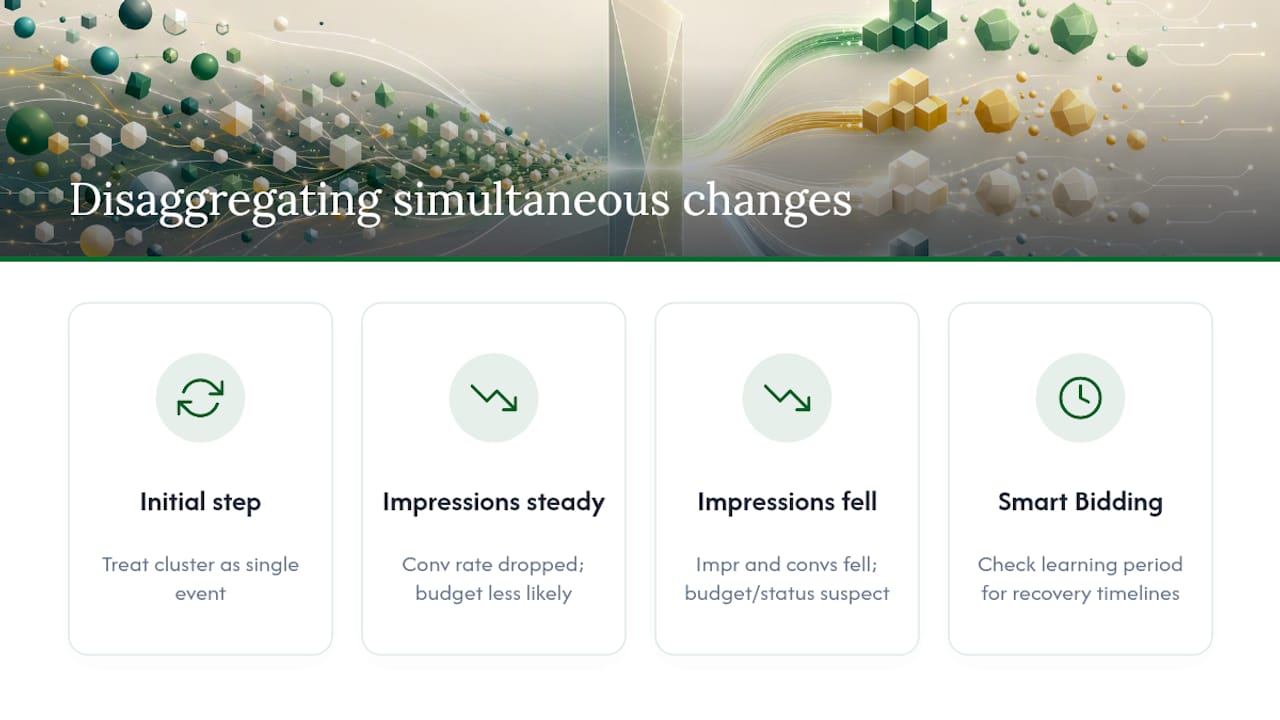
When multiple edits land within a 48-hour window, isolating causation becomes genuinely difficult. The practical approach is to treat the cluster as a single event for initial hypothesis scoring, then attempt to disaggregate by effect type.
If you only see a conversion rate drop on day eight, the budget change looks innocent and the strategy switch looks guilty — but both contributed.
The disaggregation method: pull impression share and click volume alongside conversion data. If impressions held steady while conversion rate dropped, the budget change is less likely the primary cause. If both impressions and conversions fell together, budget or status changes are more probable culprits. Pair this with Smart Bidding learning period context to set realistic expectations for stakeholders about recovery timelines.
Integrating change history with other Google Ads reports
Change history analysis gains real depth when it runs alongside other reports rather than in isolation.
Auction Insights tells you whether competitor activity intensified around the same date as your performance drop. If impression share fell and a competitor’s overlap rate spiked simultaneously, the market shifted regardless of your internal edits. That context changes the remediation recommendation entirely.
Search Terms report reveals whether query mix changed near the inflection point. A broad-match keyword left unchanged in the change log can still start matching different queries if Google’s matching behavior shifts — no edit required, but the effect looks identical to a targeting change.
Budget pacing reports confirm whether a budget edit actually changed delivery or whether the account was already hitting its daily cap before the edit. An audit of budget pacing issues often surfaces this: the change log shows a budget increase, but delivery was already constrained by bid strategy, not budget.
Combining these data sources is what separates a genuine forensic audit from a log-reading exercise. Analytics-first approaches to campaign management consistently produce stronger outcomes, and marketing analytics applied at this level of specificity is where the real diagnostic value lives.
Why senior review changes what you find
The conventional wisdom is that change history analysis is a lookup task: find the edit, reverse it, move on. That framing misses most of what actually matters in a high-spend account.
A junior reviewer sees a bidding strategy change on the date of a CPA spike and flags it as the cause. A senior reviewer asks three more questions: Was the account already in a learning period from a prior change? Did the conversion window change recently, making the CPA calculation itself unreliable? Is this campaign’s performance correlated with a seasonal pattern that would have produced the same result without any edit at all?
Senior judgment pairs account context — seasonality, product constraints, attribution model quirks — with the change log evidence to build hypotheses that hold up under scrutiny. That’s the difference between a remediation that fixes the problem and one that introduces a new learning period while the original cause goes unaddressed. North Country Consulting’s senior-led audit process applies exactly this standard: every hypothesis is tested against alternative explanations before a remediation recommendation is made.
North Country Consulting’s free audit for high-spend accounts
Accounts spending $25,000 or more per month on Google Ads get a free, senior-led audit from North Country Consulting that includes a change-history forensic timeline, three prioritized remediation actions, a governance checklist, and a short call with a senior consultant to walk through findings.
North Country manages a large volume of ad spend and achieves a notable average ROAS across client accounts. The audit is designed for marketing directors and CMOs who need a defensible answer to “why did performance shift?” — not a generic account health score. Deliverables are typically ready within five business days of account access. Request your free audit or review the full service offering to see how senior-led management works in practice.
Sources
- Review your account history – Google Ads Help
- How to Set Up Change History Monitoring for Google Ads | Lyra Guide