
Performance Max does cannibalize Search, and it happens more often than most advertisers assume. Roughly two-thirds of PMax campaigns overlap with Search on at least one term, and Search wins on conversion rate in the vast majority of those overlaps. The single highest-impact fix is exact-match protection paired with a matching negative-keyword list inside PMax. You can spot the overlap signals within 1 to 2 weeks of pulling search-term reports, and mitigation results typically show up within 1 to 4 weeks depending on how deep PMax is into its learning phase.
TL;DR:
- Over half of Performance Max campaigns overlap with Search terms, often leading to unnecessary competition and reduced attribution for Search campaigns.
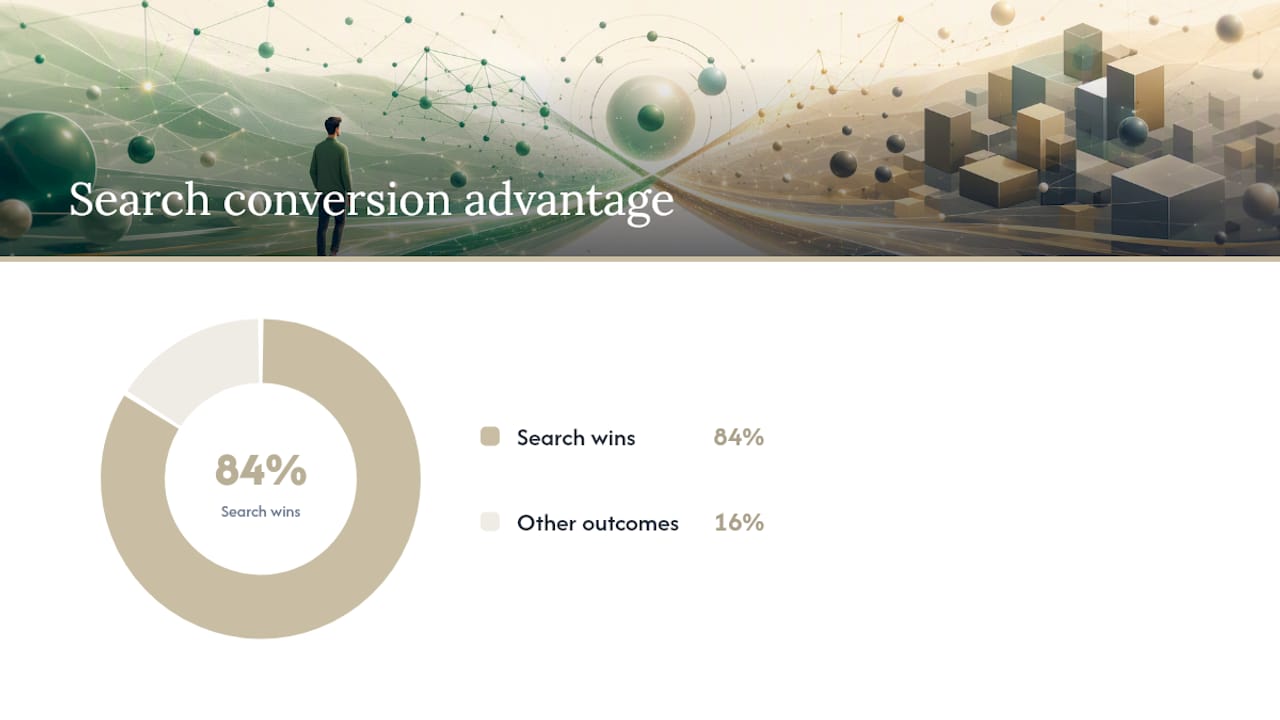
- Search tends to outperform PMax on conversion rate for overlapping terms, with 84% of comparisons favoring Search in analyzed data.
- Detecting cannibalization involves reviewing search-term reports, normalizing data, and comparing conversion metrics for overlapping keywords within 30 to 60 days.
- Fixes such as adding exact-match keywords to Search and negative keywords inside PMax can mitigate overlap with minimal risk.
- Regularly tracking impression share, conversion rate gaps, and running holdout tests help safeguard Search performance while optimizing PMax campaigns.
Table of Contents
- How Much Does Performance Max Actually Cannibalize Search?
- How Do You Detect PMax Cannibalization in Your Own Account?
- What’s the Best Way to Fix Performance Max Cannibalization?
- Why Native Reporting Hides the Real Cannibalization Number
- How a Senior-Led Team Protects Search While Running PMax
- When Is Some Cannibalization Actually Fine?
- Get a Free Audit That Catches PMax Overlap Before It Costs You
- What Advertisers Are Really Asking
- Sources
How Much Does Performance Max Actually Cannibalize Search?
The overlap between Performance Max and Search isn’t a fringe issue. Adalysis analyzed roughly 3,300 non-retail PMax campaigns and 1.2 million search terms and found that a substantial portion of PMax campaigns have at least one overlapping search term with a corresponding Search campaign, with a significant rate of term-level overlap. That’s not a rounding error. It’s nearly half of the queries showing up in both channels at once.
The performance gap on those overlapping terms is where things get interesting. When both channels were eligible to serve on the same query, Search generally performed better on conversion rate compared to PMax for most overlapping terms. PMax, meanwhile, frequently generated more impressions on the same terms. That split matters because it flips the usual assumption that more impressions equals more value.
Higher impression volume from PMax doesn’t mean better return. It often means PMax is absorbing auction share on queries that Search was already converting efficiently, then reporting that volume as new reach when it’s really redirected demand. Optmyzr’s account-level study reached a similar conclusion: PMax frequently cannibalizes Search even on exact-match keywords, which are supposed to carry priority under Google’s own auction rules.
A few things skew these numbers, and you should weight them before applying any of this to your own account:
- Overlap is account-dependent, not universal. Some advertisers see zero overlap; others see nearly 100%. Adalysis found the distribution varies widely, so a single industry average tells you almost nothing about your specific account.
- Retail and non-retail accounts behave differently. Shopping-heavy catalogs tend to show different overlap patterns than service businesses running lead-gen Search campaigns.
- Search-term normalization matters. Misspellings, plural variants, and word-order differences can inflate or hide true overlap if you’re not cleaning terms before comparing them.
- Small sample sizes mislead. A campaign with 200 impressions a month will show noisy, unreliable overlap percentages compared to one with 20,000.
Here’s the number that should reset your priorities: on overlapping terms, Search’s conversion-rate advantage held in roughly 84 out of every 100 comparisons Adalysis reviewed. If your PMax campaign is winning the impression race on a term Search already converts well, you’re not gaining reach. You’re paying to relocate a sale you already had.
How Do You Detect PMax Cannibalization in Your Own Account?
You don’t need a data science team for this. You need two reports, a spreadsheet, and about an hour of focused work.
- Pull the PMax search terms insights. Google Ads gives you visibility into the categories and some actual terms triggering PMax under Insights, and you can supplement with the auction insights report for shared auction data.
- Pull your Search search terms report for the same date range, ideally 30 to 60 days to smooth out weekly noise.
- Normalize both lists. Lowercase everything, strip punctuation, and collapse obvious plural or misspelling variants so “running shoe” and “running shoes” count as one term.
- Set a minimum impression threshold (50 to 100 impressions is a reasonable floor) before comparing performance, so single-digit anomalies don’t distort your read.
- Join the two lists on the normalized term and flag every match. This is your overlap sheet.
- Compute the delta on conversion rate and conversion value per overlapping term, Search versus PMax, side by side.
- Check match type handling. Exact-match Search keywords should, per Google’s own priority rules, generally keep serving over PMax, so any exact-match term losing impression share to PMax deserves a closer look.
Watch for a specific pattern: branded queries or high-intent exact-match terms where Search impression share is dropping month over month while PMax impressions on the same normalized term are climbing. That’s your clearest diagnostic signal that PMax is eating auction share it shouldn’t need.
Pro Tip: Before you touch a single bid or budget, decline any “remove redundant keywords” recommendation Google Ads surfaces until you’ve verified per-term performance yourself. Prooflytics flags this recommendation specifically because it can strip out the exact-match protections keeping your best-converting terms on Search.
What’s the Best Way to Fix Performance Max Cannibalization?
Fixing overlap isn’t about killing PMax. It’s about sequencing changes from lowest risk to highest, so you don’t torch incremental reach while chasing a problem that may only affect a handful of terms.
Start with the moves that carry almost no downside:
- Add your highest-value overlapping terms as exact-match keywords in Search if they aren’t already there, and tighten ad copy and landing pages so Quality Score keeps them competitive.
- Add those same overlapping terms as negative keywords inside the relevant PMax campaign, once you’ve confirmed Search outperforms on conversion rate for that term.
- Build a brand exclusion list in PMax if branded queries are showing up in the overlap sheet. Branded cannibalization is almost always a pure loss.
Once the quick wins are in place, move to structural changes that take longer but compound:
- Split a single, undifferentiated PMax campaign into asset groups organized by product line or margin tier, so you can control budget allocation more precisely.
- Strengthen audience signals with your best customer lists and site-visitor segments. Google is explicit that audience signals don’t restrict where PMax serves, but they do sharpen targeting, which can reduce unwanted brand-search overlap.
- Rebuild your asset groups around intent rather than product category alone, giving the algorithm clearer direction on which queries actually deserve PMax coverage.
For advertisers who want a defensible answer rather than a hunch, run a holdout test: pause PMax in a subset of geographies or product categories for two to four weeks and compare blended performance against the untouched control. That’s the difference-in-differences approach academic researchers recommend for isolating true cannibalization from normal demand fluctuation, and it works just as well in a Google Ads account as it does in a retail cannibalization study.
Pro Tip: Never cut PMax budget the same week you see an overlap spike. Give it a full reporting cycle (7 to 14 days) before reacting, because a single volatile week is often noise, not a trend. Cutting budget reactively is how advertisers lose the incremental reach PMax was supposed to deliver in the first place.
Why Native Reporting Hides the Real Cannibalization Number
Google Ads’ own dashboards were never built to flag cannibalization between campaign types. Performance Max and Search each report their own conversions independently, with no built-in cross-reference showing you when they’re both claiming credit for demand that only existed once. That’s why the manual audit process matters more than any single report inside the platform.
Attribution model choice compounds the distortion. Last-click, data-driven, and position-based models can each assign a different share of credit to PMax versus Search for the same customer journey, which means your perceived cannibalization rate can shift depending on a setting buried in your conversion action configuration. If you’re testing a fix, hold your attribution model constant for the entire test window. Changing it mid-test invalidates your before-and-after comparison.
Build a lightweight weekly tracking sheet instead of relying on the platform’s default views:
| Metric | Why it matters | Check frequency |
|---|---|---|
| Branded Search impression share | Early warning for PMax brand encroachment | Weekly |
| Overlapping-term conversion rate (Search vs. PMax) | Confirms which channel deserves the traffic | Weekly |
| Blended impression trend across both campaign types | Shows whether total reach is growing or just shifting | Weekly |
| PMax negative-keyword list size | Tracks how actively you’re managing exclusions | Biweekly |
A structured measurement approach matters here for the same reason it matters in organic channels: without a consistent framework, you’re comparing numbers that were never meant to be compared directly.
Treat a sustained two-week drop in branded impression share, or a conversion-rate gap that holds steady across three reporting periods, as your trigger to run a formal experiment rather than another ad-hoc bid change.
How a Senior-Led Team Protects Search While Running PMax
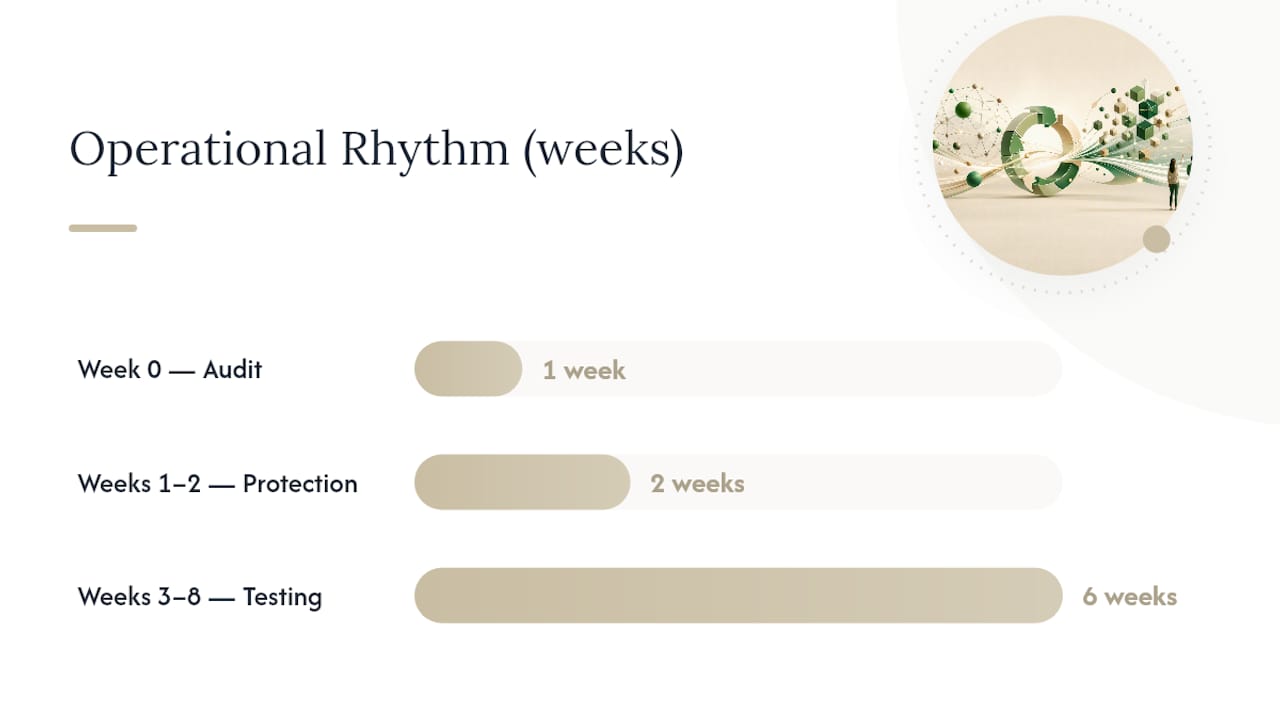
The operational fix follows a predictable rhythm once you’ve committed to it. Week zero is the audit: build the overlap sheet, flag every high-value term appearing in both channels, and rank them by conversion value. Weeks one and two are protection: exact-match keywords go live in Search, negatives go into PMax, and brand exclusions get set. Weeks three through eight are testing and iteration, using holdout experiments to confirm the changes actually improved blended ROAS rather than just shuffling which campaign gets credit.
A senior-led team typically runs this exact sequence for clients spending significant amounts on Google Ads, with experienced operators owning the account rather than junior staff executing a template. The free strategy audit specifically checks for PMax and Search overlap as part of a full account review, not as an afterthought bolted onto a generic health check.
A few templates worth borrowing regardless of who manages your account:
- An overlap-report column set that includes normalized term, impressions by channel, conversion rate delta, and conversion value delta.
- A decision threshold: any term with 100+ combined impressions and a conversion-rate gap over 20% gets an exact-match and negative-keyword action within one reporting cycle.
- An escalation rule: if branded impression share drops for two consecutive weeks, the account owner runs a holdout test before touching budget.
When Is Some Cannibalization Actually Fine?
Not every overlap deserves a fix. Treat cannibalization in three bands. Leave it alone. Protect covers your top revenue terms, branded queries, or anything with a conversion-rate gap over 20%. Act within a week. Stop applies when PMax is displacing Search on terms responsible for a meaningful share of pipeline value.
Margin and CPA targets shift these bands. A business with thin margins can’t tolerate the same overlap a high-margin SaaS company can absorb without blinking. When you take this to a CFO or CMO, frame it as a reallocation decision, not a crisis. You’re not losing demand. You’re deciding which channel gets to be paid for demand you already own.
Get a Free Audit That Catches PMax Overlap Before It Costs You
Most agencies treat Performance Max as a “set it and let the algorithm work” line item, which is exactly how overlap goes unnoticed for months. Some agencies take a more hands-on approach: experienced operators run a full account audit that specifically isolates PMax and Search overlap, term by term, before recommending any budget changes.

The free Google Ads audit includes exactly the overlap check outlined above: search-term cross-referencing, conversion-rate deltas on shared terms, and a prioritized list of exact-match and negative-keyword fixes ranked by revenue impact. If your account is spending $25,000 or more a month and you’ve never had someone manually check whether PMax is quietly eating your best Search terms, that’s the gap this audit closes. For accounts that need ongoing senior-led management rather than a one-time fix, North Country Consulting’s Google Ads management services rebuild the account structure, attribution, and reporting so the fix holds past week one. Request the audit and get a term-by-term overlap breakdown before you make another budget decision.
What Advertisers Are Really Asking
Is Performance Max Worth It Despite the Overlap Risk?
Yes, for most advertisers, because PMax typically adds incremental reach across Display, YouTube, and Shopping inventory that Search alone can’t touch. The overlap risk is manageable with exact-match protection and negative keywords, not a reason to abandon the campaign type.
What Is the Formula for Calculating a Cannibalization Rate?
A basic term-level rate is: (number of overlapping terms appearing in both PMax and Search) divided by (total unique terms across both campaigns), expressed as a percentage. For a more rigorous estimate, use a holdout or difference-in-differences design that compares performance with and without PMax active in a matched control group. See [academic research for methodology.
What Does Google Performance Max Actually Do?
Performance Max is an automated campaign type that uses Google’s machine-learning bidding and creative systems to serve ads across Search, Display, YouTube, Gmail, Maps, and Shopping from a single campaign, guided by the goals and assets you provide.
What Does Cannibalization Mean in Advertising?
Cannibalization happens when one campaign or channel takes sales, clicks, or conversions away from another campaign the advertiser already runs, rather than generating genuinely new demand. In Google Ads, it typically means Performance Max claiming credit for a conversion that Search would have captured anyway.
Does North Country Consulting Check for PMax Cannibalization?
Yes. North Country Consulting’s free Google Ads audit includes a specific check for overlap between Performance Max and Search campaigns as part of its senior-led account review.
— Eric
Sources
- Is Performance Max cannibalizing your Search ads? A deep dive into search-term overlap
- Performance Max vs Search Keyword Cannibalization | Prooflytics
- Is Performance Max Cannibalizing Your Search Campaigns? Our New Data Study Says… Probably
- Managerial methods for estimating cannibalization (Srinivasan et al.)