
Advertiser verification confirms your identity and business operations with Google, and if you received a notification, you need to start the process inside your Google Ads account under Admin > Policy > Account. Deadlines attach to each stage, and missing them can pause your ability to run ads, so the smartest move is to open that menu today and see exactly what Google is asking for.
TL;DR:
- The initial business questionnaire is due within 30 days, followed by another 30 days for assigned checks; Google typically reviews submissions within five business days.
- Organizations generally submit registration records and an authorized representative’s photo ID, while individuals submit one photo ID; every document must match the payments profile exactly.
- Only account administrators can complete tasks, and agencies should confirm who owns the payments profile first, since clients may need to submit some information directly.
- Advanced Verification may involve interviews, license checks, and physical location checks, and Google can request it again about every 12 months or after major account changes.
- Start only from Admin > Policy > Account in your own Google Ads login; never upload documents or enter credentials through emailed third party links.
Table of Contents
- What triggers advertiser verification and who gets selected
- How to start and complete advertiser verification in Google Ads
- Documents checklist: organization vs. individual accounts
- Advanced Verification: when it applies and what to expect
- Common rejection reasons and quick fixes
- What happens after you submit: timelines and status checks
- How to verify a request is legitimate and avoid phishing
- Practitioner perspective on verification across multiple accounts
- How North Country Consulting supports verification and account stability
- FAQ
- Sources
What triggers advertiser verification and who gets selected
Google selects advertisers for verification for several reasons: a broader push for ad transparency, content flagged during routine review, operation in a regulated vertical like financial services or healthcare, or recovery from a prior suspension. None of these are arbitrary. They connect to Google’s effort to confirm that the entity running ads is who it claims to be.
Notification arrives two ways: an in-account alert and an email tied to the account’s registered contact. Only someone with admin access can see and complete the verification tasks, which matters for agencies managing client accounts where admin rights sometimes sit with the wrong person.
Accounts that receive a verification deadline and don’t respond can be paused. That’s not a warning. It’s an operational reality that stops ad delivery mid-campaign, so treating the notification as urgent from day one avoids a scramble later.
How to start and complete advertiser verification in Google Ads
The process always begins in the same place: Admin > Policy > Account, where the Advertiser Verification task list appears once your account has been flagged. From there, the sequence is predictable.
- Open the “About your business” questionnaire first. Your answers determine which additional tasks Google assigns next.
- Complete any identity verification task, which usually means uploading a government-issued photo ID for an authorized representative.
- Complete any business operations verification task, which typically means registration documents and proof the business is actively operating.
- Complete billing tasks if requested, confirming that the payments profile matches the business information submitted.
Agencies should confirm who actually owns the payments profile before starting any of this. If the client owns it, the client may need to complete some tasks directly, and sorting that out after the clock starts just burns days you don’t have.
Deadlines are specific: advertisers have a month to answer the initial “About your business” questions, and then an additional month to complete any verification tasks Google assigns afterward. Once submitted, Google’s review typically takes up to five business days.
Pro Tip: Screenshot each completed task as you submit it. If Google requests clarification later, you’ll have a record of exactly what you sent and when.
Documents checklist: organization vs. individual accounts
What you submit depends on how your account is structured, and the two paths require different paperwork.
- Organizations typically need registration or incorporation documents, such as a Certificate of Incorporation, plus a government-issued photo ID from an authorized representative.
- Individuals need a single government-issued photo ID, such as a passport, state ID, or driver’s license.
- A D-U-N-S number is optional for organizations but can help confirm business legitimacy faster.
- Individuals are sometimes asked to confirm a Social Security number as an added identity check.
Formatting matters as much as content. Document requirements for advertiser verification specify that every document must match the information already on file in your payments profile, so a mismatched business name or outdated address is enough to trigger rejection even when the documents themselves are legitimate. Submit high-resolution scans, confirm IDs haven’t expired, and reproduce your legal entity name exactly as it appears on registration paperwork, suffixes, punctuation, and all.
Advanced Verification: when it applies and what to expect
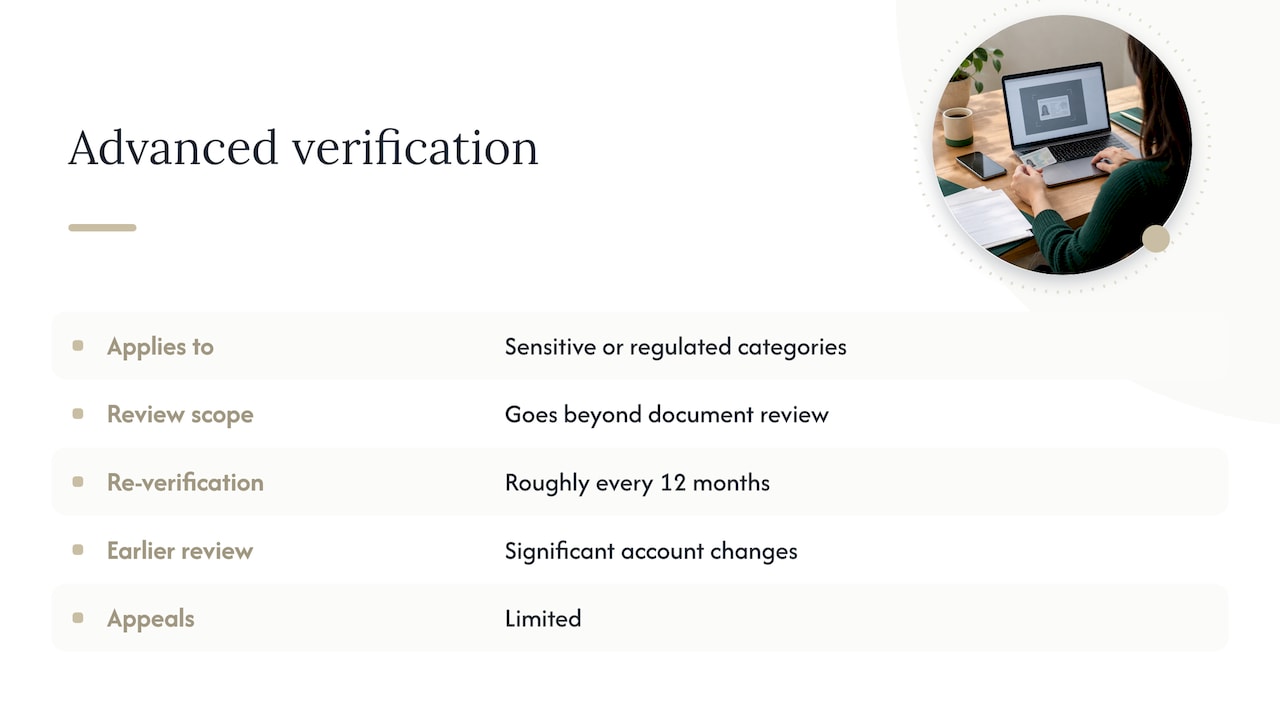
A smaller set of advertisers face a deeper review called Advanced Verification. It typically applies to accounts in sensitive or heavily regulated categories, and it goes beyond document review.
According to Google’s Advanced Verification policy, this tier can include video interviews, professional license checks, and verification of a physical business location. If you’re asked to participate in a recorded interview, treat it the same as any other required task: schedule it promptly and have your documentation ready to reference.
Re-verification under this program isn’t necessarily a one-time event. Google may request it again roughly once every 12 months, or sooner if your account undergoes a significant change, such as a new business address, ownership structure, or payments profile. Appeals for Advanced Verification decisions are limited, which makes getting it right the first time more valuable than it is in the standard verification flow.
Common rejection reasons and quick fixes
Most rejections trace back to a short list of avoidable mistakes documented in Google’s guidance on business operations verification.
- Business name on the account doesn’t match the name on submitted documents.
- Address listed in Google Ads doesn’t match the address on registration paperwork.
- Website references third parties (resellers, affiliates, partner brands) without documentation explaining the relationship.
- Documents are expired, low-resolution, or don’t clearly show the required information.
- The payments profile is owned by a different entity than the one submitting verification.
The fixes are mostly a matter of consistency. Align your legal entity name across your Google Ads billing profile, registration documents, and any name submitted for ad disclosures, since practitioners consistently point to nomenclature consistency as the single most reliable way to avoid rejection. If your site mentions a third-party brand or partner, document that relationship before Google asks about it.
Pro Tip: Before submitting anything, open your website and your Google Ads account side by side and compare every name, address, and phone number listed.
What happens after you submit: timelines and status checks
Once you’ve submitted your documents, Google typically updates your verification status within five business days, though some cases take longer, particularly Advanced Verification reviews involving interviews or license checks.
You can check your current status anytime from the same Admin > Policy > Account screen where you started. If Google needs more information, you’ll get both an in-account notification and an email, so it’s worth checking your account directly rather than waiting on email alone.
Appeals exist, but they’re limited for Advanced Verification outcomes. Read the specific rejection reason before appealing. In most cases, resubmitting corrected documents is faster than contesting a decision that came down to a name or address mismatch.
How to verify a request is legitimate and avoid phishing
Every legitimate verification request originates from inside your Google Ads account or from an official Google email address, never from a third-party link asking you to upload sensitive documents or enter credentials.
- Start the process only from Admin > Policy > Account inside your own Google Ads login.
- Confirm the sender’s domain before clicking any link in an email claiming to be from Google.
- Never respond to a verification email by entering your Google Ads password on an external page.
- Keep a copy of everything you submit, along with the date, in case Google requests clarification.
Practitioner perspective on verification across multiple accounts
Across accounts we manage, verification works best treated as routine compliance rather than a fire drill. We centralize documents, assign one admin per account, and confirm payments profile ownership before any task starts, especially during an agency-to-client handoff, where mismatched ownership causes most of the delays we see.
— Eric
How North Country Consulting supports verification and account stability
Verification is one more place where small inconsistencies compound into real revenue loss, and it’s exactly the kind of operational detail we build into our Google Ads management work. Auditing account structure, documentation, and payments profile alignment before problems surface can help prevent a verification notice from turning into a paused account mid-campaign.
If you’re not sure where your account stands, our free Google Ads audit checks for verification risk alongside the structural and tracking issues that quietly erode ad spend efficiency. It’s a practical first step whether you’re bracing for a verification request or just want a senior set of eyes on an account that’s never been rebuilt from the ground up.
For advertisers also running ChatGPT Ads, our senior-led ChatGPT Ads management covers pixel setup and verification alongside campaign structure, so your measurement stays consistent across both channels. Reach out and we’ll walk through what your account needs.
FAQ
What is advertiser verification in Google Ads?
Advertiser verification is Google’s process for confirming the identity and business operations behind an account running ads. It involves submitting identity documents, business registration paperwork, or both, and it starts from Admin > Policy > Account once you’ve been notified.
How long does Google Ads verification take to complete?
After you submit your documents, Google typically updates verification status within five business days, though some cases take longer. You have 30 days to answer the initial business questions and another 30 days to complete any requested verification tasks.
What documents do I need for advertiser verification?
Organizations typically need registration or incorporation documents plus a government-issued photo ID from an authorized representative, while individuals need a single government-issued photo ID like a passport or driver’s license. Every document must match the business information already on file in your payments profile.
What is Advanced Verification and who needs it?
Advanced Verification is a more intensive review applied to certain regulated or sensitive verticals, and it can include video interviews and professional license checks. Re-verification under this tier can be requested roughly once a year or after major account changes.
How do I know if a verification request is really from Google?
Legitimate requests always appear inside your Google Ads account under Admin > Policy > Account, along with an email from an official Google domain. Never upload documents or enter login credentials through a third-party link sent by email.