
Ad customizers in Google Ads let you insert dynamic text directly into your responsive search ads, swapping in product names, prices, inventory counts, or countdown timers based on the keyword, ad group, or campaign that triggered the ad. The result: one ad that adapts in real time to hundreds of different search queries without requiring you to write hundreds of separate ads.
The core benefits break down cleanly:
- Tailored messaging: Each searcher sees ad copy matched to their specific query, not a generic headline.
- Scalability: A single responsive search ad can generate hundreds of variations, each pulling from your attribute data.
- Reporting accuracy: Because the ad itself does not change, performance data accumulates on one ad rather than fragmenting across dozens of duplicates.
- Relevance at scale: Customizers work especially well for large inventories, time-sensitive promotions, and accounts where product details are a genuine selling point.
Expanded text ads are gone. Since June 30, 2022, Google no longer supports creating or editing ad customizers for expanded text ads. Responsive search ads are now the only format that matters, and customizers are built for them.
How ad customizers work, and when you should use them
Ad customizers function like keyword insertion or countdown timers: you place a placeholder in your ad text, and Google fills it in at auction time using data you have defined in your account.

The hierarchy Google uses to resolve which value to show runs in this order: keyword level, then ad group, then campaign, then account, then the default value you specify in the syntax. The most specific match wins. That structure gives you granular control without requiring a separate ad for every variation.
When customizers deliver the most value:
- Large inventories: A retailer selling hundreds of appliance models can surface the exact model name, capacity, and starting price for each search query without writing individual ads.
- Dynamic pricing: If your prices change frequently, updating a single attribute spreadsheet pushes new prices into every affected ad instantly.
- Time-sensitive promotions: Countdown timers inserted via
{COUNTDOWN()}create urgency automatically, counting down to a sale end date in the user’s or advertiser’s time zone. - Seasonal campaigns: Swap in seasonal messaging at the campaign level without touching individual ads.
- Keyword-level relevancy: When a searcher types a specific product model, the ad can reflect that model name directly, which tends to lift click-through rates.
The transition from expanded text ads also matters here. Accounts that relied on legacy customizer feeds need to migrate their data structure to the attribute-based format that responsive search ads require. The setup is meaningfully different, and the earlier you rebuild it cleanly, the less technical debt you carry.
How to create and implement ad customizers in responsive search ads
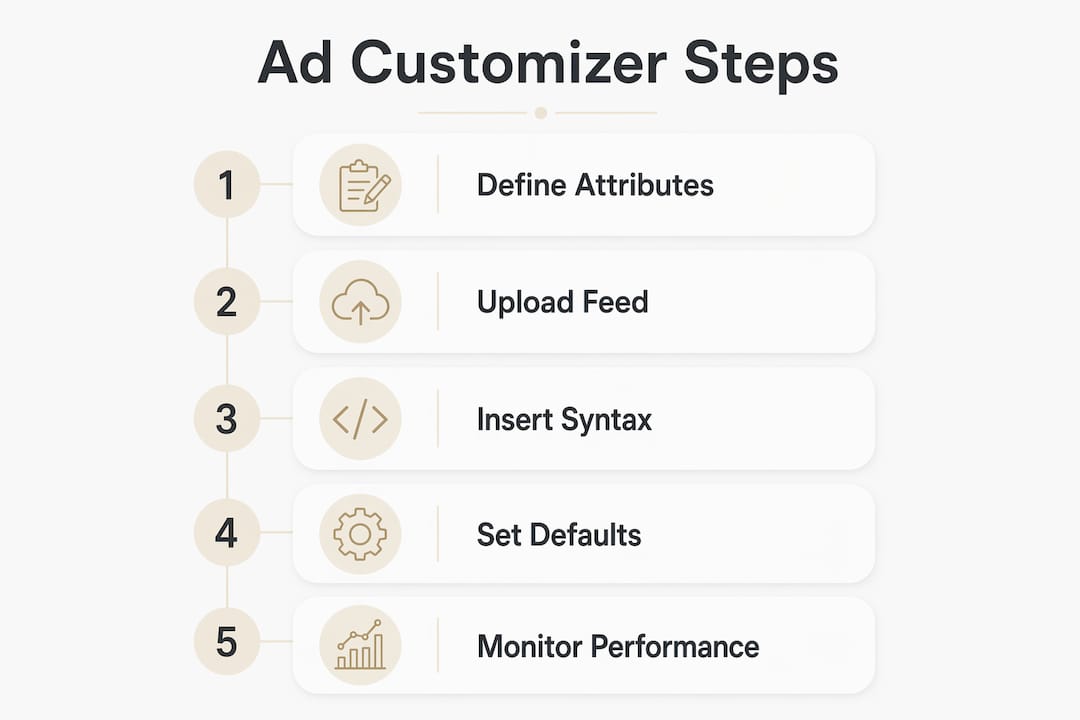
Setting up ad customizers follows four steps. Each one builds on the last, so skipping ahead creates problems.
Step 1: Open business data
- In your Google Ads account, click the Tools icon.
- Navigate to Ad customizer attributes.
- Click the plus button to begin.
Step 2: Define your customizer attributes
Attributes are the categories of dynamic content you want to insert. Name them clearly because you will reference these names in your ad syntax.

| Data type | Common use | Characters allowed | Example value |
|---|---|---|---|
| Text | Product name | Letters, numbers, symbols | Hiking Shoes |
| Price | Cost | Numbers, decimals, currency symbols | $24.99 |
| Number | Inventory count | Numbers, decimals | — |
| Percent | Discount rate | Numbers, decimals, percent symbol | — |
You can add attributes one at a time or upload them in bulk via a spreadsheet. For accounts with more than a handful of attributes, the spreadsheet route is faster and easier to audit.
Step 3: Assign values at the right level
After creating attributes, assign values at the account, campaign, ad group, or keyword level. The column headers in your upload spreadsheet follow this pattern: Customizer:AttributeName. For a keyword-level value, both the “Ad group” and “Campaign” columns must be filled in.
Key rule from Google’s developer documentation: “Responsive search ads that don’t have a customizer value available can’t be reviewed.” Always populate the account-level value as a baseline, even if you plan to override it at lower levels. An ad that cannot be reviewed cannot serve.
Step 4: Insert the customizer syntax into your ad
In the responsive search ad editor, type an opening curly bracket { in any headline or description field. Select Ad customizer from the dropdown, choose your attribute, and set a default value. The resulting syntax looks like this:
{CUSTOMIZER.ProductName:Running Shoes}
If no attribute value resolves for a given auction, Google displays the default value instead of leaving the field blank.
Pro Tip: Always write default values that make grammatical sense on their own. A default like “our products” reads naturally if the customizer fails; a default like “PRODUCT_NAME” exposes your template to anyone who sees the ad.
Formatting rules and limits you need to know
The 40-attribute limit per account is the constraint that catches most advertisers off guard. You cannot simply create a new attribute for every campaign or product line.
Critical formatting rules:
- Character limits apply to the resolved text, not the placeholder. If the substituted value pushes a headline past 30 characters, Google falls back to the default value. Write short defaults.
- Price attributes require no space between the number and the currency symbol or code.
$24.99is valid;$24.99 USDwith a space is not. - Text attributes accept any letters, numbers, or symbols, but the resolved ad still must pass Google’s ad approval policies.
- Default values are mandatory in the syntax. An ad with a customizer placeholder and no default cannot be approved.
- Attribute names are case-insensitive but must be unique. “ProductPrice” and “productprice” are treated as the same attribute.
- Special characters in attribute names should be avoided. Stick to letters, numbers, and underscores.
Pro Tip: Treat your 40-attribute slots like a shared resource across the whole account. Name attributes broadly (“Price” rather than “SummerSalePrice”) so you can reuse them across campaigns. An attribute named too narrowly burns a slot and forces you to create near-duplicates later.
Real-world ad customizer examples that show the range
The best way to see what customizers actually do is to look at how they change the ad text at auction time.
Inventory-level targeting (keyword level):
A kitchen appliance retailer sets up attributes for model details and prices that dynamically update based on the keyword, so ads show relevant product information to searchers without specifying exact quantities or prices. The same ad, with a different keyword, shows a completely different model and price.
Campaign and ad group level targeting:
| Campaign | Ad group | Brand attribute | Models attribute | Start_price attribute |
|---|---|---|---|---|
| Stand Mixers | ProWhip | ProWhip | — | — |
| Stand Mixers | KitchenPro | KitchenPro | — | — |
The ad copy dynamically reflects the brand and number of models available, along with starting prices, adjusting per ad group targeting. Switch ad groups, and the numbers and brand name update automatically.
Countdown timer for a sale:
{COUNTDOWN(2026-08-31 23:59:59,5)}
This inserts a live countdown that starts appearing five days before the sale ends, updating every time the ad serves. No manual edits required.
Account-level global variable:
An auto lender uses an account-level attribute for current APR. When rates change, one spreadsheet update pushes the new rate into every ad across every campaign simultaneously.
Expert recommendations for getting the most from customizers
Ad customizers are not a set-and-forget tool. The accounts that get the most from them treat attribute data as a living asset that needs the same governance as a product feed.
Common pitfalls and how to avoid them:
- Missing default values cause ads to show blank or truncated text, which can hurt approval rates and quality scores. Every placeholder needs a fallback that makes sense on its own.
- Attribute bloat happens when teams create new attributes instead of reusing existing ones. You hit the 40-attribute ceiling faster than you expect, and cleaning it up mid-campaign is painful.
- Stale data is the most common performance killer. A price attribute showing last quarter’s pricing actively misleads searchers and wastes budget.
- Ignoring Smart Bidding alignment: Customizers that surface highly relevant ad text improve click-through rates, and better CTR feeds stronger signals into Google’s Smart Bidding algorithms. The two systems reinforce each other when the data stays current.
Pro Tip: Schedule a monthly audit of your attribute spreadsheet. Flag any attribute that has not been updated in 60 days and either refresh the data or consolidate the attribute into a broader one. This single habit prevents most of the account-bloat and stale-data problems that erode customizer performance over time.
The AI-driven direction Google is moving toward with features like AI Max reinforces why clean, well-structured attribute data matters. The better your underlying data, the more effectively automated systems can use it.
Measuring the performance impact of your customizers
The reporting advantage of ad customizers is structural: because the ad unit itself does not change, all performance data accumulates on a single ad rather than scattering across dozens of variants. You can compare customized versus non-customized ads directly within the same ad group.
Track these metrics specifically after deploying customizers:
- Click-through rate by keyword: Keyword-level customizers should lift CTR on the queries where the ad text now matches the search term more precisely.
- Conversion rate by attribute value: If you are customizing prices, check whether certain price points convert better than others. That data informs both your bidding and your pricing strategy.
- Ad strength scores: Google’s ad strength indicator in the RSA editor reflects how well your headlines and descriptions combine. Customizer-heavy ads sometimes score lower on “variety” because many headlines share the same attribute. Balance customizer headlines with static ones.
- Impression share lost to rank: If customizers improve relevance but your bids do not keep pace, you may see impression share drop. Relevance and bid work together.
Use Google Ads Experiments to run a clean A/B test between ads with and without customizers in the same ad group. That gives you a controlled read on the actual lift rather than a before-and-after comparison muddied by seasonality.
How ad customizers compare to other dynamic ad tools in Google Ads
Google offers several ways to make ads dynamic. They are not interchangeable.
Ad customizers vs. keyword insertion: Keyword insertion ({KeyWord:Default}) simply drops the triggering keyword into the ad text. It requires no data setup and works instantly, but it is limited to whatever the user typed. Ad customizers pull from structured data you control, so the substituted text can be a polished product name, a formatted price, or a model number rather than raw search query text.
Ad customizers vs. Dynamic Search Ads (DSA): DSA generates headlines automatically by crawling your website. You write the descriptions; Google writes the headlines. Ad customizers flip that: you write the ad structure and control exactly what data populates each field. DSA is broader and requires less setup; customizers are more precise and require data governance. Google is upgrading DSA to AI Max starting in 2027, which will change how that tool works at a fundamental level.
Ad customizers vs. location insertion: The built-in {LOCATION(City):Default} tag inserts the user’s detected city or state. It is a single-dimension customization. Ad customizers can combine multiple attributes in one ad, giving you far more control over the full message.
For e-commerce accounts with structured product data, ad customizers paired with a well-maintained attribute feed consistently outperform both keyword insertion and DSA on branded and non-branded product queries. North Country Consulting’s e-commerce Google Ads work applies exactly this structure: clean attribute data, keyword-level targeting, and Smart Bidding working from the improved CTR signals that relevant ad text generates.
Key Takeaways
Ad customizers in Google Ads deliver their full value only when attribute data is current, default values are always set, and the 40-attribute limit is managed proactively across the account.
| Point | Details |
|---|---|
| Hierarchy resolves values | Google uses keyword, ad group, campaign, account, then default value to pick which text to show. |
| 40-attribute account limit | Name attributes broadly and reuse them across campaigns to avoid hitting the ceiling. |
| Default values are mandatory | Ads without a default value in the customizer syntax cannot be reviewed or served. |
| Customizers amplify Smart Bidding | Higher CTR from relevant ad text feeds better signals into Google’s automated bidding algorithms. |
| Measure at the keyword level | Track CTR and conversion rate by keyword after deploying customizers to isolate actual performance lift. |
Want expert help implementing ad customizers at scale?
Ad customizers are one of the highest-leverage tools in Google Ads, but they require clean data architecture, disciplined attribute management, and ongoing updates to stay effective. North Country Consulting builds and manages these systems for high-spend accounts, with senior-led oversight on every account and a strong average return on ad spend. If your account is spending $25,000 or more per month and you want to know whether your customizer setup is actually working, request a free audit or explore the full range of senior-led PPC management North Country Consulting offers.